
Summary of Nokia Library For Proteus
This lesson demonstrates building a simple graphical user interface (GUI) using an Arduino and a Nokia 3310 LCD to create a menu system. It explains the purpose, connections, required components, and basic working notes such as using logic level conversion and uploading Arduino code to drive the display. The project shows how to display text and bitmaps and suggests expanding the interface into a fuller GUI with additional modules.
Parts used in the Nokia 3310 Menu Interface:
- Arduino
- Nokia 3310 LCD
- Logic level converter(s)
In this lesson(Nokia Library For Proteus), I will show you how to build a simple Graphical User Interface with the help of the Nokia 3310 LCD. I will design a Nokia 3310 Menu interface with the used of Arduino.
Nokia Library For Proteus
Nokia 3310 LCD is a Graphical LCD device where we can manage its individual pixels, there is more we can do with simple displaying some text. One thing we can do is shows a picture in the form of bitmap.
Here we are designing a Graphical User Interface to interrelate with Arduino.
So, let us build a simple Nokia 3310 Menu system, which we can manage and interact with Arduino in a more habitual way.
The purpose of this project is to show a simple menu on the Nokia 3310 LCD and passes through the menu.
Nokia 3310 LCD Menu
Graphical User Interface is a way to interrelating with the hardware using a screen on display. GUI makes it simply to interrelate with the hardware as we get a visual response from the hardware. For example, you are designing a remote monitoring system to check out whether the light is ON or OFF. If we design the system in such a way that the status of the light is shows on a screen, then the job becomes very simple.
The purpose of this Arduino Nokia 3310 Menu Interface gives an overview of how it’s simple to build our own GUI system using Arduino and Nokia 3310 LCD. We can interrelate with Arduino through the Nokia 3310 Menu and manage different parameters.
Required Components
Arduino
Nokia 3310
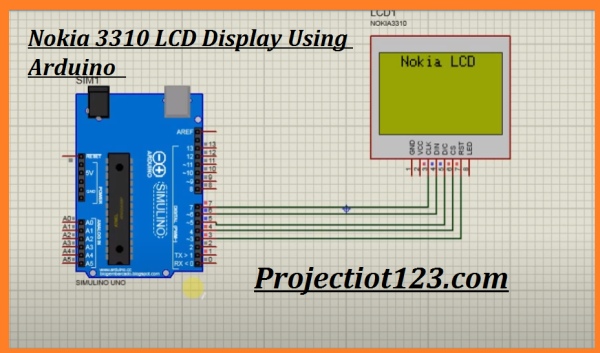
Circuit Diagram
As you see in the diagram the connection of this project is very simple. The RST pin 7 of Nokia 3310 is attached with Arduino pin 3. Next pin of Nokia 3310 CS is connected to Arduino pin 4. The D/O pin of Nokia 3310 is attached with Arduino pin 5. The DIN pin of Nokia 3310 is attached with Arduino pin 6. The CLK pin of Nokia 3310 is attached with Arduino pin 7.
Working
Nokia 3310 LCD carry a maximum logic voltage of 3.5v. So, I have utilized a couple of logic level converter to attach with Arduino and Nokia 3310.
We know that for the communication of Nokia 3310 LCD first we have to install the code in Arduino then after installing the code simulate the program. The LCD first display the name of the module Nokia 3310. It’s up to what you want to display on the LCD. Here I just display the name of the module. You can also set the restore option. This option will restore the default setting and your mobile will be restored.
Conclusion
This project is based on designing a Graphical User Interface with the support of the Arduino based Nokia 3310 Display is executed in this project.
It is simple design but you can enlarge the idea into a full GUI system. Additionally, we can attach more modules which make this project more interesting.
Source: Nokia Library For Proteus
- What is the purpose of this Nokia 3310 Menu Interface project?
The purpose is to show a simple menu on the Nokia 3310 LCD and allow interaction with an Arduino to demonstrate a basic GUI system. - What components are required for this project?
The required components listed are an Arduino, a Nokia 3310 LCD, and logic level converter(s). - How is the Nokia 3310 connected to the Arduino?
Connections: Nokia RST to Arduino pin 3, CS to Arduino pin 4, D/O to Arduino pin 5, DIN to Arduino pin 6, and CLK to Arduino pin 7. - Do I need level shifting between Arduino and the Nokia 3310?
Yes, the Nokia 3310 carries a maximum logic voltage of 3.5V so logic level converters are used between Arduino and the display. - How do I get the display to show the menu?
You install the Arduino code that drives the Nokia 3310 LCD, then simulate or run the program so the LCD displays the menu or desired text. - Can the Nokia 3310 display images as well as text?
Yes, the Nokia 3310 LCD is a graphical device that can manage individual pixels and display bitmaps as well as text. - Is this GUI expandable beyond the simple menu shown?
Yes, the article states the simple design can be enlarged into a full GUI system and additional modules can be attached to enhance the project.
