
Summary of AUTOMATIC SCORING FOR SKEEBALL MINI-GOLF
This article describes a DIY automatic scoring system for a mini-golf course. The creator replaced manual scorekeeping with electronics to enhance the gaming experience. Each hole uses an IR break-beam sensor triggered by a ball passing through, guided by vinyl siding. An Arduino Mega processes sensor data, controls LEDs, and updates scores on 7-segment displays, creating a self-contained, automated game.
Parts used in the Automatic Scoring for Skeeball Mini-Golf:
- IR break-beam sensors
- Vinyl siding
- Arduino Mega
- LEDs
- 7-segment displays
Minigolf is a fun, simple pastime that has the benefit of taking up much less space than the classical game it is inspired by. [gcall1979] had built himself a small game for the lounge room, but found keeping score to be a tedious exercise. Of course, that was nothing that couldn’t be solved with some electronics!
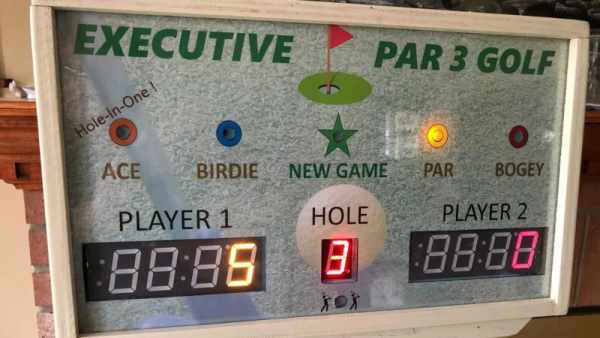
The game consists of a skeeball-type minigolf course, where the score is determined by the hole the player puts the ball through. To track this, each hole is fitted with an IR break-beam sensor that triggers when a ball passes through. Vinyl siding is used to guide the balls going through the holes to ensure the sensor is triggered consistently. The sensors are read by an Arduino Mega, which is also responsible for flashing LEDs and updating the score throughout the game on the included 7-segment displays.
It’s a basic hack, but one that makes the game far more of a self-contained experience. No more fumbling with pencils and paper means it’s easier to focus on dominating the competition on the (miniature) green. Of course, those with dreams of the driving range might consider this recreation of the famous Floating 14th Hole!
Source: AUTOMATIC SCORING FOR SKEEBALL MINI-GOLF
- How is the score determined in this project?
The score is determined by which hole the player puts the ball through, triggering an IR break-beam sensor. - What ensures the sensor is triggered consistently?
Vinyl siding is used to guide the balls going through the holes to ensure consistent sensor triggering. - Does the Arduino Mega handle the LED flashing?
Yes, the Arduino Mega is responsible for flashing LEDs and updating the score throughout the game. - What component reads the sensors?
An Arduino Mega reads the IR break-beam sensors fitted at each hole. - What display type shows the score?
The score is updated on included 7-segment displays. - Why did the creator build this system?
The creator found keeping score manually to be a tedious exercise and wanted to solve it with electronics. - What makes this game more of a self-contained experience?
The elimination of fumbling with pencils and paper allows players to focus on dominating the competition. - Can this system be adapted for other projects?
The article suggests those with dreams of the driving range might consider this recreation of the famous Floating 14th Hole.
