
Summary of THE GOOGLE CHROME DINOSAUR GAME, IN REAL LIFE
Ryan modified the Google Chrome Dinosaur Game to allow movement-based control using an Arduino MKR board. The project employs a force sensor to detect jumps and a stretch sensor to detect ducking actions. These resistive transducers are integrated via voltage divider circuits, with software-adjustable thresholds for responsiveness.
Parts used in the Hackable Chrome Dinosaur Game:
- Arduino MKR board
- Force sensor
- Stretch sensor
- Voltage divider circuits
- Keyboard library (Arduino)
[Ryan] wanted to hack the Google Chrome Dinosaur Game so he could control the dinosaur with his own movements. The game only requires two keyboard presses (up and down arrow keys), so controlling the game with the Arduino Keyboard library only requires a few simple function calls.
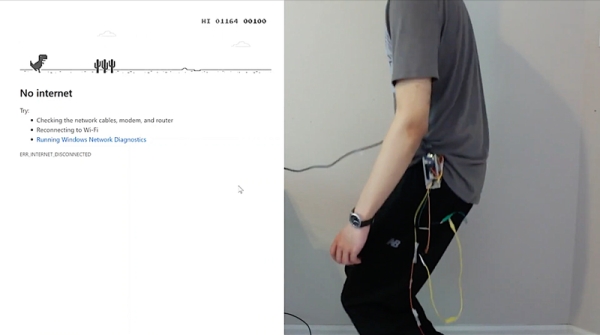
He uses the Arduino MKR board in his build, but notes any number of other boards would work as well. A force sensor detects his jumps and a stretch sensor detects him ducking. Both the stretch and force sensors are resistive transducers, so two simple voltage divider circuits (one for each sensor) are needed to convert changes in force to a voltage. You may need to adjust the sensor threshold to ensure the code responds to your movements, but [Ryan] makes that pretty easy to do in software as both thresholds are stored as global variables.
It’s a pretty simple hack, but could make for some good socially-distanced fun. What other hackable Google Chrome extensions do you like?
Source: THE GOOGLE CHROME DINOSAUR GAME, IN REAL LIFE
-
How can I control the dinosaur game with my own movements?
You can hack the game by using an Arduino board with a force sensor for jumping and a stretch sensor for ducking. -
What type of sensors are used in this project?
The project uses a force sensor to detect jumps and a stretch sensor to detect ducking. -
Can I use a board other than the Arduino MKR?
Yes, the author notes that any number of other boards would work as well. -
How do the sensors convert physical movement into signals?
Both sensors are resistive transducers that require simple voltage divider circuits to convert changes in force to a voltage. -
How many keyboard presses does the original game require?
The game only requires two keyboard presses: up and down arrow keys. -
How are sensor thresholds adjusted in the code?
Thresholds are stored as global variables in the software, making it easy to adjust them. -
Does the Arduino Keyboard library require complex function calls?
No, controlling the game with the Arduino Keyboard library only requires a few simple function calls.
