
Summary of Program Arduino Pro Mini Using Arduino Uno
This article explains how to program a 5V/16MHz Arduino Pro Mini using an existing Arduino Uno as a USB-to-serial converter, eliminating the need for extra hardware. The process involves removing the IC from the Uno, wiring specific pins between the boards, selecting the correct board settings in the software, and uploading code while monitoring LED activity.
Parts used in the Program Arduino Pro Mini Using Arduino Uno:
- Arduino Uno Board
- Arduino Pro Mini (5V, 16MHz)
- ATmega328 IC
- Arduino Software
Hello everyone. Today I am going to show how to program arduino pro mini using arduino uno.
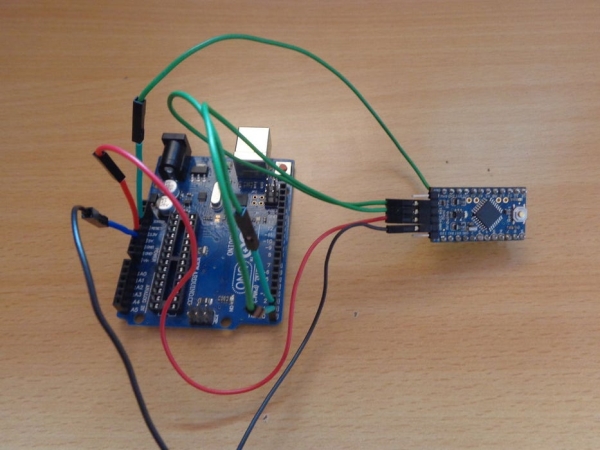
If you already had a arduino uno and you newly buy arduino pro mini then you don’t need to buy the USB to serial converter to program the arduino pro mini because you can program pro mini using your arduino uno board. We can make pro mini to act as a central ic for arduino uno board. First of all you have to know which arduino pro mini you are using either it is 5v 16mhz or 3.3v 8mhz. Use only 5 Volt and 16MHZ pro mini with the arduino uno. we can’t program 3.3v 8mhz pro mini with arduino uno. Here i am using 5v 16mhz pro mini.Let us see the circuit connection.
Step 1: Video
Instead of reading you can watch video for full description
Step 2: Connect Pro Mini With Arduino Uno
Follow the simple steps bellow: the circuit connection
clearly shown in the video
Remove the ic in arduino uno board.
- Connect arduino uno board 5V pin to pro mini’s VCC pin.
- Connect arduino uno board GND pin to pro mini’s GND pin.
- Connect arduino uno board TX pin to pro mini’s TX0 pin.
- Connect arduino uno board RX pin to pro mini’s RXI pin
- Connect arduino uno board RESET pin to pro mini’s RST pin.
Step 3: Open Arduino Software for Program the Pro Mini
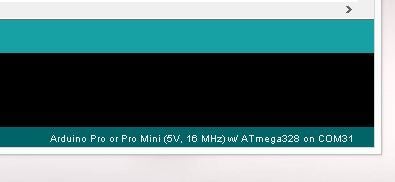
Connect the all circuit connection now open the arduino software and select tools->Board ->Ardunio Pro or Pro Mini(5V, 16MHZ) vv/ ATmega328. if you select the arduino pro you can see the selected board in the bottom of the software as shown in above image.
And open the coding you want to program and click the upload button. Now you can see that program uploading into pro mini. you can see the tx and rx led in arduino uno board blinking while program uploading . after uploading of the code. now remove the all connection and give power supply to the pro mini. your code works perfectly on arduino mini. enjoy projects with pro mini. watch the video for to clearly see how to do all steps.
Thank you for reading.
Source: Program Arduino Pro Mini Using Arduino Uno
- Can I program an Arduino Pro Mini without a USB to serial converter?
Yes, you can use your existing Arduino Uno board to program the Pro Mini. - Which version of the Arduino Pro Mini is compatible with this method?
You must use a 5V 16MHz Pro Mini; the 3.3V 8MHz version cannot be programmed this way. - What is the first step in connecting the Pro Mini to the Uno?
The first step is to remove the IC from the Arduino Uno board. - How do I connect the ground pins between the two boards?
Connect the Arduino Uno GND pin directly to the Pro Mini's GND pin. - Which pins on the Arduino Uno connect to the TX0 and RXI pins on the Pro Mini?
Connect the Uno TX pin to Pro Mini TX0 and the Uno RX pin to Pro Mini RXI. - What board setting must be selected in the Arduino Software before uploading?
Select Tools->Board->Arduino Pro or Pro Mini(5V, 16MHZ) vv/ ATmega328. - How can I verify that the code is uploading correctly?
You will see the TX and RX LEDs on the Arduino Uno board blinking during the upload.
