
Summary of Arduino Temperature Sensor Code
This project demonstrates reading Celsius and Fahrenheit temperatures using an LM35 sensor with an Arduino. The system connects the sensor to an analog pin, processes the voltage data via code, and displays real-time temperature readings on a 16x2 LCD screen. It includes logic to convert raw analog values into precise temperature metrics for both scales.
Parts used in the Arduino Temperature Sensor Project:
- 16×2 parallel LCD display (compatible with Hitachi HD44780 driver)
- Arduino
- 10kΩ potentiometer
- LM35 temperature sensor
- Jumper wire
This arduino projects show how to read Celsius and Fahrenheit temperature with LM35 temperature sensor.
Parts List;
1) 1x 16×2 parallel LCD display (compatible with Hitachi HD44780 driver)
2) 1x Arduino
3) 1x 10kΩ potentiometer
4) 1x LM35 temperature sensor
5) Jumper wire
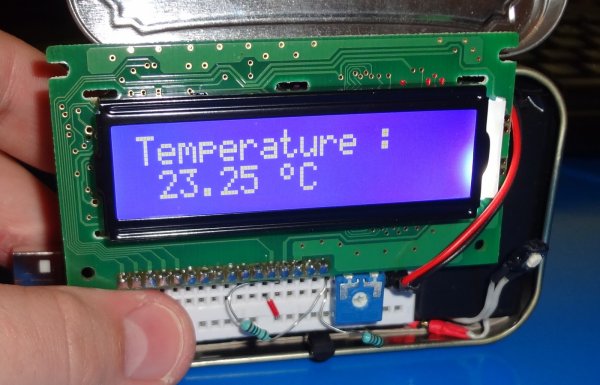
Instruction;
1) Connect all jumper wire as shown in diagram.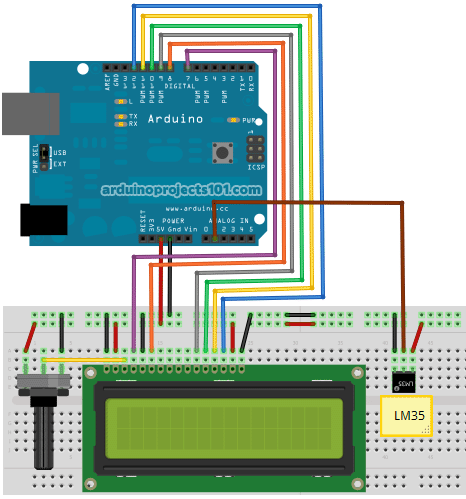
2) Connect LM35 center lead to analog pin 1, make sure ground lead connected to ground and Vs lead to 5V pin.
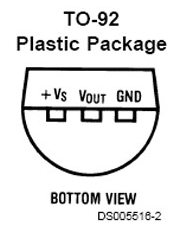
Upload this code to your arduino
/*
  Temperature Sensor
  Reading temperature with LM35 sensor.

  Coded by: arduinoprojects101.com
*/

// include the library code:
#include <LiquidCrystal.h>

// initialize the library with the numbers of the interface pins
LiquidCrystal lcd(7, 8, 9, 10, 11, 12);

//declare variables
float tempC;
float tempF;
int tempPin = 1;

void setup(){
  // set up the LCD's number of columns and rows:
  lcd.begin(16, 2);
  lcd.print("Temp1=");
  lcd.setCursor(0, 1);
  lcd.print("Temp2=");
}

void loop(){
  tempC = analogRead(tempPin);           //read the value from the sensor
  tempC = (5.0 * tempC * 100.0)/1024.0;  //convert the analog data to temperature
  tempF = ((tempC*9)/5) + 32;            //convert celcius to farenheit

  // print result to lcd display
  lcd.setCursor(6, 0);
  lcd.print(tempC,1);
  lcd.print("'C");

  lcd.setCursor(6, 1);
  lcd.print(tempF,1);
  lcd.print("'F");

  // sleep...
  delay(1000);
}
lcd.print(“Temp1=”);
print temperature label.
lcd.setCursor(0, 1);
lcd.print(“Temp2=”);
print temperature label, start print at column 0, second line (0=1st line, 1=2nd line)
tempC = analogRead(tempPin);
reading Vout from LM35 at analog pin 1
tempC = (5.0 * tempC * 100.0)/1024.0;
convert analog data to Celsius reading
tempF = ((tempC*9)/5) + 32;
convert Celsius reading to Farenheit
lcd.print(tempC,1);
print tempC value (,1) is for 1 decimal point.
Source : Arduino Temperature Sensor Code
- How do I connect the LM35 sensor?
Connect the center lead to analog pin 1, the ground lead to ground, and the Vs lead to the 5V pin. - What library is required for the LCD?
The LiquidCrystal library must be included in the code. - How does the code convert analog data to Celsius?
It uses the formula (5.0 * tempC * 100.0)/1024.0 to convert the analog data. - How is Fahrenheit calculated from Celsius?
The code calculates it using the formula ((tempC*9)/5) + 32. - Can this project display both temperature units?
Yes, it displays both Celsius and Fahrenheit on the LCD display. - What is the delay between updates?
The code includes a 1000 millisecond delay before the next reading. - Which pins are used for the LCD interface?
Pins 7, 8, 9, 10, 11, and 12 are initialized for the library. - How many decimal points are shown?
The print function uses ,1 to show one decimal point.
