
Summary of Indoor Air Quality Monitoring System
This article details an IoT-based indoor air quality monitoring system designed to detect toxic gases like LPG, CO2, and CO. The system connects via Arduino boards to the Thinger.io cloud, allowing remote visualization of air quality data on Android devices. It aims to mitigate health risks associated with poor indoor air by providing real-time alerts and data analysis for homes, offices, and industrial settings.
Parts used in the Indoor Air Quality Monitoring System:
- Arduino Yun Shield & Genuino Yun Shield
- Arduino Leonardo
- Arduino Yun
- Arduino MKR GSM 1400
- Arduino MKR WAN 1300
- Seeed Grove - Gas Sensor (MQ2)
- Seeed Grove - Air quality sensor v1.3
- Android device
- Thinger.io Platform
- Jumper wires
- Solar panel
An indoor air quality monitoring system for detecting toxic gases.
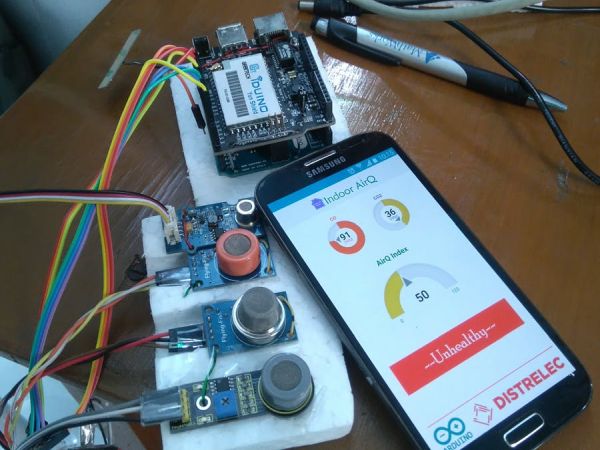
Things used in this project
Hardware components |
||||||
 |
|
× | 1 | |||
 |
|
× | 1 | |||
 |
|
× | 1 | |||
 |
|
× | 1 | |||
 |
|
× | 1 | |||
 |
|
× | 1 | |||
 |
|
× | 1 | |||
 |
|
× | 1 | |||
Software apps and online services |
||||||
 |
|
|||||
Story
Introduction
Indoor air pollution has been consistently ranked by the US Environmental Protection Agency (EPA) and its Science Advisory Board to be among the top five environmental public health risks. Average person spends an estimated 90% of their time indoors so that poor indoor air quality (IAQ) poses a substantial risk to public health. Poor air quality may cause increased short-term health problems such as fatigue and nausea as well as chronic respiratory diseases, heart disease, and lung cancer. It is estimated that annual costs and productivity losses in US is $10 to $20 billion related to sick building syndrome, which is defined to describe acute health and discomfort effects that appear to be linked to poor indoor air quality and the time spent in a building.
In this project, we are going to present an indoor air quality monitoring system. Our system is connected to the Internet, and as a result, anyone can remotely visualize the air quality index form anywhere.
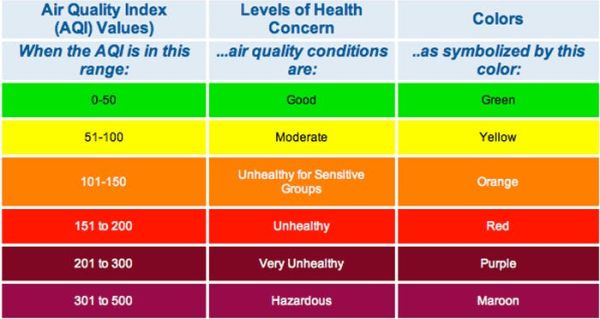
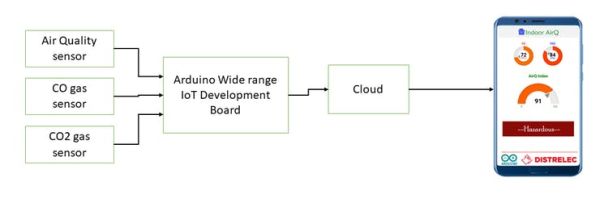
Possible Application Domain of This System
- Homes and offices
- Industries
- Remote sensing for firefighters
- Research and agriculture
- Hospital and clinic
- ICU unit
Things
- Wide range of IoT boards with WiFi (MKR1000 and Yún Rev2) and GSM/narrowband connectivity (MKR FOX 1200, MKR WAN 1300, and MKR GSM 1400). [For prototyping this project I used Arduino Leonardo with Yun shield]
- Gas sensors (MQ-2, 3, 7)
- Air quality sensor (MQ-135)
- Android device
- Mobile application development platform
- IoT-cloud
- Jumper wires
- Programming skills
- Arduino IDE/Arduino Web IDE
- Solar panel for green power source
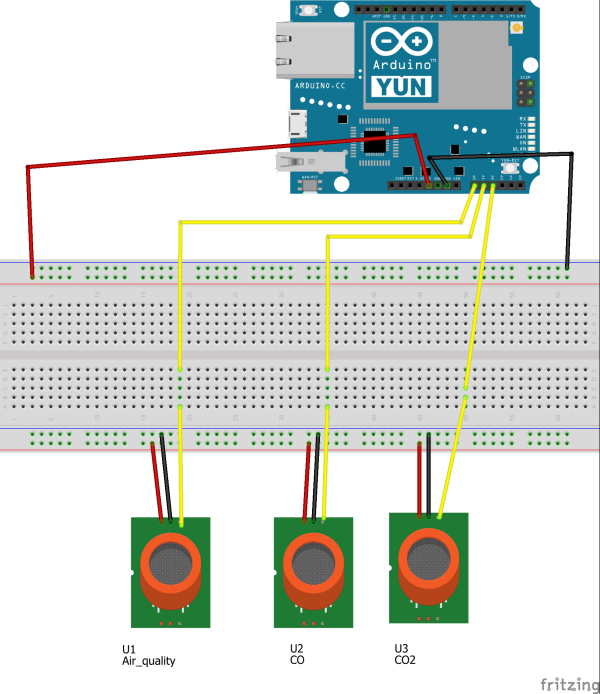
Circuit Diagram
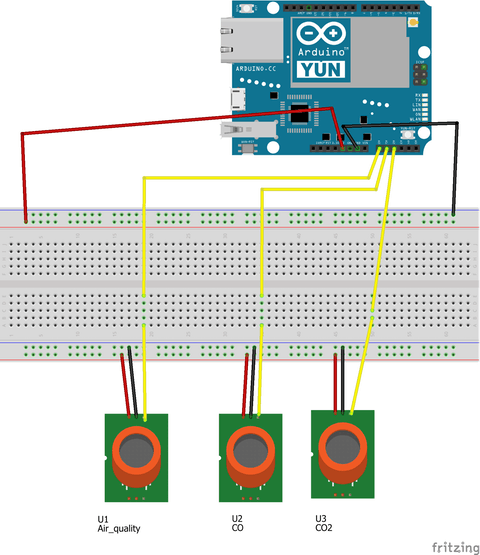
Air Quality Sensor
VCC    to     5V pin of Arduino
GND    to     GND pin of Arduino
SIG    to     A3 pin of Arduino
MQ-2 gas sensor
VCC    to     5V pin of Arduino
GND    to     GND pin of Arduino
SIG    to     A2 pin of Arduino
MQ-3 gas sensor
VCC    to     5V pin of Arduino
GND    to     GND pin of Arduino
SIG    to     A1 pin of Arduino
Upload the Firmware
Download the firmware (source code) and upload it to the Arduino board. Before uploading make sure that, you have include all the libraries. Please refer this tutorials for connecting the Arduino Yun with Internet.
The git repository
https://github.com/Mohammadsalahuddin/indoor_air_quality_monitoring.git
Cloud Connectivity
Please refer the documentation section of thinger.io for cloud connectivity http://docs.thinger.io/arduino
***Attention***
The Mobile Application Collects data from my own iot-cloud account as a result if the device is offline, the mobile application does not shows any data (NaN). If you want to test the APK perfectly, mail me for powering up the device. Other wise please check the demo apps. The demo apps works without device. Thanks for yourkindunderstanding .
Demo
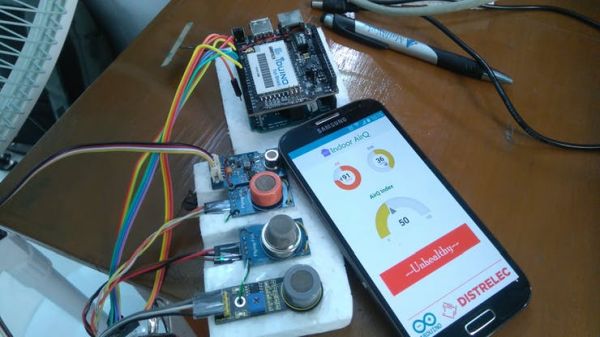
Device and demonstration
Future Plan
- Onboard indicator should be added for indicating the air quality index.
- Buzzer-based alarm while highly pollution is detected.
- Push notification for notifying the users during hazardous situation.
Reference
- US Environmental Protection Agency (USEPA). Indoor air quality tools for schools Communications guide. Available at http://www.epa.gov.
- H.S. Brightman and N. Moss. Sick building syndrome studies and the compilation of normative and comparative values. Indoor Air Quality Handbook. Editors: J. D. Spengler, J. F. McCarthy, and J. M. Samet, New York: McGraw-Hill, 2001.
- J.-J. Kim, S.K. Jung, and J.T. Kim.Wireless monitoring of indoor air quality by a sensor network. Indoor and Built Environment, 19:1:145-150, 2010.
Custom parts and enclosures
Schematics
circuit diagram
Code
- How does the system connect to the internet?
The system uses Arduino boards like the Yun or MKR series connected to the Thinger.io cloud platform for connectivity. - What sensors are used to detect gas levels?
The project utilizes Seeed Grove Gas Sensor MQ2 and Seeed Grove Air quality sensor v1.3 along with MQ-3 sensors. - Can users view data remotely?
Yes, anyone can remotely visualize the air quality index from anywhere using a mobile application connected to the IoT cloud. - What happens if the device is offline?
If the device is offline, the mobile application will not show any data and may display NaN values. - Which software environment is required for programming?
Users need the Arduino IDE or Arduino Web IDE along with specific libraries to upload the firmware. - What are the potential applications for this system?
Possible domains include homes, offices, industries, remote sensing for firefighters, research, agriculture, hospitals, and ICU units. - How are the sensor signals connected to the Arduino?
The signal pins connect to analog inputs A0, A1, A2, and A3 on the Arduino board. - What future improvements are planned for the project?
Future plans include adding onboard indicators, buzzer-based alarms for high pollution, and push notifications for hazardous situations.
