
Summary of Control Pi-Plate With Spark Core
This article details how to expand the I/O capabilities of a Spark Core using the stackable ppDAQC board from Pi-Plates.com. It outlines necessary hardware components, wiring configurations for power and SPI signals, and provides the required C++ code structure, including specific library files and initialization steps for the SPI interface to ensure proper communication between the microcontroller and the data acquisition board.
Parts used in the ppDAQC and Spark Core Assembly:
- A ppDAQC board from Pi-Plates.com
- A Spark Core
- A 5VDC power supply or the USB power supply included with the Core
- A small protoboard (currently included with the Core Evaluation kit)
- Jumper wires
The ppDAQC board from Pi-Plates.com is an inexpensive yet powerful solution for expanding the input/output capabilities of the Spark Core. And since Pi-Plates are stackable, it is a simple task to scale up the I/O capabilities of a single Core. All that is required for connectivity are the four SPI signals (signals A2-A5) as well as a single digital output (D6). Power can come from the Core or from the ppDAQC board.
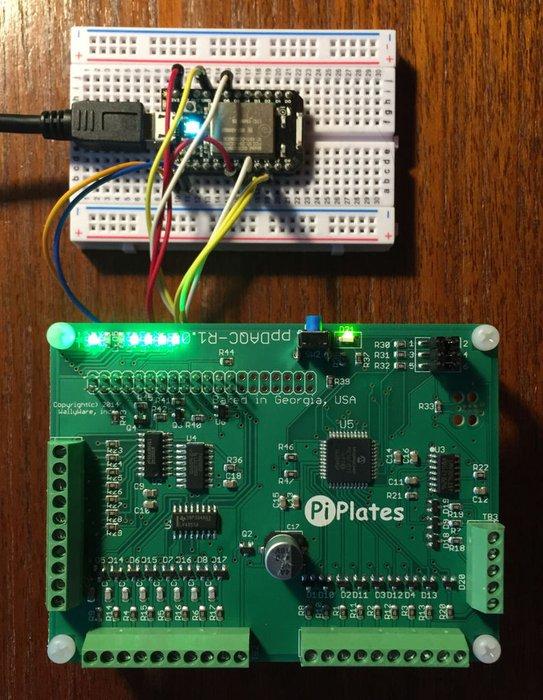
Step 1: Required Components
To build this assembly the following components are required:
1. A ppDAQC board from Pi-Plates.com
2. A Spark Core
3. A 5VDC power supply or the USB power supply included with the Core.
4. A small protoboard (currently included with the Core Evaluation kit)
5. Jumper wires
Step 2: Connections – 1
The diagram and table explain how the ppDAQC and the Spark Core board are connected. This implementation uses an external 5VDC supply that provides power for the Spark Core through the ppDAQC board. This approach allows you to drive peripherals with the open collector pins that would pull more than 1 amp. If you’re just playing around, use the USB power supply that came with your Spark Core.
Step 3: Code: Structure
All Spark applications for the ppDAQC require three files:
1. ppDAQC.ccp – a lightweight set of library functions
2. ppDAQC.h – the header file with all of the function prototypes
3. yourapplication.ino – your application program
The application program has to have the following structure:
#include "ppDAQC.h"

extern int ppFRAME; //____ppDAQC I/O ports that are initialized below

extern int ppCE; //

void setup()

{

SPI.begin();

delay(1); // Wait 1msec

SPI.setClockDivider(SPI_CLOCK_DIV64);

delay(1); // Wait 1msec

SPI.setDataMode(SPI_MODE0); //All of these function are required for

//initializing the SPI/Pi-Plate interface

pinMode(ppFRAME,OUTPUT); //

pinMode(ppCE,OUTPUT); //

digitalWrite(ppCE,HIGH); //

//initialization for your application variables go below:

}

void loop()

{

// Your application code

}
- What is the primary function of the ppDAQC board?
The ppDAQC board is an inexpensive solution for expanding the input/output capabilities of the Spark Core. - How many SPI signals are required for connectivity?
All that is required for connectivity are the four SPI signals (signals A2-A5) as well as a single digital output (D6). - Can the project be powered by the Core itself?
Power can come from the Core or from the ppDAQC board. - What are the three required files for all Spark applications for the ppDAQC?
All Spark applications for the ppDAQC require three files: ppDAQC.ccp, ppDAQC.h, and yourapplication.ino. - Which SPI mode must be set during initialization?
SPI.setDataMode(SPI_MODE0) must be called to initialize the SPI/Pi-Plate interface. - Why might one use an external 5VDC supply instead of USB?
This approach allows you to drive peripherals with the open collector pins that would pull more than 1 amp. - How do you scale up the I/O capabilities of a single Core?
Since Pi-Plates are stackable, it is a simple task to scale up the I/O capabilities of a single Core. - What variable declaration is needed for the application program?
The application program needs extern int ppFRAME and extern int ppCE declarations.
