
Summary of Revive Old Drive-In Speakers with a Modern LED Twist
This article describes a DIY project reviving vintage drive-in theater speakers by integrating modern electronics. The build transforms retro metal speakers into a 20-watt amplified stereo system featuring an RGB lighted dial that syncs with music beats. Using four off-the-shelf circuit boards, the creator preserves the nostalgic toggle switch while adding digital volume control and visual effects powered by an Arduino Pro Mini.
Parts used in the Revive Old Drive-In Speakers:
- Arduino Pro Mini
- Adafruit Stereo 20W Class D Audio Amplifier – MAX9744 board
- Adafruit Electret Microphone Amplifier
- Sparkfun RGB Encoder breakout board
- Old-school toggle switch for power
- Vintage drive-in theater speaker enclosure
When I was a kid we went to the drive-in theater to see movies like The Legend of Boggy Creek and Evel Knievel. I loved those movies but I remember just as vividly those retro-cool metal speakers that entered into our car for these campy films. A few years ago I found one of these speakers at a flea market and it came home with me.
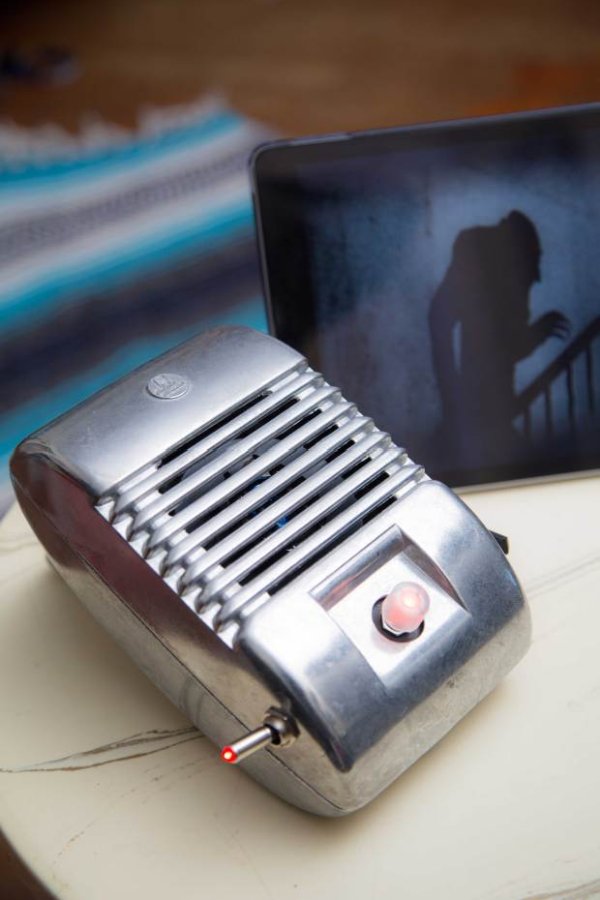
After it sat in my garage for years, I finally decided it needed to be what it was made to be: a speaker. But this time it gets some pretty nice power and technology, as a 20-watt amplified stereo speaker set with an RGB lighted dial that first dials in your volume by color and then, with a click, pulses to the beat of the music. It’s all done with 4 modern off-the-shelf circuit boards inside — but to keep the retro look, there’s an old-school toggle switch for power.
Another thing I really like about this project is that we take some off-the-shelf maker kit work and apply it to a gift from the past and make it new again.
Hardware
Arduino Pro Mini: As with most of my hardware projects, I start with a standard Arduino. Of course, the standard Arduino board isn’t going to fit into this case and designing a custom board is time-consuming and expensive. The solution for many projects is to use one of the small Arduino boards available. I used the Arduino Pro Mini and it was perfect for this project. It’s inexpensive, very small, and reliable.
Adafruit Stereo 20W Class D Audio Amplifier – MAX9744 board: One of the things I really needed for this project was the ability to control the volume digitally. After hunting for a while I settled on the Ada Fruit MAX9744 board. This beautiful little board gave me everything I needed in a small package and it sounds awesome.
Adafruit Electret Microphone Amplifier: This optional finishing touch provides modulation of the color of the LED to the beat of the music. This is accomplished by using this little mic board to listen to the music, then filtering the analog signal to detect the beat (thanks to some existing open source Arduino software). This mode is enabled and disabled by clicking the encoder. If this mode is not wanted, simply omit it from the project and everything else will work just fine as-is.
Sparkfun RGB Encoder breakout board: This little board makes the addition of the RGB encoder easy for this project.
1. Build the Adafruit Amplifier
Follow the manufacturer’s instructions for Digital Input, except don’t install all the header pins; install only those for SDA, SCL, Vi2c, SHDN, Mute, GND, and VDD (Figure A).
2. Prepare the Arduino Pro Mini
Solder the headers on (Figure B), then download the project code file DriveIn.ino, and upload it to the Arduino.
TIP: Find or draw a diagram of the pin markings on the Arduino, because they’re difficult to see after the headers are installed.
3. Solder RGB encoder to breakout
Insert the encoder into the side of the board labeled RGB, then solder the headers on the opposite side, labeled RG (Figure C).
NOTE: It’s easy to mistakenly use the wrong side of the encoder breakout board. Be sure to assemble as shown.
Read More: Revive Old Drive-In Speakers with a Modern LED Twist
- Why was the Arduino Pro Mini chosen for this project?
The Arduino Pro Mini was selected because it is inexpensive, very small, and reliable, fitting perfectly where a standard Arduino board would not. - How is the volume controlled in this build?
Volume is controlled digitally using the Adafruit MAX9744 board and adjusted via an RGB encoder that dials in color before pulsing to the beat. - What component detects the music beat for the LED effects?
The Adafruit Electret Microphone Amplifier listens to the music and filters the analog signal to detect the beat for LED modulation. - Can the beat-sensing feature be omitted from the project?
Yes, if the mode is not wanted, you can simply omit the microphone amplifier and everything else will work just fine as-is. - Which specific pins should be installed on the Adafruit Amplifier board?
You should install headers only for SDA, SCL, Vi2c, SHDN, Mute, GND, and VDD, rather than installing all header pins. - What is the purpose of the old-school toggle switch?
The old-school toggle switch is used for power to maintain the retro look of the original speaker casing. - How do you enable or disable the beat-sync mode?
This mode is enabled and disabled by clicking the encoder. - Is designing a custom board necessary for this project?
No, designing a custom board is time-consuming and expensive; using the small Arduino Pro Mini is the preferred solution.
