
Summary of Useless Box
Summary: A maker built a humorous Useless Machine: an Arduino-controlled servo-powered finger that flips a switch back to OFF. The Arduino monitors the switch; when ON, it drives the servo to push the switch off, then returns to a reset position. Construction uses simple materials (cardboard housing, breadboard wiring, 9V battery) and requires programming, testing servo angles, and ensuring sufficient force.
Parts used in the Useless Machine:
- Arduino
- Servo motor
- 9V battery
- Wires
- Breadboard
- 10 ohm resistor
- Switch
- Cardboard (for box and servo housing)
- Dental floss (to secure finger to servo)
Story
Fascinated by this humorous anthropomorphic idea on instructable that left me philosophizing deeply about the essence of art, I decided to make this a project after witnessing many ruthless battles between human and robot on YouTube.

How does it work?
The Arduino “listens” to the state of the switch and actuates the servo when the switch is activated.
In the OFF state, the Arduino sends the servo to the reset position. When a user flips the switch to ON, the Arduino sends a signal to the servo and actuates a finger to push the switch to the OFF state.
Instructions
1. Program the Arduino.
2. Make the schematics using 9v battery, wires, breadboard, 10 ohm resistor, Arduino, and a switch.
3. Launch Arduino.
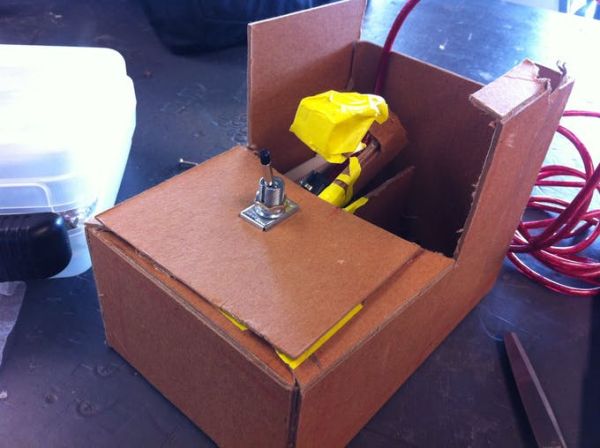
4. Make a box with cardboard. [I made it large enough to house the breadboard.]
5. Create servo housing and the finger. [Here, I used a rectangular cardboard with a hole as housing for servo motor and dental floss to secure the bind of the finger and servo motor. The finger is made with multiple layers of S-shaped cardboard.]
6. Test the angle of movements and adjust numbers in the program. Make sure there is enough force for the finger to push the switch off.
7. Wire and attach power supply
8. Test the Most Useless Machine Ever and voila!
Note:
Move the Arduino to the side so when the finger rotates, it does not get in the way.
Attach the 9V power supply to the Arduino. Remember to detach the battery when not in use or else it will drain your battery.
Read More: Useless Box
- How does the Arduino control the machine?
The Arduino listens to the state of the switch and actuates the servo when the switch is activated. - What happens when the switch is OFF?
In the OFF state, the Arduino sends the servo to the reset position. - What happens when a user flips the switch to ON?
The Arduino sends a signal to the servo and actuates a finger to push the switch to the OFF state. - What power supply is used?
A 9V battery is used as the power supply attached to the Arduino. - How is the servo mounted and the finger attached?
The servo is housed in a rectangular cardboard with a hole, and the finger is secured to the servo using dental floss; the finger is made from multiple layers of S-shaped cardboard. - What adjustments are necessary after assembly?
Test the angle of movements and adjust numbers in the program to ensure there is enough force for the finger to push the switch off. - Where should the Arduino be placed inside the box?
Move the Arduino to the side so when the finger rotates, it does not get in the way. - What safety or maintenance note is given about the battery?
Detach the 9V battery when not in use to prevent battery drain.
