
Summary of Smoke Detector using MQ2 Gas Sensor and Arduino
This DIY project details the construction of a Smoke Detector Circuit using an Arduino UNO and an MQ2 sensor to monitor air smoke levels in PPM. The system displays readings on a 16x2 LCD and activates a buzzer when smoke exceeds 1000 ppm, though this threshold is adjustable via code. Unlike breadboard setups, this specific build utilizes a custom-designed PCB shield created with EasyEDA for better integration.
Parts used in the Smoke Detector Circuit:
- Arduino UNO
- Smoke Detector Arduino Shield (Self Designed)
- Power Supply
- Smoke Sensor (MQ2)
- Resistors (10K and 1K)
- Buzzer
- 16x2 LCD
- 10k POT
- LED
- LM358
- Burg strips
Smoke Detectors are very useful in detecting smoke or fire in buildings, and so are the important safety parameters. In this DIY session, we are going to build a Smoke Detector Circuit which not only sense the smoke in the air but also reads and displays the level of Smoke in the Air in PPM (parts per million). This circuit triggers the Buzzer when Smoke level becomes higher than 1000 ppm, this threshold value can be changed in the Code according to the requirement. This circuit mainly uses MQ2 Smoke/Gas sensor and Arduino to detect and calculate the level of smoke. MQ2 gas sensor is also sensible to LPG, Alcohol, and Methane etc. 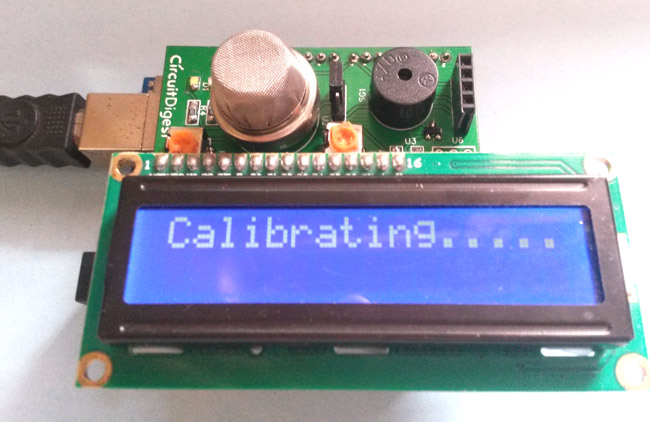 This Smoke Detector can be easily built on Bread Board or Dot Board but we have decided to build this as an Arduino Shield on PCB. We have used EasyEDA online PCB simulator and designer to build this Smoke Detector Shield for Arduino. We have explained the whole process in this Article and also provided PCB layout for this Arduino Shield so that you can also order this Shield if you need.
Components Required:
- Arduino UNO
- Smoke Detector Arduino Shield (Self Designed)
- Power Supply
Components for Smoke Detector Arduino Shield:
- Smoke Sensor (MQ2)
- Resistors (10K and 1K)
- Buzzer
- 16×2 LCD
- 10k POT
- LED
- LM358
- Burg strips
-
Designing Smoke Detector Shield for Arduino:
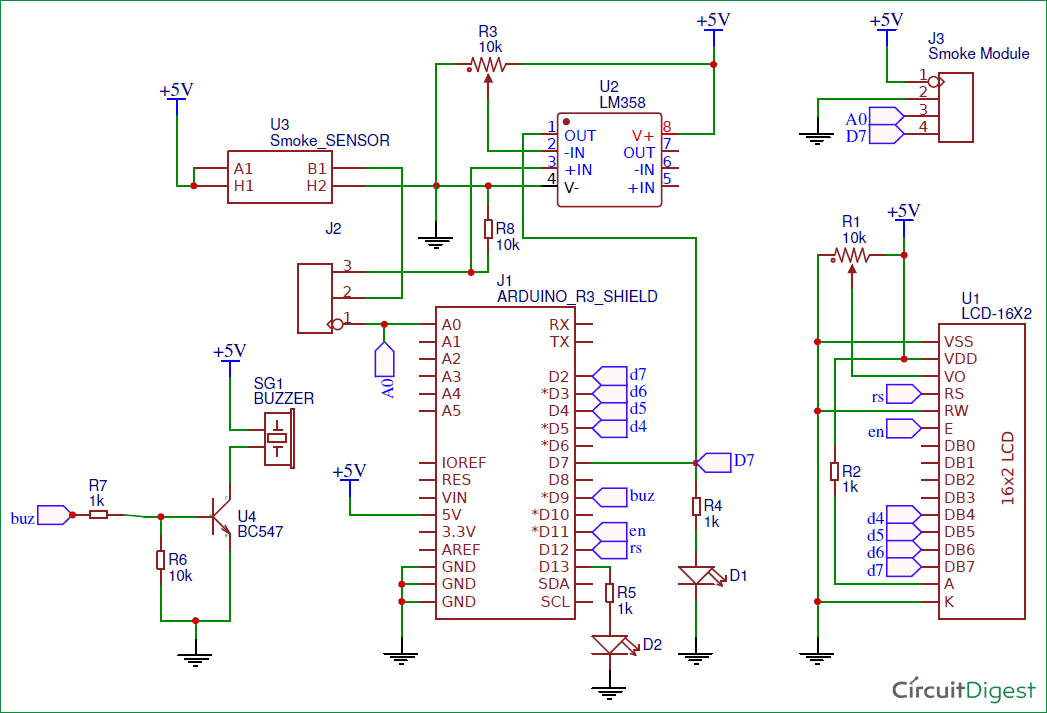
For designing Smoke Detector Shield for Arduino we have used EasyEDA, in which first we have designed a Schematic and then converted that into the PCB layout by Auto Routing feature of EasyEDA.
- What components are required to build the circuit?
The project requires an Arduino UNO, a self-designed Smoke Detector Arduino Shield, and a Power Supply. - How does the circuit detect smoke levels?
The circuit uses an MQ2 gas sensor to sense smoke in the air and calculate the level in PPM. - Can the smoke threshold value be changed?
Yes, the threshold value of 1000 ppm can be changed in the Code according to requirement. - What happens when smoke levels exceed 1000 ppm?
The circuit triggers the Buzzer when the smoke level becomes higher than 1000 ppm. - What software was used to design the PCB shield?
The designers used EasyEDA online PCB simulator and designer to create the shield. - Does the MQ2 sensor detect other gases besides smoke?
Yes, the MQ2 gas sensor is also sensible to LPG, Alcohol, and Methane etc. - What display component is used to show the results?
A 16x2 LCD is used to read and display the level of smoke in the air. - Is it possible to order the designed shield?
Yes, the article provides the PCB layout so you can order the Shield if needed.
