
Summary of Rabbit Ears on a Cap using Arduino
This article details a student project at Singapore Polytechnic creating moving rabbit ears on a cap. Using an Arduino Uno, a 3-axis accelerometer, and two servo motors, the ears rotate based on head direction: left turn moves ears left, right turn moves them right, and looking straight keeps them still. The team utilized affordable materials from DAISO and standard electronics tools to assemble and program the device for educational purposes regarding sensors and microcontrollers.
Parts used in the Rabbit Ears on a Cap:
- Arduino Uno
- MMMA7361L 3-Axis Accelerometer ±1.5/6g with Voltage Regulator
- Servo motors x2
- Molex pins (2 pin & 5 pin)
- Cable ties
- Stripboard
- Single core wire
- Rabbit Ears
- Hairband
- Acrylic board
- Cap
- Breadboard
We are students from Singapore Polytechnic.
After looking at the famous Necomimi Arduino Cat Ears, we decided to give it a try to help us familiarise ourselves with the accelerometer and the arduino.
Using the materials that we had on hand, we managed to produce a set of moving rabbit ears that is similar but not as fantastic. 🙂
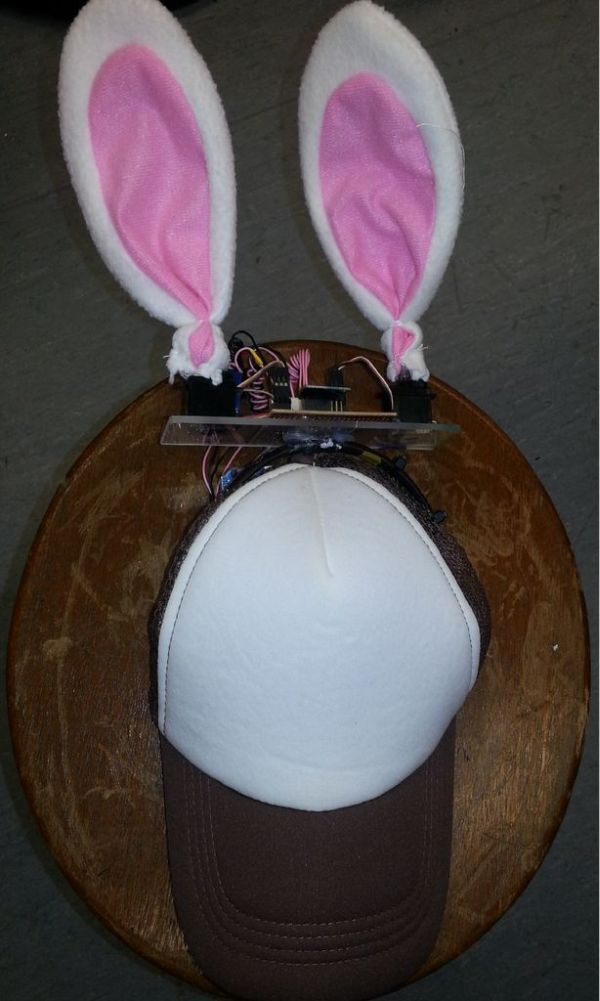
We made a pair of rabbit ears on a cap that move according to the direction your head turns using an accelerometer, servo motors and an Arduino Uno.
Step 1: Components & Tools & Software
The componets and tools that we used to create the Rabbit Ears on a Cap
(Hopefully we didn’t miss out any thing.)
The rabbit ears and the cap were bought from the shop where everything costs $2, DAISO. Our friend had kindly given us one of her hairbands. The other tools and components were provided by our FYP supervisor Teo Shin Jen.
Components:
1. Arduino Uno
2. MMMA7361L 3-Axis Accelerometer ±1.5/6g with Voltage Regulator http://www.pololu.com/catalog/product/1251
3. Servo motors x2
4. Molex pins ( 2 pin & 5 pin )
5. Cable ties
6. Stripboard
7. Single core wire
8. Rabbit Ears ( bought from DAISO)
9. Hairband
10.Acrylic board
11.Cap ( bought from DAISO )
12. Breadboard ( for testing servo and accelerometer)
Tools:
1.Glue gun
2.Soldering Iron
3.Wire stripper
4.Wire cutter
5.Pliers
6.Molex Crimp tool
Software:
1. Arduino IDE
Step 2: Testing of Motor
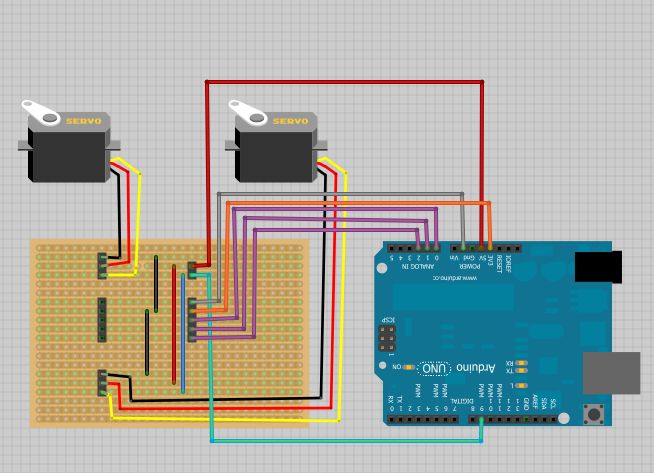
We first planned out what we intended to do, which was to have the ears turn to the left and back to the middle repeatedly when you turn your head left , the ears to turn to the right and back to middle repeatedly when you turn your head right and have the ears remain still when you look straight.
Once we gathered all the items we needed, we noticed that there was a single iron wire inside each ear to give it its shape. It will prove extremely useful when we need to mount the ears on the motors.
The next thing to do was to test the two servo motors.
This is the code we wrote to test the motors, we fine-tuned the values to have the motors turn to the direction we need it to be.
Using the same setup as the Sweep servo example which can be found here :http://arduino.cc/it/Tutorial/Sweep
—————————————————-
TestingMotor Code:
#include <Servo.h>
Servo myservoLeft;
Servo myservoRight;
int i;
2. MMMA7361L 3-Axis Accelerometer ±1.5/6g with Voltage Regulator
3. Servo motors x2
4. Molex pins ( 2 pin & 5 pin )
5. Cable ties
For more detail: Rabbit Ears on a Cap using Arduino
- How do the ears move when turning the head?
The ears turn to the left and back to the middle when the head turns left, and they turn to the right and back to the middle when the head turns right. - What happens to the ears when looking straight?
The ears remain still when the user looks straight ahead. - Which components were used to control the movement?
The project uses an Arduino Uno, a MMMA7361L 3-Axis Accelerometer, and two servo motors. - Where were the rabbit ears and cap purchased?
The rabbit ears and the cap were bought from the shop DAISO. - What is the purpose of the iron wire inside the ears?
The single iron wire inside each ear is useful for mounting the ears on the motors. - Can the servo motors be tested using existing code?
Yes, the Sweep servo example code found on the Arduino website can be used as a setup for testing. - Who provided some of the tools and components?
The FYP supervisor Teo Shin Jen provided the other tools and components.
