
Summary of Temperature Sensing using DS18B20 Digital Sensors
This article details the integration of DS18B20 digital temperature sensors with Arduino and emonTx devices. It explains the sensor's 1-wire communication, accuracy specifications, and two power modes: normal (3-wire) and parasite (2-wire). The text outlines wiring configurations for single or multiple sensors, recommending radial arrangements for short distances and daisy-chaining for long runs. Specific guidance is provided for connecting sensors to emonTx V2 via a 3.5mm jack port, emphasizing normal mode for reliability and suggesting suitable cable types like 22AWG wire or CAT 5.
Parts used in the Temperature Sensing Project:
- DS18B20 thermometer sensor
- Arduino microcontroller
- emonTx device
- 4k7 pull-up resistor
- 3.5mm temperature jack port
- Male 3.5mm jack connector
- 3-core 22AWG wire
- CAT 5 network cable
Hardware
Multiple sensors can be connected to the same data bus; each sensor identifies itself by a unique serial number.
The sensor can operate in normal or parasite power mode. In normal mode, a 3-wire connection is needed. In parasite power mode the sensor derives its power from the data line, meaning only two wires, the data line and a ground connection, are required.
Note: The Arduino positive supply rail is referred to as Vcc and the positive supply for the DS18B20 as Vdd. In this context, these are the same thing.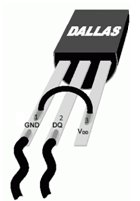
Normal Mode
In normal mode, each sensor is connected between a power line (Vdd pin 3) and ground (GND pin 1), and the data output (DQ pin 2) connects to a third, data, line. The data output is a 3-state or open-drain port (DQ pin 2) and a 4k7 pull-up resistor to the power line is required. The data line is connected to a free Arduino digital input or Arduino digital pin 4 in the case of the emontx.
Normal mode is recommended when many devices and/or long distances are encountered.
Parasite Mode
Parasite power mode requires both DS18B20 GND (pin 1) and Vdd (pin 3) to be connected to ground. The DQ pin (pin 2 – the middle pin) is the data/parasite power line. The data line requires a pull-up resistor of 4k7 connected to + 5 V. The data line is connected to a free Arduino digital input or Arduino digital pin 4 in the case of the emonTx.
Parasite mode should only be used when a small number of devices are used over relatively short distances.
Connecting multiple sensors
If the sensors are located relatively close to the Arduino/emonTx, then satisfactory operation should be achieved by making a parallel connection of the sensors at the connection to the Arduino or emonTx . This is called a radial or ‘star’ arrangement.
If long cable runs are required, consideration should be given to connecting in ‘daisy-chain’ fashion where one cable runs from the furthest sensor, connecting to each sensor in turn before ending at the Arduino or emonTx.
There is more about this in the note below.
For short cable runs, unscreened two- or three-core cable, or single-core (parasite mode) or twin-core (normal mode) screened audio cable should be suitable. For longer cable runs, low capacitance cable such as rf aerial downlead (parasite mode) has been successfully used over a distance of 10 m. CAT 5 network cable has also been used with success over a distance of 30m, with data & ground using one twisted pair and power & ground using a second twisted pair.
Temperature Sensing with the emonTx
The emonTx supports direct connection of DS18B20 temperature sensors, however there are significant differences between the emonTx V2 and the emonTx V3.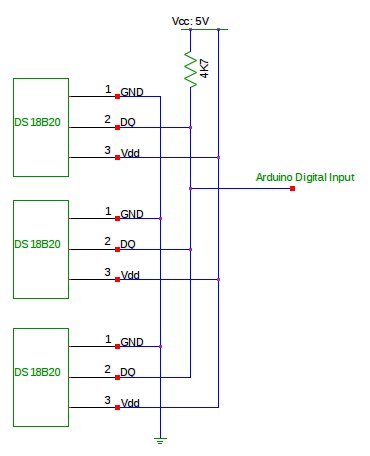
The emonTx V2
The PCB includes the option to solder a DS18B20 sensor directly onto the PCB for monitoring the temperature where the emonTx is located. A more useful option is to connect DS18B20 temperature sensors to the 3.5mm temperature jack port for monitoring remote temperatures such as outside temperature, living room temperature and boiler temperature.
The sensors can be connected either in normal or parasite power mode. We recommend normal power mode for increased reliability. 3-core 22AWG wire is perfect for wiring up sensors. The sensors can also be bought ready encapsulated and wired up, and the 4k7 pull-up resistor is provided on the pcb.
Wire up the sensor(s) to a male 3.5mm jack as follows:
For more detail: Temperature Sensing using DS18B20 Digital Sensors
- What is the accuracy range of the DS18B20 sensor?
The sensor has an accuracy of plus or minus 0.5 degrees Celsius within the -10 to +85 degree Celsius range. - How many wires are required for normal power mode?
Normal mode requires a 3-wire connection consisting of a power line, ground, and a data line. - Can multiple sensors connect to the same data bus?
Yes, multiple sensors can be connected to the same bus, with each identifying itself by a unique serial number. - What is the recommended power mode for increased reliability?
Normal power mode is recommended for increased reliability, especially when using many devices or long distances. - How should sensors be arranged for long cable runs?
For long runs, a daisy-chain fashion should be used where one cable connects from the furthest sensor back to the Arduino. - Which cable type works well over a distance of 30 meters?
CAT 5 network cable has been successfully used over a distance of 30 meters. - Where does the data line connect on an emonTx?
The data line connects to a free Arduino digital input or specifically to Arduino digital pin 4 on the emonTx. - Does the emonTx V2 support direct PCB soldering for the sensor?
Yes, the emonTx V2 PCB includes the option to solder a DS18B20 sensor directly onto the board. - Is a pull-up resistor needed if using ready-encapsulated sensors?
No, the 4k7 pull-up resistor is already provided on the pcb when using ready encapsulated sensors.
