
Summary of Simple mass storage for your microcontroller project using arduino
The article describes a uDrive project enabling microcontrollers to access gigabytes of storage via an SD card. It functions as an external PC drive, allowing file transfers using five simple commands: Read, Write, Dir, Erase, and Initialise. The system connects to controllers like PICAXE or Arduino using five wires (Gnd, Power, Tx, Rx, optional Reset) and operates on 3-5V.
Parts used in the uDrive Project:
- uDrive device
- Micro SD card
- Micro-to-standard SD adaptor
- USB to SD adaptor
- Microcontroller (e.g., PICAXE, Arduino)
- Connecting wires (Gnd, Power, Tx, Rx)
Do you want gigabytes of storage for your microcontroller? Would you like a simple way to tranfer files from your PC to your picaxe or arduino or other micro project?
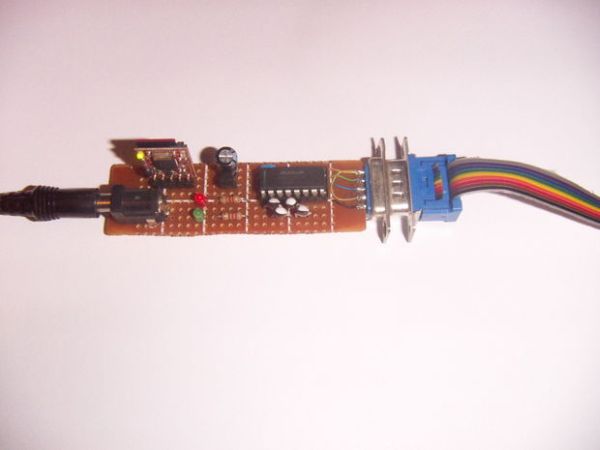
This little projects demonstrates the uDrive that can be set up as an extra drive on a PC. Copy files to and from the SD card, then put it in the uDrive and talk to it with 5 simple commands:
Read – Read a file off the drive
Write – Write a file to the drive
Dir – get the directory listing of files on the drive
Erase – erase a file
Initialise – send 1 byte at your preferred baud rate
Step 1: Connecting to your microcontroller
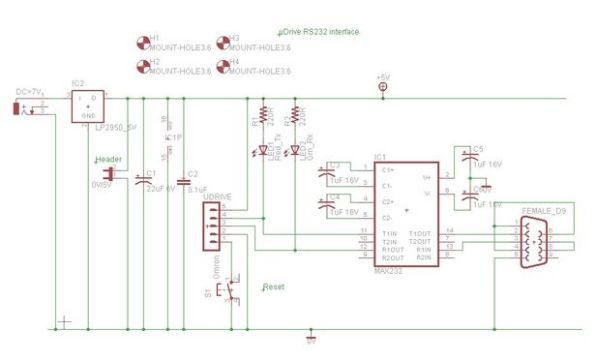
Connection uses 5 wires: Gnd, Power, Tx, Rx and an optional reset line. The reset line can be left unconnected if no reset is needed.
The uDrive works from 3 to 5V so can interface to a wide range of controllers.
Step 2: Copying files across
Copying involves taking the micro SD card out of the uDrive and putting it into a micro-to-standard SD adaptor. This goes into a USB adaptor that plugs into the PC and then the SD card appears as another drive on the PC. The micro SD is the small purple part seen on the left of this picture. The USB to SD adaptor cost $5 including shipping on ebay. Most micro SD cards come with micro to standard adaptors and the total cost of the package is under $10 for gigabytes of storage.
Step 3: Accessing the files from a microcontroller
Microcontrollers all have different languages; assembly, C, Basic, Spin etc. You will have to write your own exact code, but below is an example using vb.net. This is still a bit complicated, but it is a lot easier than trying to talk to a SD card using bit-bang SPI code.
For more detail: Simple mass storage for your microcontroller project
- How many wires are required for connection?
The connection uses 5 wires including Gnd, Power, Tx, Rx, and an optional reset line. - Can the reset line be left unconnected?
Yes, the reset line can be left unconnected if no reset is needed. - What voltage range does the uDrive support?
The uDrive works from 3 to 5V. - How do files appear on the PC?
The SD card appears as another drive on the PC after being placed in the USB adaptor. - What are the five simple commands available?
The commands are Read, Write, Dir, Erase, and Initialise. - Does this method require bit-bang SPI code?
No, it is easier than trying to talk to an SD card using bit-bang SPI code. - What is the approximate total cost of the package?
The total cost of the package is under $10. - Which programming languages are mentioned for microcontrollers?
Assembly, C, Basic, and Spin are mentioned as languages used by microcontrollers.
