
Summary of Raspbmc Mediabox Steampunk style
Concise summary: A Steampunk-styled MediaBox built around a Raspberry Pi Model B with a 7" integrated display, IR remote support, web and mobile control, audio output, and network file sharing. The project uses readily available components mounted in a wooden box with basic woodworking tools and finishes to achieve the aesthetic.
Parts used in the Mediabox Steampunk style:
- Raspberry Pi Model B
- small SD card (around 256MB)
- USB stick for the operating system (2GB)
- USB hub with power supply
- 7 inch display set from Pollin
- Edimax WLAN stick
- Flirc IR remote control USB dongle
- Speedlink Vigo USB soundcard
- wooden box (W240mm x H180mm x D145mm)
- small wooden bar (about 100mm x 5mm x 5mm)
- brass spray
- junction box with 3 spaces
- Velcro tape
I wanted to have my personlal, nice looking Mediabox with a big display and remote control. I’ ve been playing around with the Raspberry for a while so I decided this would be the platform of choice for this project. I’ m actually a fan of Steampunk so I decided to use a Steampunkish style for the box.
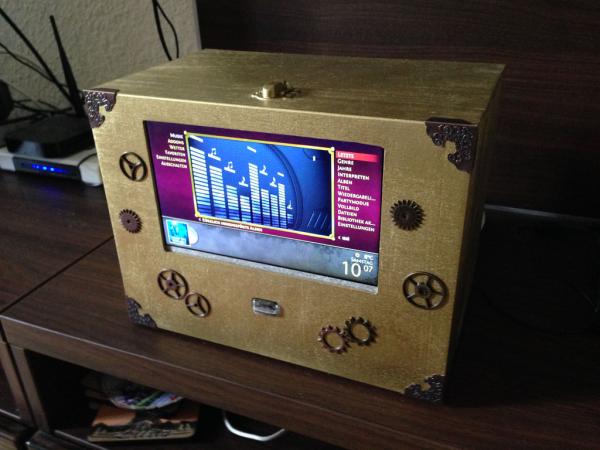
Features:
- Raspbmc user interface accessible via a 7″ inbuilt display
- control via any IR remote
- control via web interface
- control via smartphone / tablett app
- audio output via Cinch
- Samba, FTP support
Step 1: Needed Parts and Tools
Parts
Here is a list of the basic parts I used for building the MediaBox:
- Raspberry Pi Model B: 30..35€
- a small SD card (256MB or so)
- USB stick for the operating system (2GB)
- USB hub with power supply
- 7″ Display set from Pollin 39,95€
- Edimax WLAN stick: 7,99€
- Flirc IR remote control USB dongle: 19,00€
- Speedlink Vigo USB soundcard: 11,95
- wooden box from the art supply store (W240mm x H180mm x D145mm)
- small wooden bar (about 100mm x 5mm x 5mm)
- brass spray
- junction box with 3 spaces
- Velcro tape
All together the whole thing will cost you about 130€.
Tools
For cutting the holes in the wooden box I used a Dremel. If you don’ t have one you can use a coping saw. Also you will need:
- sandpaper for smoothing the edges
- wood glue for the wooden bars holding the display in place
- wood drills for the supply cable
Step 2: Mounting the display
The display set comes in three parts: the actual display, the main board and the control panel. All three parts of are connected quite easily by plugging the flat cables in the appropriate plugs according to the manual.
For mounting the display to the wooden box you have to cut a rectangle. I used a Dremel with a straight edge guide (Dremel 678) here. Surely one can also use a coping saw. Don’ t cut the rectangle to big because you have to smoothen the edges with sandpaper afterwards.
For more detail: Raspbmc Mediabox Steampunk style
- What platform is used for the Mediabox?
The project uses a Raspberry Pi Model B as the platform. - What display size is integrated in the box?
A 7 inch display set is used and mounted in the wooden box. - How can the Mediabox be controlled?
It can be controlled via any IR remote, via a web interface, and via a smartphone or tablet app. - What operating system interface is accessible on the display?
Raspbmc user interface is accessible via the 7 inch inbuilt display. - What network and file sharing options are supported?
The box supports WLAN using the Edimax stick and Samba and FTP for file sharing. - What audio output hardware is used?
Audio output is provided via Cinch using the Speedlink Vigo USB soundcard. - What tools are recommended for cutting the wooden box?
A Dremel with a straight edge guide was used; a coping saw is an alternative. Sandpaper and drills are also needed. - How are the display parts connected?
The display, main board, and control panel are connected by plugging the flat cables into the appropriate plugs per the manual. - What finishing and mounting materials are used inside the box?
Small wooden bars and wood glue hold the display; brass spray is used for the Steampunk finish and Velcro tape for attachments. - What is the approximate total cost of the project?
The total cost is about 130€ according to the article.
