
Summary of 3D BRD Viewer
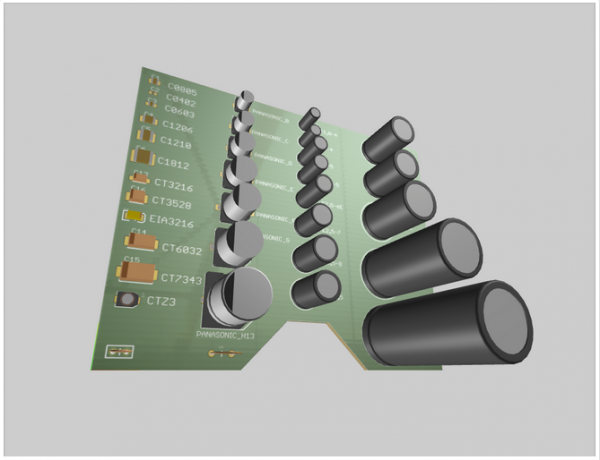
3D BRD Viewer is a free WebGL tool that lets you drag and drop CadSoft EAGLE .brd files to view PCBs in 3D with a 360° perspective. It includes around 200 component models, supports defining simple box models or uploading STP/DAE files, saves model placements in browser local storage, and works best in recent Chrome, Firefox, and Opera. Known issues include forgotten changes after import, problems with circular boards, certain curved dimensions, rotation controls, and texture rendering outside board outlines.
Parts used in the3D BRD Viewer:
- WebGL renderer
- CadSoft EAGLE .brd file parser (XML-based)
- 3D component models (approximately 200 models)
- Model manager interface (Manage Model, Place, translate/offset controls)
- Box model definition tool (manual dimensions from datasheets)
- 3D model upload support (STP and DAE formats)
- Per-board local storage for translations/offsets/models
- Rotation and translation UI controls for components
- Browser compatibility handling (Firefox, Chrome, Opera)
Overview
3D BRD Viewer is a free tool to visualize CadSoft EAGLE PCB Designs in 3D. You can drag your .brd file anywhere on this page and have a full 360 degree view of how your board will appear after assembly.
Models
The tool currently has close to two hundred 3D models of different components. We’ve tried to include the most used packages, but we can’t account for every device out there, and probably your board won’t render completely the first time you load it. “Not found” models are red-ish colored (right hand side list), once you select an element click “Manage Model” and try to find your element model in the list of available models. If you can’t there are two other options:
1. Define a box – find the datasheet for your device and get the dimensions from there.
2. Upload a file – stp and dae formats are currently supported. Most connector manufacturers provide a step file for their products.
After you click “Place” the tool will add that model to the scene for all elements with the same package. Then if there are alignment issues you can move each element individually from it’s dropdown menu. The changes you make are saved in your browser local storage based on the filename of the board, so that next time you load it it will have the same translations/offsets/models/boxes.
Browser Support
We’ve implemented the viewer using WebGL so browser support isn’t great. It’s stable under the latest versions of Firefox, Chrome and Opera, you can try other (IE) browsers at your own risk.
EAGLE Support
We’ve only tested the tool with EAGLE 7.1 and 7.2, but in theory it should be able to render a board made with version 6 since thats when they introduced the xml file structure. Let us know if you experience any issues.
Known problems
- After a file import the changes made to the board are forgotten.
- Circular-shaped boards most often do not render correctly.
- Curved dimension (layer 20) with an angle larger than 180 degrees render incorrectly.
- Currently the rotation controls of an object are not ideal. It is possible to achieve any rotation, but it takes some trial and error.
- Text, traces and other stuff outside the board dimension area produce incorrect texture renderings. Board size and component placement are correct but the image on top and bottom of the board showing the traces, resist and silk are compressed to fit the board outline.
Donations help us put more time towards fixing these problems.
For More Details: 3D BRD Viewer
- How do I view my EAGLE .brd file in 3D?
Drag and drop your .brd file onto the page to load a 360 degree 3D view. - What if a component model is not found?
Not found models appear red; select the element, click Manage Model, then Define a box or Upload a file (STP/DAE) to add a model. - Can I upload custom 3D models?
Yes, STP and DAE formats are supported for uploads. - How are my model placements saved?
Changes are saved in your browser local storage linked to the board filename. - Which browsers are supported?
The viewer is stable in recent versions of Firefox, Chrome, and Opera; other browsers may be unreliable. - Which EAGLE versions are supported?
Tested with EAGLE 7.1 and 7.2, and should work with version 6 due to the XML structure. - What known rendering problems should I expect?
Known issues include forgotten changes after import, incorrect rendering of circular boards, curved dimensions over 180 degrees, imperfect rotation controls, and compressed textures for traces and silk outside the board outline. - How can I fix alignment issues of placed models?
After placing a model you can individually move elements from their dropdown menu to correct alignment.
