
Summary of Xbox 360 RF module + Arduino
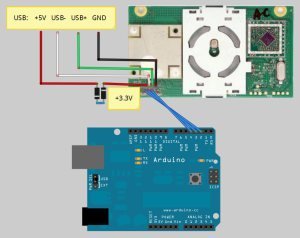
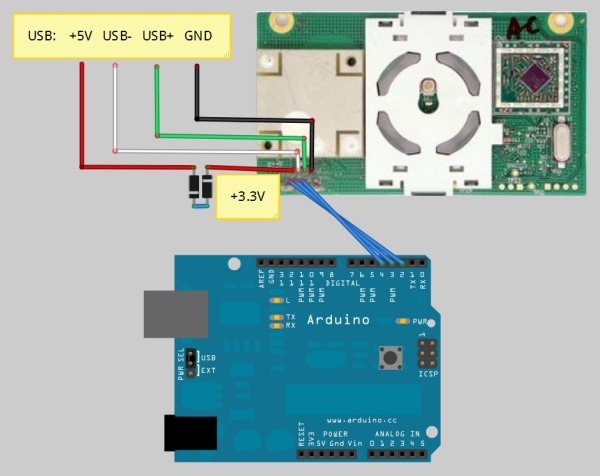
This article provides an Arduino sketch designed to communicate with an Xbox 360 RF module. The code initializes LEDs, triggers a startup animation, and waits for a button press to initiate synchronization. It outlines necessary pin connections and power requirements, specifically noting the need for a 3.3V supply derived from USB 5V using diodes.
Parts used in the Xbox 360 RF Module Project:
- Arduino
- Xbox 360 RF module
- USB wires
- Two diodes
- Data wire
- Serial wire
- Clock wire
- Power button (repurposed as sync)
I was going to make a huge write-up on this, but I can’t be bothered right now. I’ll probably do something about it later. Until then, have an Arduino sketch. If you don’t know what you’re doing with it then chances are you don’t have an Arduino, in which case the file is useless to you.
The sketch:
/* Arduino code to communicate with xbox 360 RF module.
Original work by (yaywoop) / additional ideas from Alexander Martinez - modified by dilandou (www.dilandou.com, www.diru.org/wordpress)
First sends LED initialisation code followed by LED startup animation code, then sleeps until a button press for sync command.
RF module must be powered with 3.3V, two diodes in series with USB 5v will do. Connect the USB wires to a host computer, and the data and serial wires to Arduino.
of course, make sure to have a common ground */
#include <avr/sleep.h>
#define sync_pin 2 //power button repurposed for sync button (pin 5 on the module)
#define data_pin 3 //data line (pin 6 on the module)
#define clock_pin 4 //clock line (pin 7 on module)
int led_cmd[10] = {0,0,1,0,0,0,0,1,0,0}; //Activates/initialises the LEDs, leaving the center LED lit.
int anim_cmd[10] = {0,0,1,0,0,0,0,1,0,1}; //Makes the startup animation on the ring of light.
int sync_cmd[10] = {0,0,0,0,0,0,0,1,0,0}; //Initiates the sync process.
volatile boolean sync_enable = 0;
 void sendData(int cmd_do[]) {
pinMode(data_pin, OUTPUT);
digitalWrite(data_pin, LOW); //start sending data.
int prev = 1;
for(int i = 0; i < 10; i++){
while (prev == digitalRead(clock_pin)){} //detects change in clock
prev = digitalRead(clock_pin);
// should be after downward edge of clock, so send bit of data now
digitalWrite(data_pin, cmd_do[i]);
void sendData(int cmd_do[]) {
pinMode(data_pin, OUTPUT);
digitalWrite(data_pin, LOW); //start sending data.
int prev = 1;
for(int i = 0; i < 10; i++){
while (prev == digitalRead(clock_pin)){} //detects change in clock
prev = digitalRead(clock_pin);
// should be after downward edge of clock, so send bit of data now
digitalWrite(data_pin, cmd_do[i]);
For more detail: Xbox 360 RF module + Arduino
- How should the RF module be powered?
The RF module must be powered with 3.3V, which can be achieved by placing two diodes in series with USB 5V. - What is the purpose of the provided Arduino sketch?
The sketch sends LED initialization code, follows with startup animation code, and sleeps until a button press for a sync command. - Which pins are assigned for sync, data, and clock functions?
Pin 2 is used for the sync function, Pin 3 for the data line, and Pin 4 for the clock line. - How do you connect the USB wires to the system?
You must connect the USB wires to a host computer while linking the data and serial wires to the Arduino. - What is required regarding the electrical ground?
You must ensure that there is a common ground between the connected components. - What happens after the LED initialization code is sent?
After sending the initialization code, the system sends the LED startup animation code before sleeping for a sync command. - Can this project work without an Arduino?
No, the file is described as useless if you do not have an Arduino or know how to use it.
