Projects

Arduino Sound Sensor with LED

Arduino – Sound Sensor (with LED)

This instructable is the written version of my “Arduino – Sound Sensor (with LED)” YouTube video that I’ve uploaded recently. I strongly recommend you to check it out. My YouTube Channel Step 1: Tutorial Sound sensors can be used for a variety of things, one of them could be turning lights off and on by […]

Gesture Controlled Robotic Arm Using Kinect Arduino

Gesture Controlled Robotic Arm Using Kinect & Arduino

This is a Simulink Model to Control a Robotic Arm By Gestures that are captured using Kinect. A Robotic Arm is developed using Servo Motors. Step 1: Things Used in This Project Hardware components: Arduino Mega 2560 Microsoft Kinect for Xbox 360 Microsoft Xbox Kinect Adapter Adafruit Servo Motor SparkFun USB to Serial Breakout – […]

Sparrow My Assistant

Sparrow – My Assistant

Hello everyone. I am a graphic designer with a restless soul (my site www.inoace.com). I loved doing electronics years ago and than got busy with life and job. I am now blessed with some time ( rare now a days 😛 ). This is my first microcontroller / arduino based project. Edit: Just a tip, I was […]

The Interactive Donation Box

The Interactive Donation Box

Donation boxes can be much more interesting and attractive when you combine them with electronics and a little bit of programming. This instructable will show you how to. As the name explains, making donation boxes interactive can help you gain much more attention and make people happy at the same time! Indeed, and awesome way […]

Distinguish Walking and Running Using Machine Learning

Distinguish Walking and Running Using Machine Learning

Electronic market is full of devices called pedometer and fitness tracker. They counts the number of steps you have taken, distance you have covered, whether you are walking or running and bunch of other stuff. Ever wondered, how these devices perform such measurements. I decided to make one on my own and share the knowledge […]

Tracked Robot Bluetooth Controlled by Arduino Via Android Application

Tracked Robot Bluetooth Controlled by Arduino Via Android Application

After trying to remote tracked robot by IR remote control.I have proceed to control same robot platform by Bluetooth Arduino controller via Android application.This method is more reliable,longer distance,pretty Android application enhancement. Same principle,low cost play and home level technical skill.Programming khownledge is not necessary. Thanks for free download Arduino Bluetooth RC Car from Google play. Project more […]

The Bluetooth Module and the Arduino

Connecting “stuff” Via Bluetooth / Android / Arduino

A very good wireless local area network (and personal) is undoubtedly the Bluetooth (BT). Today in our day-to-day is common to find us using cell phones, stereos, cameras, etc., interconnected with the help of the famous “blue little light”. In the world of IoT and automation in general, it is very common find remote controls […]

SparkRover 3D Printed Smartphone Controlled Robot

SparkRover – 3D Printed Smartphone Controlled Robot

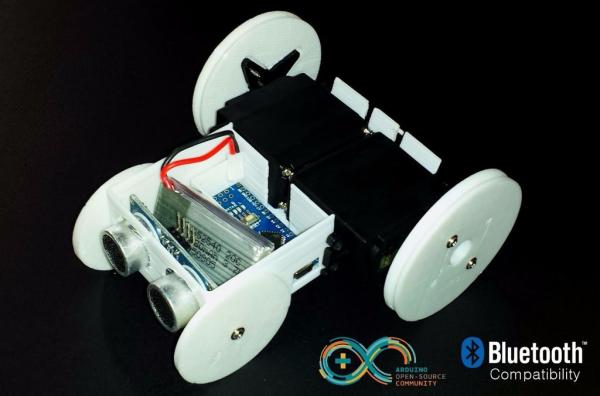
Over the years, I have built several large robots using a custom-made robotics driver that I created called the SmartRover system. This driver was initially used for my SmartRover robot that I built which ran at a peak current of 60 amps at 24 volts. Obviously, the SmartRover can be overkill for many beginners. With […]

Phone Controlled Computer Starter

Phone Controlled Computer Starter

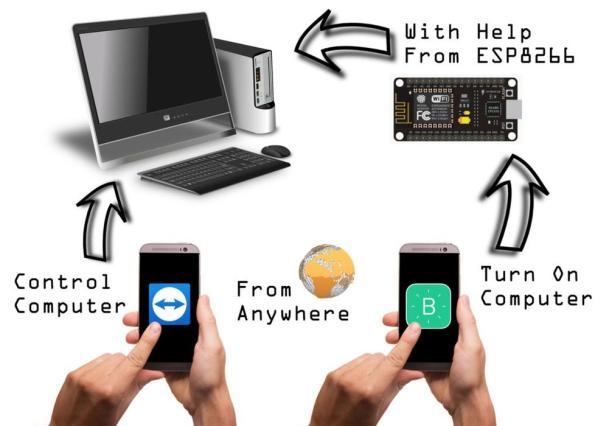
Have you ever wanted to start your computer while you are away from home to access some files? Or maybe you wanted to start a download of a new game, so that it would be done when you got home. This project will show how to start and control your computer from anywhere in the […]

Arduino Basics Emulate Your Arduino Circuits Online

Arduino Basics: Emulate Your Arduino Circuits Online

Want to make your arduino circuits online? want to test components with your code before buying? Then this is the right instructable for you. Lets start! Step 1: Open and Sign Up for 123D Circuits 1) Log on to 123D circuits and then make your account. 2) Click on new and make a new design. […]

Scroll to Top