
Summary of Nanino – the DIY friendly Arduino
The Nanino is a minimalistic, single-sided Arduino-compatible development board designed for low-cost manufacturing. It features an FTDI connector for serial communication instead of USB, allowing power via the cable or external sources. The board includes LEDs for status, a reset switch, and a prototype area. Programming is done via pin headers or by removing the IC using various programmers like AVR-ISP or USBtinyISP.
Parts used in the Nanino:
- Single sided PCB
- LEDs for power and pin 13
- Reset switch
- Prototype area
- FTDI Connector
- On board crystal
- Decoupling caps
- AVR-ISP programmer (optional)
- USBtinyISP programmer (optional)
Description
A minimalistic single sided Arduino compatible development board.
Features
- Single sided PCB (easy to manufacture)
- Arduino compatible form factor
- LED’s for power and pin 13
- Easy to access reset switch
- Prototype area
- FTDI Connector for serial communication
- On board crystal with decoupling caps
- Minimal cost (due to PCB and component count)
Development
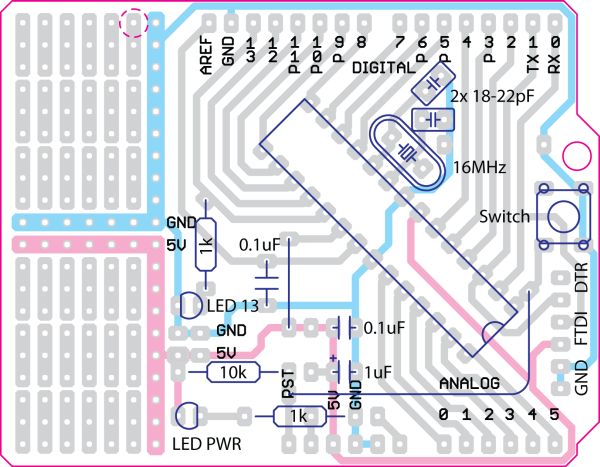
I got a request from a college student in Brazil for a minimalistic Arduino PCB, very similar to a project I worked on a while ago. The requirements were to have a low cost single sided board that was easy to manufacture. It uses wide traces and a minimum of components. Instead of having a USB connection, a 5V FTDI cable is used. The board can be powered by either the FTDI cable or an external power supply (like a 5V USB charger or batteries). See it as what comes between a Veroduino and a Diavolino Milled PCB.
Bootloader
In order to simplify the layout, the ICSP connector was removed. The bootloader can instead be programmed through the Arduino pin headers, or by removing the IC. An AVR-ISP (in-system programmer), USBtinyISP, a ParallelProgrammer, a Boot-Cloner or an Arduino can be used as a programmer.
Upload program to the Nanino
The Nanino has a serial interface (ttl level) that is compatible with a standard 5V FTDI cable. You can also build your own serial adapter or for example use a Sony Ericsson dock as adapter. Note that the FTDI auto reset is not implemented. You can either press reset after a program update, or add a 0,1uF capacitor between pin6 of the FTDI cable and the reset pin.
For more detail: Nanino – the DIY friendly Arduino
- How is the Nanino powered?
The board can be powered by either the FTDI cable or an external power supply such as a 5V USB charger or batteries. - Does the Nanino have a USB connection?
No, the board does not have a USB connection; it uses a 5V FTDI cable for serial communication. - How can I program the bootloader on the Nanino?
The bootloader can be programmed through the Arduino pin headers or by removing the IC and using an in-system programmer. - What programmers are compatible with the Nanino?
You can use an AVR-ISP, USBtinyISP, ParallelProgrammer, Boot-Cloner, or another Arduino as a programmer. - Is the FTDI auto reset implemented on the board?
No, the FTDI auto reset is not implemented on the Nanino board. - How do I handle the reset when uploading code?
You must press the reset button after a program update or add a 0.1uF capacitor between pin6 of the FTDI cable and the reset pin. - What makes the Nanino cost-effective?
The minimal cost is achieved due to the single-sided PCB design and a minimum component count. - Can I build my own serial adapter for the Nanino?
Yes, you can build your own serial adapter or use a Sony Ericsson dock as an alternative adapter.
