
Summary of Make A Arduino Solar Radio
This article details a DIY Arduino-based solar-powered radio. Key features include a 12-position channel selector, seek controls, and an LCD displaying RDS call signs, frequency, battery voltage, and solar charging current. The project utilizes the Si4703 library for FM reception and EEPROM for storing presets. While functional, the software requires refinement to improve response times when signal strength is low or RDS data is unavailable.
Parts used in the Arduino Solar Radio:
- Solar panel
- Arduino board (implied by code)
- LiquidCrystal display (16x2)
- Si4703 Breakout module
- Rotary encoder/potentiometer
- Push buttons (up, down, set)
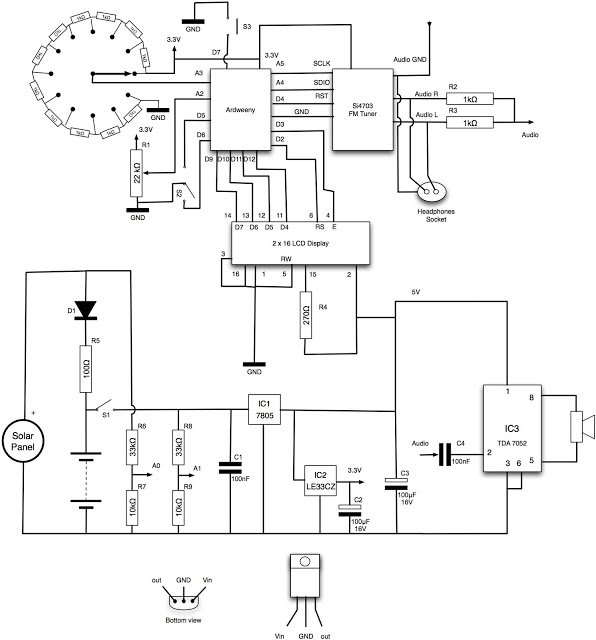
- Battery voltage monitoring circuit
- Solar charging current sensor
- EEPROM storage
Solar charging, via the panel on the back.
* 12 position switch to select channel number
* Seek up / seek down controls and ‘store’ button
* RDS display of call sign
* Frequency display
* Battery voltage display
* Solar charging current display
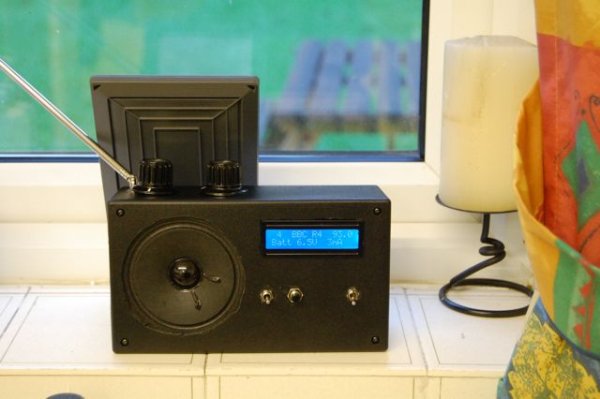
The software still needs a bit of attention. Its fine if the signal is good and RDS comes in quickly, but if not, then adjusting the volume or changing channel takes a few seconds to kick in. As I only really listen to Radio 4, its not a problem, but I’ll get round to updating it some time.
Also, here is the sketch. It uses the library I described in my previous post.
#include <EEPROM.h>
#include <LiquidCrystal.h>
#include <Si4703_Breakout.h>
#include <Wire.h>
int resetPin = 4;
int SDIO = A4;
int SCLK = A5;
int volumePin = A2;
int rotaryPin = A3;
int upSwitchPin = 5;
int downSwitchPin = 6;
int setSwitchPin = 7;
int lcdRSPin = 3;
int lcdEPin = 2;
Si4703_Breakout radio(resetPin, SDIO, SCLK);
LiquidCrystal lcd(lcdRSPin, lcdEPin, 12, 11, 10, 9);
int channel[12];
int currentChannel = 0;
int channelNumber = 3;
int volume = 1;
long autoUpdatePeriod = 5000l;
long lastUpdate;
void setup()
{
pinMode(upSwitchPin, INPUT);
digitalWrite(upSwitchPin, HIGH);
pinMode(downSwitchPin, INPUT);
digitalWrite(downSwitchPin, HIGH);
pinMode(setSwitchPin, INPUT);
digitalWrite(setSwitchPin, HIGH);
radio.powerOn();
radio.setVolume(0);
lcd.begin(16, 2);
lcd.clear();
readChannelsFromEEPROM();
updateChannel();
setVolume();
displayRDS();
}
void loop()
{
int newChannelNumber = 11 – (analogRead(rotaryPin) / 90);
if (newChannelNumber != channelNumber)
{
channelNumber = newChannelNumber;
updateChannel();
displayRDS();
}
int up = ! digitalRead(upSwitchPin);
int down = ! digitalRead(downSwitchPin);
int set = ! digitalRead(setSwitchPin);
if (up)
{
currentChannel = radio.seekUp();
updateDisplay();
}
if (down)
{
currentChannel = radio.seekDown();
updateDisplay();
}
if (set)
{
channel[channelNumber] = currentChannel;
saveChannel(channelNumber, currentChannel);
flashSet();
displayRDS();
}
setVolume();
if (millis() > lastUpdate + autoUpdatePeriod)
{
lastUpdate = millis();
updateDisplay();
displayRDS();
}
delay(50);
}
void updateChannel()
{
clearRDS();
currentChannel = channel[channelNumber];
updateDisplay();
radio.setChannel(currentChannel);
}
void setVolume()
{
volume = (analogRead(volumePin) + 35) / 70;
radio.setVolume(volume);
}
void updateDisplay()
{
lcd.setCursor(0, 0);
if ((channelNumber + 1) < 10) lcd.print(” “);
lcd.print(channelNumber + 1);
lcd.setCursor(12, 0);
lcd.print(currentChannel / 10); lcd.print(“.”); lcd.print(currentChannel % 10);
lcd.setCursor(0, 1); lcd.print(“Batt “);
int v = getBatteryVolts();
lcd.print(v / 10); lcd.print(“.”); lcd.print(v % 10); lcd.print(“V”);
int i = getChargeCurrent();
lcd.setCursor(11, 1); lcd.print(” “);
lcd.setCursor(11, 1);
lcd.print(i / 10); lcd.print(“mA”);
char rdsBuffer[10];
getRDS(rdsBuffer);
lcd.setCursor(3, 0);
lcd.print(rdsBuffer);
}
void displayRDS()
{
char rdsBuffer[10];
getRDS(rdsBuffer);
lcd.setCursor(3, 0);
lcd.print(rdsBuffer);
}
void flashSet()
{
lcd.setCursor(3, 0);
lcd.print(” SET “);
delay(500);
clearRDS();
}
void clearRDS()
{
lcd.setCursor(3, 0);
lcd.print(” “);
}
int getBatteryVolts()
{
// volts * 10
// potential divider 33k:10k
// Vcc 3.3V
// Vin 10V, Vout = 2.326V, raw at 10V = 1023 * 2.326 / 3.3 = 721
// V*10 = raw / 72
int raw = analogRead(1);
return raw / 7;
}
 int getChargeCurrent()
{
// current mA * 10
int battVoltsTen = getBatteryVolts();
int solarVoltsTen = analogRead(0) / 7;
int mV = (solarVoltsTen – battVoltsTen) * 100;
int mA10 = mV / 10;
if (mA10 < 0)
{
mA10 = 0;
}
return mA10;
}
void getRDS(char* buffer)
{
radio.readRDS(buffer, 2000);
}
void saveChannel(int i, int channel)
{
byte high = highByte(channel);
byte low = lowByte(channel);
EEPROM.write(i * 2, high);
EEPROM.write(i * 2 + 1, low);
}
void readChannelsFromEEPROM()
{
for (int i = 0; i < 12; i++)
{
byte high = EEPROM.read(i*2);
byte low = EEPROM.read(i*2 + 1);
int ch = high * 256 + low;
if (ch > 700 && ch < 1500)
{
channel[i] = ch;
}
}
}
For more detail: Make A Arduino Solar Radio
- How does the device charge its battery?
The device uses a solar panel located on the back for charging. - Can I select specific radio channels manually?
Yes, there is a 12 position switch to select the channel number. - What information appears on the RDS display?
The display shows the call sign of the station. - Does the unit show the current battery status?
Yes, it displays both the battery voltage and the solar charging current. - How do I change the volume on this radio?
You can adjust the volume using the analog read pin connected to the rotary pin. - What happens if the signal is weak during operation?
Adjusting the volume or changing channels may take a few seconds to kick in if the signal is not good. - How many channels can be stored in memory?
The system stores up to 12 channels using the EEPROM library. - What library is used for the radio tuner?
The project uses the Si4703_Breakout library.
