
Summary of INA219 Current & Voltage Sensor using Arduino Uno with Proteus Simulation
This project demonstrates measuring load voltage and current using an Adafruit INA219 sensor with an Arduino Uno inside a Proteus VSM simulation. It uses I²C to read shunt and bus voltages, computes load voltage and current, and displays results on a serial terminal. The setup is useful for battery monitoring, power analysis, and educational labs, and can be extended for LCDs, data logging, or alarms.
Parts used in the INA219 Current & Voltage Sensor using Arduino Uno with Proteus Simulation:
- Arduino Uno
- Adafruit INA219 Current Sensor Breakout
- DC Power Source (Battery)
- Load Resistor
- Shunt Resistor (integrated with INA219)
- Virtual Serial Terminal (Proteus)
Introduction
This microcontroller project demonstrates how to measure load voltage and current using an Adafruit INA219 current sensor with an Arduino Uno in a Proteus simulation environment.
It is a practical embedded systems example that shows real-time electrical measurements using I²C communication.
Such projects are widely used in DIY electronics, power monitoring, and battery-powered systems.
By combining Arduino, INA219, and Proteus VSM, this project offers a safe and visual way to test current-sensing circuits.
It is ideal for learners working on practical electronics and sensor-based microcontroller projects.
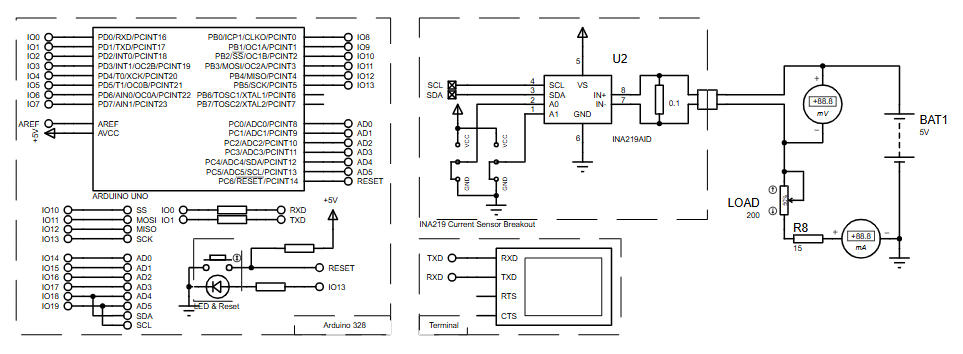
How the Project Works (Overview)
The Arduino Uno communicates with the INA219 current sensor over the I²C bus.
The INA219 measures:
-
Shunt voltage across a small resistor
-
Bus voltage of the load
Using these values, the sensor internally calculates the current flowing through the load.
The Arduino reads this data and sends voltage and current readings to the serial monitor at regular intervals.
Block Diagram / Workflow Explanation
-
Power Source supplies voltage to the load
-
INA219 Sensor is placed in series with the load to measure current
-
I²C Interface (SDA & SCL) transfers sensor data to Arduino Uno
-
Arduino Uno processes the measurements
-
Serial Terminal displays voltage and current readings
This workflow reflects a real-world power monitoring system implemented through Proteus simulation.
Key Features
-
Measures bus voltage, shunt voltage, and load voltage
-
Real-time current measurement in milliamps
-
Uses I²C communication for efficient data transfer
-
Fully simulated using Proteus VSM for AVR
-
Arduino-compatible and easy to expand
-
Clean and readable serial output for debugging
Components Used
-
Arduino Uno
-
Adafruit INA219 Current Sensor Breakout
-
DC Power Source (Battery)
-
Load Resistor
-
Shunt Resistor (integrated with INA219)
-
Virtual Serial Terminal (Proteus)
Applications
-
Battery monitoring systems
-
Power consumption analysis
-
Embedded energy meters
-
DIY electronics testing tools
-
Educational embedded systems labs
-
Load monitoring in power supplies
Explanation of the Code (High-Level)
-
Wire Library initializes I²C communication
-
Adafruit_INA219 Library handles sensor configuration and calculations
-
During
setup(), the INA219 is initialized with default voltage and current ranges -
In
loop():-
Shunt voltage, bus voltage, and current are read from the sensor
-
Load voltage is calculated
-
All values are printed to the serial monitor every two seconds
-
The code is modular and can be easily extended for LCD display, data logging, or alarms.
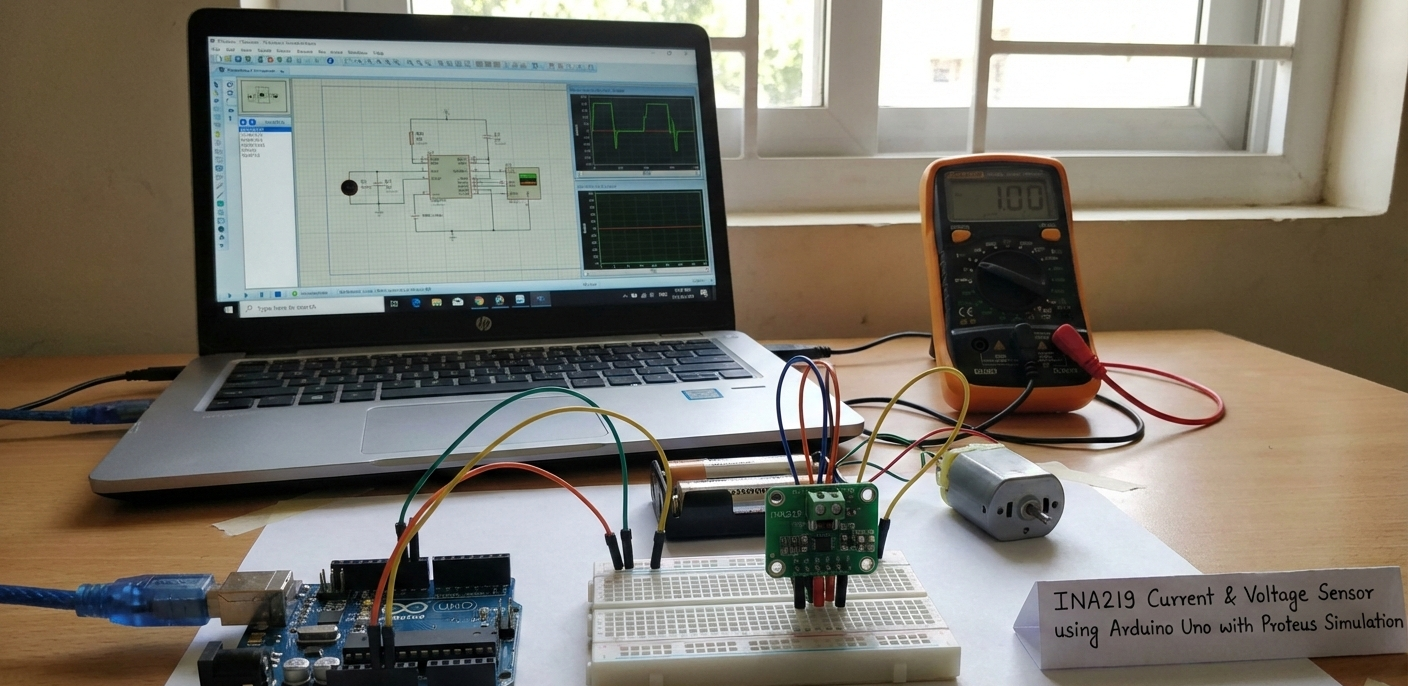
Source Code
Download
 #ifndef ESP8266
    while (!Serial);     // will pause Zero, Leonardo, etc until serial console opens
  #endif

  Serial.begin(115200);
  Serial.println("Hello!");

  // Initialize the INA219.
  // By default the initialization will use the largest range (32V, 2A).  However
  // you can call a setCalibration function to change this range (see comments).
  ina219.begin();
  // To use a slightly lower 32V, 1A range (higher precision on amps):
  //ina219.setCalibration_32V_1A();
  // Or to use a lower 16V, 400mA range (higher precision on volts and amps):
  //ina219.setCalibration_16V_400mA();

Serial.println("Measuring voltage and current with INA219 ...");Proteus Simulation
In Proteus, the Arduino Uno interfaces with the INA219 sensor via SDA and SCL pins.
The simulation accurately shows voltage and current changes as the load varies.
A virtual terminal displays serial output, making debugging and observation straightforward.
This setup closely mirrors real hardware behavior without physical risk.
FAQs
[ultimate-faqs Include_category=”ina219-current-&-voltage-sensor”]Conclusion
This INA219 current and voltage sensor project using Arduino Uno with Proteus simulation is a solid learning example for embedded systems enthusiasts.
It combines sensor interfacing, I²C communication, and real-time monitoring in a clean and modern way.
The project is practical, expandable, and ideal for understanding power measurement in microcontroller-based designs.
Complete File
INA219 Current & Voltage Sensor using Arduino Uno with Proteus Simulation
- How does the Arduino communicate with the INA219 sensor?
The Arduino communicates with the INA219 over the I²C bus using SDA and SCL lines. - What measurements does the INA219 provide?
The INA219 measures shunt voltage, bus voltage, and provides calculated current. - Can this project be simulated without hardware?
Yes, the entire setup is simulated in Proteus VSM with a virtual serial terminal for output. - How often are readings sent to the serial monitor?
Voltage and current values are printed to the serial monitor every two seconds. - Which libraries are used in the example code?
The Wire library initializes I²C and the Adafruit_INA219 library handles sensor configuration and calculations. - Is the INA219 shunt resistor external or integrated?
The shunt resistor is integrated with the INA219 breakout in this project. - What applications are suggested for this project?
Applications include battery monitoring, power consumption analysis, embedded energy meters, DIY testing tools, educational labs, and load monitoring in power supplies. - Can the code be extended for displays or logging?
Yes, the article states the code is modular and can be extended for LCD display, data logging, or alarms.
