
Summary of Adafruit Trellis Shield Momentary Keyboard Test using ATmega328P with Proteus Simulation
This project simulates an Adafruit Trellis Shield momentary keyboard with LED feedback using an ATmega328P in Proteus. It demonstrates I2C keypad scanning, interrupt-driven input via the HT16K33, real-time LED responses, and serial output for debugging. The design supports momentary and latching modes, is scalable to multiple Trellis modules, and is fully testable in simulation for learning and prototyping embedded interfaces.
Parts used in the Adafruit Trellis Shield Momentary Keyboard Test using ATmega328P with Proteus Simulation:
- ATmega328P microcontroller
- Adafruit Trellis Shield (HT16K33-based)
- Arduino-compatible 5V power supply
- Pull-up resistor for interrupt pin
- I2C communication lines (SDA)
- I2C communication lines (SCL)
- Proteus simulation environment (virtual Trellis and ATmega328P models)
- Serial interface for debugging (virtual serial in Proteus)
Introduction
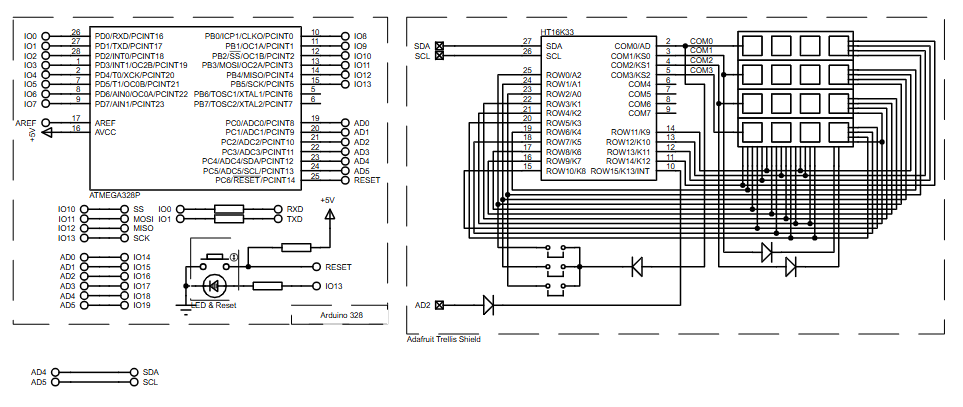
This project demonstrates a practical microcontroller project that uses an Adafruit Trellis Shield as a momentary keyboard with LED feedback, simulated in Proteus.
Built around the ATmega328P, the system shows how button matrices and LEDs can be handled efficiently using I2C communication.
It is a clean example of embedded systems design combining hardware input, visual output, and firmware logic.
Adafruit Trellis keyboard simulation is demonstrated in this project using an ATmega328P microcontroller in Proteus, showcasing I2C keypad scanning, LED feedback, and interrupt-driven input handling without physical hardware.The project is especially useful for learning keypad scanning, LED control, and interrupt-based input handling.
Using Proteus simulation, the complete behavior can be tested without physical hardware, making it ideal for DIY electronics learners and developers.
How the Project Works (Overview)
The ATmega328P communicates with the Adafruit Trellis Shield through the I2C protocol using only two data lines (SDA and SCL).
Each key press on the Trellis matrix is detected by the controller, which then immediately turns on the corresponding LED.
When the button is released, the LED turns off again, implementing momentary mode behavior.
The system also outputs key press and release events through the serial interface for monitoring and debugging.
Block Diagram / Workflow Explanation
-
Key Press Detection
-
A key is pressed on the Trellis matrix.
-
The HT16K33 driver detects the change and triggers the INT pin.
-
-
Microcontroller Processing
-
ATmega328P reads the key state using the Adafruit Trellis library.
-
The firmware checks whether a key was just pressed or released.
-
-
LED Control
-
On press: the matching LED is turned ON.
-
On release: the LED is turned OFF.
-
-
Display Update
-
The updated LED state is written back to the Trellis display over I2C.
-
Key Features
-
I2C-based keypad and LED control using minimal wiring
-
Momentary and latching operation modes supported
-
Scalable design supporting up to 8 Trellis matrices
-
Real-time LED feedback for every key press
-
Serial output for debugging and key tracking
-
Fully testable using Proteus simulation
Components Used
-
ATmega328P microcontroller
-
Adafruit Trellis Shield (HT16K33-based)
-
Arduino-compatible power supply (5V)
-
Pull-up resistor for interrupt pin
-
I2C communication lines (SDA, SCL)
Applications
-
DIY MIDI controllers and button panels
-
Custom control interfaces for robotics
-
Menu navigation systems
-
Educational projects for embedded systems
-
Prototyping human-machine interfaces
-
LED-based input dashboards
Explanation of Code (High-Level)
The firmware uses the Wire library to enable I2C communication and the Adafruit_Trellis library to manage the keypad and LEDs.
-
Initialization Phase
-
Serial communication is started for debugging.
-
The Trellis module is initialized at I2C address
0x70. -
All LEDs are briefly turned on and off as a startup test.
-
-
Main Loop
-
The controller continuously checks for key state changes.
-
In momentary mode, LEDs turn on only while the key is pressed.
-
In latching mode, LEDs toggle state on each press.
-
The display is refreshed after each update to reflect LED changes.
-
No complex timing, ADCs, or interrupts are required beyond the Trellis INT pin, making the firmware clean and easy to extend.
Source Code
Download
/***************************************************
  This is a test example for the Adafruit Trellis w/HT16K33

  Designed specifically to work with the Adafruit Trellis
  ----> https://www.adafruit.com/products/1616
  ----> https://www.adafruit.com/products/1611

  These displays use I2C to communicate, 2 pins are required to
  interface
  Adafruit invests time and resources providing this open source code,
  please support Adafruit and open-source hardware by purchasing
  products from Adafruit!

  Written by Limor Fried/Ladyada for Adafruit Industries.
  MIT license, all text above must be included in any redistribution
 ****************************************************/
Proteus Simulation
In Proteus, the ATmega328P is connected to the Trellis Shield through SDA and SCL lines, with an interrupt pin wired to A2.
When simulated, pressing a virtual key immediately lights its LED and sends a serial message.
Releasing the key turns the LED off, accurately reflecting real hardware behavior.
This confirms correct I2C communication, firmware logic, and LED control.
FAQs
[ultimate-faqs Include_category=”adafruit-trellis-shield-momentary”]Conclusion
This project is a clean and practical example of using an ATmega328P with an Adafruit Trellis Shield in Proteus simulation.
It demonstrates keypad scanning, LED feedback, and I2C communication in a beginner-friendly yet expandable way.
Ideal for learning embedded systems, firmware logic, and interactive hardware design, this project serves as a solid foundation for more advanced interfaces and control systems.
Complete File
Adafruit Trellis Shield Momentary Keyboard Test using ATmega328P with Proteus Simulation
- How does the ATmega328P detect key presses on the Trellis?
The HT16K33 detects key changes and triggers the INT pin, and the ATmega328P reads key state via I2C using the Adafruit Trellis library. - Can the project be tested without physical hardware?
Yes, the complete behavior is testable using Proteus simulation without physical hardware. - What happens when a key is pressed in momentary mode?
On press the matching LED is turned on, and on release the LED is turned off. - Does the system support latching operation?
Yes, the firmware supports latching mode where LEDs toggle state on each press. - How are LEDs and keypad controlled over wires?
LEDs and keypad are controlled via I2C using only two data lines, SDA and SCL. - What debugging output is available?
The system outputs key press and release events through the serial interface for monitoring and debugging. - Is the design scalable to multiple Trellis matrices?
Yes, the design supports up to 8 Trellis matrices. - Which library is used for Trellis management?
The Adafruit_Trellis library along with the Wire library for I2C is used. - What initiates the firmware startup test?
All LEDs are briefly turned on and off at initialization as a startup test.
