
Summary of Flyback SMPS Design Tool Using Arduino
The NXP Flyback SMPS Design Tool streamlines the design of flyback power supplies using TEA1721, TEA1723, TEA1733, and TEA1738 controller IC families. This updated tool unifies these families into a single interface with an improved workflow, enabling automatic export of design parameters to Excel. It guides users through calculations to generate design overviews, transformer winding proposals, detailed schematics, waveforms, and part lists, while allowing designs to be saved, shared, or ordered directly from distributors.
Parts used in the NXP Flyback SMPS Design Tool:
- TEA1721 family (A, B, D, F)
- TEA1723 family (A, B, D, F)
- TEA1733 family (A, B, C, M, L)
- TEA1738 family (F, G, L)
- Transformer cores
- BOM parts (Bill of Materials)
- Distributor links for ordering
The NXP Flyback SMPS Design Tool helps you design flyback power supplies using NXPs TEA1721, TEA1723, TEA1733 and TEA1738 family. The TEA1721(A, B, D, F) family, the TEA1723(A, B, D, F) family, the TEA1733(A, B, C, M, L) family and TEA1738(F, G, L) family are low cost Switched Mode Power Supply (SMPS) controller IC’s intended for flyback topologies.
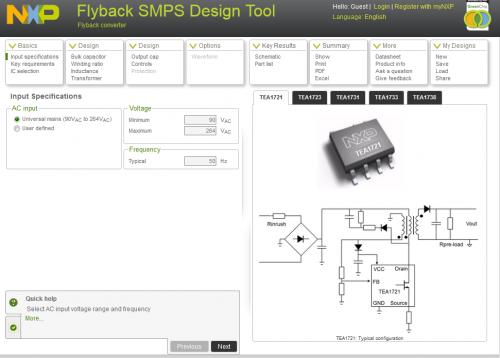
The latest update of the tool combines the TEA172x family and the TEA173x family into one tool. It comes along with a new style and an improved flow. Now it is also possible to export all design parameters, results and graphs automatically into an Excel sheet for post-processing or presentation purposes. Furthermore the database of transformer cores is extended.
The tool guides you step-by-step through the calculation process in order to obtain all relevant design parameters with minimum time and effort.
Once completed you will have a design overview, including the summary of the calculated design parameters, a picture of the transformer winding proposal, detailed schematics, and waveforms. The online tool calculates the complete schematics and a part list. Optionally the calculated BOM parts can directly be ordered at linked distributors. The tool also allows you to load and save designs as well as to share designs with other engineers.
For more detail: Flyback SMPS Design Tool Using Arduino
-
What families of ICs does the NXP Flyback SMPS Design Tool support?
The tool supports the TEA1721, TEA1723, TEA1733, and TEA1738 families. -
Can I export my design results to Excel?
Yes, the tool allows you to export all design parameters, results, and graphs automatically into an Excel sheet. -
Does the tool provide transformer winding proposals?
Yes, once the design is completed, it includes a picture of the transformer winding proposal. -
How can I obtain the calculated Bill of Materials?
The online tool calculates a complete part list which can be ordered directly at linked distributors. -
Is it possible to save and share designs with other engineers?
Yes, the tool allows you to load and save designs as well as share them with other engineers. -
What kind of visual outputs does the tool generate?
The tool generates detailed schematics, waveforms, and a summary of calculated design parameters. -
Has the database for transformer cores been updated?
Yes, the database of transformer cores has been extended in the latest update.
