
Summary of Easy Electronics Organization using Arduino
Summary: This article describes organizing electronics parts using stackable Ikea Helmer drawers and "Really Useful Boxes" to group similar components. It details specific drawers (Arduino, Random Parts, Ideas) and suggests a tools drawer with common electronics tools for easy access and labeling.
Parts used in the Electronics Organization Project:
- Ikea Helmer drawer unit
- Really Useful Boxes (stackable storage boxes)
- Labels for boxes/drawers
- Notebook or Projects Note Book
- Soldering iron
- Solder
- Soldering paste flux
- Helping Hands tool (Extra Hands tool)
- Breadboard
- Jumper wires
- Multimeter or battery tester
- Assorted small and large screwdrivers
- Needle nose pliers
- Wire strippers
- Ruler
- Super glue
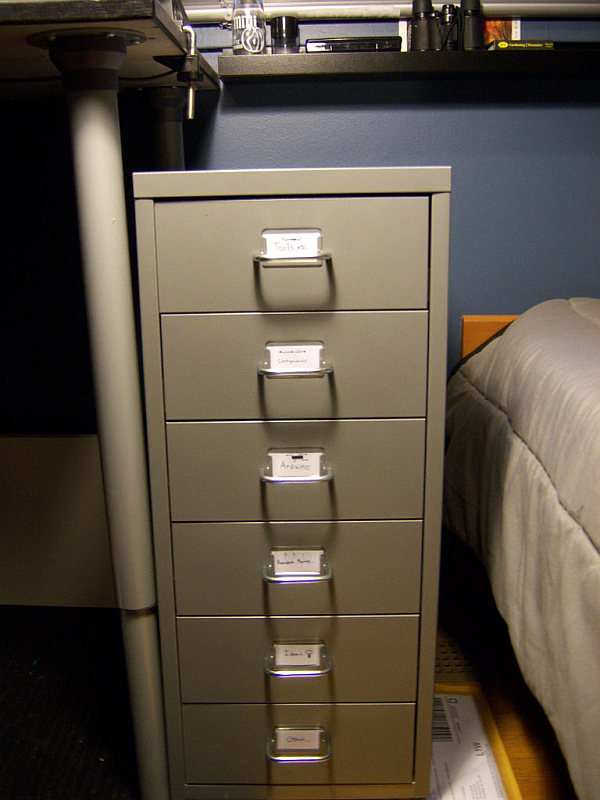
Like many other electronic enthusiasts I need to have a constant supply of materials in order for us to keep building, hacking, or just playing around with electronics. However as probably any of us have come to realize we need a lot of space and storage to hold every thing. Enter the world of stack-able containers. I got one from Ikea, a “Helmer.” its simple metal design fits in with my rooms decor and it had just the right amount of space. In this instructable I will show you how I actually organized my electronics “collection.”
Dont forget to visit the site!
http://www.wix.com/SimpleCircuits/Simple-Circuits
Components
Here I used some “Really Useful Boxes” (that’s actually their name) from staples and they let me tell you they are a life saver! You simply pack them full with stuff of the same kind, and then put them in the drawer, they are also easily stack-able! there is no limit to what you can put in them !(unless its too big of course!). Mine are all labled with what the name of the components that are in side, thus each component is very easy to locate.
The Arduino Drawer
Or what ever micro controller you use. I prefer Arduino for all my projects so that’s why I labeled the drawer “Arduino.” I even though the micro controller is technically a component I find it easier to have all of its stuff (cords, programming cable, shields, etc.) in one area for easy access. The decision is totally up to you.
Random Parts Bin
We all have one of these some place…mine is right under the Arduino bin. Basically anything you haven’t organized yet (circuit boards from consumer electronics, plastic bits, handy little things, etc) all go in here. There is not organizational code for me here, but if you want to still keep things fairly organized go ahead!
Ideas Bin
Here is where you can keep all your plans, schematics, drawings, or quick notes. I keep this bin simple by just leaving my “Projects Note Book” which contains everything I have ever built or imagined.
-Soldering Iron
-Solder
-Soldering Paste Flux
-Extra Hands tool
-Bread board
-Jumper wires
-Multi-meter and or battery tester
-Assorted Small Screw Drivers or a few big ones
-Needle Nose Pliers
-Wire Strippers
-Ruler
-Super Glue
For more detail: Easy Electronics Organization using Arduino
- What storage unit did the author use?
The author used an Ikea Helmer drawer unit. - What boxes are recommended for organizing components?
Really Useful Boxes from Staples are recommended for packing and stacking components. - How does the author organize Arduino-related items?
The author keeps Arduino boards, cords, programming cables, shields, and related items together in an Arduino drawer. - Where does miscellaneous unorganized parts go?
Miscellaneous or unorganized items go in a Random Parts bin under the Arduino bin. - What should be kept in the Ideas bin?
The Ideas bin holds plans, schematics, drawings, quick notes, and the Projects Note Book. - What major tools does the author suggest keeping in a tools drawer?
Suggested tools include a soldering iron, solder, soldering paste flux, helping hands tool, breadboard, jumper wires, multimeter or battery tester, screwdrivers, needle nose pliers, wire strippers, ruler, and super glue. - Are the storage boxes stackable?
Yes, the Really Useful Boxes are stackable and fit inside the drawer. - Does the author label the boxes?
Yes, the author labels boxes with the component names to make items easy to locate.
