
Summary of SPI-Based BME280 Sensor Interface using Arduino Uno with Proteus Simulation
This project demonstrates interfacing a Bosch BME280 (temperature, pressure, humidity, altitude) with an Arduino Uno via SPI inside a Proteus simulation, using the Adafruit BME280 library to read sensor data and output formatted values to a virtual serial terminal for firmware validation and learning.
Parts used in the SPI-Based BME280 Sensor Interface using Arduino Uno with Proteus Simulation:
- Arduino Uno (ATmega328P)
- Bosch BME280 Environmental Sensor
- SPI communication lines (MOSI)
- SPI communication lines (MISO)
- SPI communication lines (SCK)
- SPI communication lines (CS)
- Virtual Serial Terminal (Proteus)
- 3.3V power source for sensor operation
Introduction
This microcontroller project demonstrates how to interface a Bosch BME280 pressure, temperature, and humidity sensor with an Arduino Uno using SPI communication inside a Proteus simulation environment.
The project focuses on practical electronics and embedded systems learning by combining real-world sensor data with virtual circuit testing.
Using Proteus simulation, the system allows safe validation of firmware before hardware deployment.
This project is useful for understanding sensor integration, SPI communication, and environmental data monitoring.
It fits well into DIY electronics, embedded systems prototyping, and sensor-based microcontroller projects.
How the Project Works (Overview)
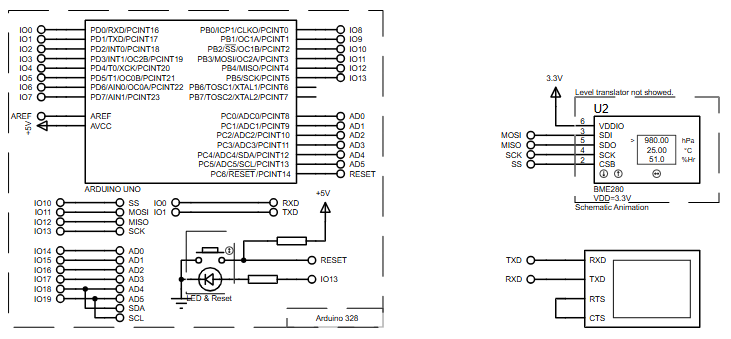
The Arduino Uno communicates with the BME280 sensor over the SPI bus.
The sensor continuously measures temperature, pressure, humidity, and calculates approximate altitude using sea-level pressure.
The microcontroller reads the sensor data using the Adafruit BME280 library and sends formatted values to the Serial Monitor.
Proteus simulates the SPI signals and serial output, allowing users to verify functionality without physical hardware.
Block Diagram / Workflow Explanation
-
Arduino Uno (ATmega328P) acts as the main controller
-
SPI Interface connects Arduino to the BME280 sensor (MOSI, MISO, SCK, CS)
-
BME280 Sensor performs environmental measurements
-
Serial Interface (UART) transmits readings to the virtual terminal
-
Proteus Simulation visualizes circuit behavior and output
Workflow:
-
Arduino initializes SPI and serial communication
-
BME280 sensor is detected and configured
-
Sensor readings are captured periodically
-
Data is printed to the serial terminal in real time
Key Features
-
SPI-based BME280 sensor interfacing
-
Measures temperature, pressure, humidity, and altitude
-
Hardware SPI support for faster communication
-
Serial monitoring of live sensor data
-
Proteus VSM compatible design
-
Uses widely adopted Adafruit sensor libraries
Components Used
-
Arduino Uno (ATmega328P)
-
Bosch BME280 Environmental Sensor
-
SPI communication lines (MOSI, MISO, SCK, CS)
-
Virtual Serial Terminal (Proteus)
-
3.3V power source for sensor operation
Applications
-
Weather monitoring systems
-
Environmental data logging
-
Altitude and pressure measurement projects
-
Embedded systems learning labs
-
IoT sensor prototyping
-
DIY electronics and academic demonstrations
Explanation of Code (High-Level)
The firmware initializes SPI and serial communication during startup.
The Adafruit_BME280 library handles sensor configuration and calibration internally.
Once the sensor is detected, the loop function repeatedly reads:
-
Temperature (°C)
-
Pressure (hPa)
-
Humidity (%)
-
Altitude (meters)
The readings are formatted and transmitted through UART, making them visible in the Proteus serial monitor.
Timing control ensures stable, periodic data output.
Source Code
Download
/***************************************************************************
  This is a library for the BME280 humidity, temperature & pressure sensor

  Designed specifically to work with the Adafruit BME280 Breakout
  ----> http://www.adafruit.com/products/2650

  These sensors use I2C or SPI to communicate, 2 or 4 pins are required
  to interface. The device's I2C address is either 0x76 or 0x77.

  Adafruit invests time and resources providing this open source code,
  please support Adafruit andopen-source hardware by purchasing products
  from Adafruit!

  Written by Limor Fried & Kevin Townsend for Adafruit Industries.
  BSD license, all text above must be included in any redistribution
  See the LICENSE file for details.
 ***************************************************************************/
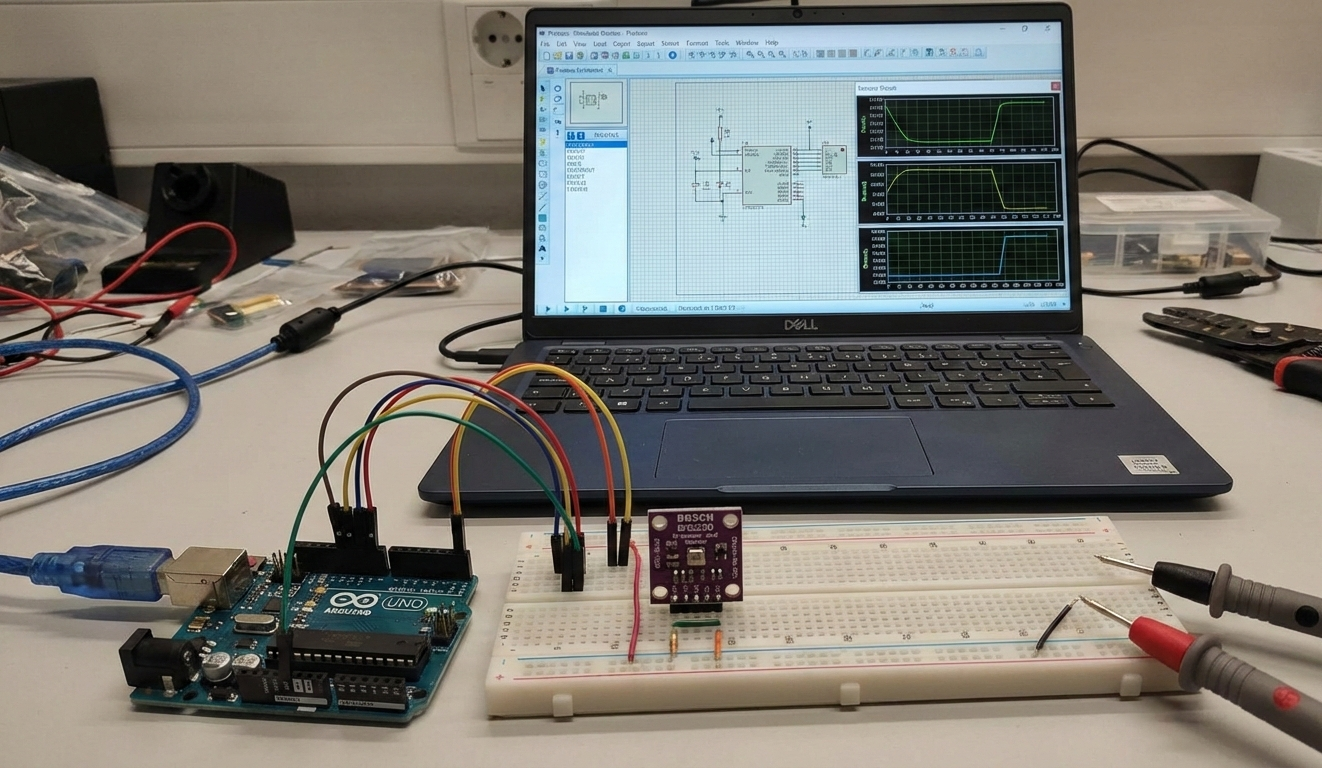
Proteus Simulation
In Proteus, the Arduino Uno is connected to the BME280 using SPI pins.
The virtual terminal displays real-time environmental readings.
The simulation verifies SPI timing, sensor detection, and serial output without physical hardware.
This makes the setup ideal for firmware debugging and educational demonstrations.
FAQs
[ultimate-faqs Include_category=”arduino-with-bosch-bme280-pressure”]Conclusion
This Arduino Uno BME280 project is a solid example of a practical embedded systems application using Proteus simulation.
It helps learners understand SPI communication, sensor integration, and firmware testing without hardware risks.
The project is ideal for students, hobbyists, and anyone exploring microcontroller-based environmental monitoring systems.
Complete File
SPI-Based BME280 Sensor Interface using Arduino Uno with Proteus Simulation
- How does the Arduino communicate with the BME280 sensor?
The Arduino Uno communicates with the BME280 sensor over the SPI bus using MOSI, MISO, SCK, and CS lines. - Can this project measure altitude?
Yes, the sensor calculates approximate altitude using sea-level pressure. - Does the project use hardware or software SPI?
The project uses hardware SPI support for faster communication. - What library is used to read data from the BME280?
The Adafruit BME280 library is used to handle sensor configuration and readings. - How are sensor readings viewed in the simulation?
Readings are printed to the Proteus virtual serial terminal via UART. - What measurements does the system provide?
It provides temperature (°C), pressure (hPa), humidity (%), and calculated altitude (meters). - Can Proteus simulate SPI timing and sensor detection?
Yes, Proteus simulates SPI timing, sensor detection, and serial output for verification. - Is a specific power voltage required for the BME280?
Yes, the BME280 requires a 3.3V power source for operation.
