
Summary of Arduino MCP32008 12bit ADC using Arduino Uno with Proteus Simulation
This article details an Arduino MCP3208 12-bit ADC project using Proteus simulation. The Arduino Uno communicates via SPI to read eight single-ended and four differential analog channels, converting raw data to voltage values with a 2.5V reference. Results are displayed on a virtual serial terminal for real-time monitoring. This setup is ideal for learning embedded systems, multi-channel signal monitoring, and ADC interfacing without physical hardware.
Parts used in the Arduino MCP3208 12-bit ADC Project:
- Arduino Uno
- MCP3208 12-bit ADC breakout board
- Virtual terminal / UART terminal
- Adjustable analog input controls for CH0 to CH7
- Voltage reference source
- Supporting resistors
- Power supply connections
- SPI interconnections between Arduino and ADC
Introduction
The Arduino MCP3208 12-bit ADC project is a simple but effective example of analog data acquisition using an external ADC. In this design, an Arduino Uno communicates with the MCP3208 12-bit ADC through SPI and reads multiple analog channels from the simulation inputs. The measured data is converted into voltage values and printed to a virtual serial terminal in Proteus. This makes the project useful for learning ADC interfacing, voltage measurement, and multi-channel signal monitoring in embedded systems. It is especially helpful for students, hobbyists, and anyone building Proteus simulation based electronics projects.
How the Project Works
The project uses the Arduino Uno as the main controller and the MCP3208 as the external analog-to-digital converter. Based on the provided flowchart, the system first initializes the SPI divider, then prints a serial header, and begins a loop that repeatedly reads analog data. It samples all 8 single-ended channels first, converts each raw ADC reading into a voltage using a 2.5V reference, and prints the result. After that, it reads 4 differential channel pairs, converts those readings as well, and prints them in the same serial output stream. A short delay is used between sampling steps, and the header is reprinted every 10 lines for readability. This creates a continuous live monitoring view in the simulation terminal.
Workflow Explanation
1. Arduino Uno as the Main Controller
The Arduino Uno acts as the processing unit of the project. It controls the SPI communication, requests ADC samples, converts readings to voltage values, and sends formatted output to the UART terminal.
2. MCP3208 12-bit ADC Breakout Board
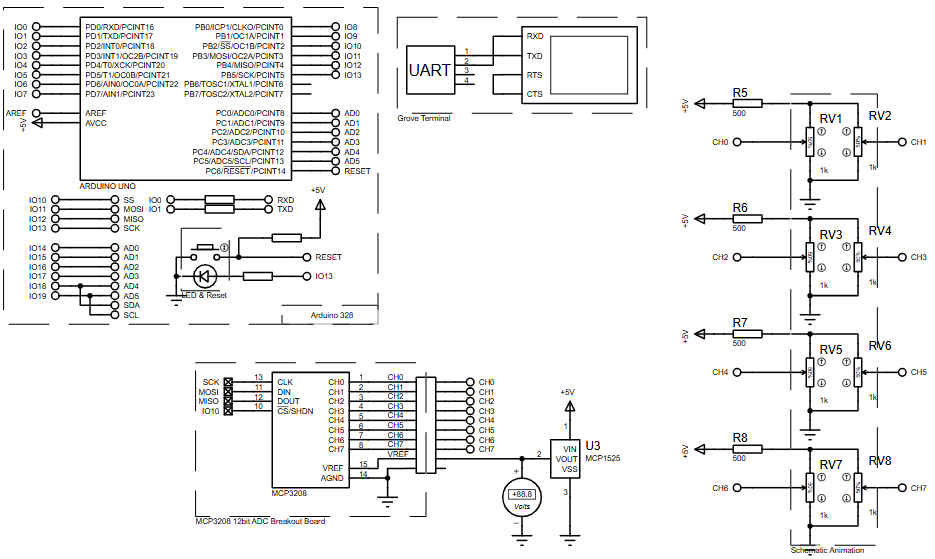
The MCP3208 receives analog signals from multiple channels and converts them into 12-bit digital values. From the schematic, it is wired through SPI lines including clock, data input, data output, and chip select.
3. Analog Input Sources
The schematic shows multiple adjustable analog input sources connected to channels CH0 through CH7 using variable resistive controls. These simulate analog voltages for testing the ADC channels in Proteus.
4. Voltage Reference
A reference source is connected for ADC conversion, and the flowchart indicates that raw readings are converted to voltage using a 2.5V reference.
5. Serial Output Terminal
The measured voltages are printed to a virtual terminal through UART so the user can observe both single-ended and differential readings during the Proteus simulation.
Key Features
- Uses Arduino Uno as the main controller
- Interfaces with MCP3208 12-bit ADC over SPI
- Reads 8 single-ended analog channels
- Reads 4 differential input pairs
- Converts raw ADC values into voltage values
- Displays readings on a virtual serial terminal
- Uses adjustable analog inputs for live simulation testing
- Repeats formatted output with header refresh for easier monitoring
- Suitable for learning ADC interfacing in embedded systems
Components Used
Based on the provided schematic and project description, the main components are:
- Arduino Uno
- MCP3208 12-bit ADC breakout board
- Virtual terminal / UART terminal
- Adjustable analog input controls for CH0 to CH7
- Voltage reference source
- Supporting resistors
- Power supply connections
- SPI interconnections between Arduino and ADC
Working Principle
The working principle of this circuit is straightforward. The analog voltages applied at channels CH0 to CH7 are fed into the MCP3208 ADC. The Arduino Uno communicates with the ADC using the SPI interface and requests conversions channel by channel. The ADC returns 12-bit digital values, which the Arduino then converts into voltage readings using the configured reference value. These voltage values are printed to the serial terminal, allowing the user to observe the channel behavior in real time. The flowchart also shows that the design supports both single-ended channel measurement and differential channel measurement.
Applications
This type of ADC-based microcontroller project can be used in many practical areas, such as:
- Multi-channel sensor monitoring
- Data acquisition systems
- Battery or voltage monitoring units
- Industrial analog signal measurement
- Embedded testing platforms
- Educational labs for SPI and ADC interfacing
- Prototyping for DIY electronics
- Low-cost instrumentation projects
Explanation of Code
No source code text was provided, so a full code breakdown cannot be embedded here. Based on the provided project description and flowchart, the code logic appears to include these functional modules:
SPI Communication Setup
The Arduino configures SPI communication with the MCP3208. The flowchart specifically shows an SPI divider setting during setup.
Analog Channel Sampling
The program loops through channels 0 to 7 for single-ended readings and through 0 to 3 for differential readings. Each reading is stored as an ADC value before conversion.
Raw-to-Voltage Conversion
The raw 12-bit digital output is converted into a voltage using a 2.5V reference. This is the main numerical processing stage in the program.
Serial Terminal Output
The results are printed to a UART/virtual terminal in a formatted structure. A header is shown and refreshed periodically so the output remains readable during continuous monitoring.
Flowchart
Proteus Simulation
In the Proteus simulation, the Arduino Uno is connected to the MCP3208 ADC breakout through SPI, while several adjustable analog sources feed channels CH0 to CH7. As the simulated input voltages change, the ADC samples them and the Arduino prints converted voltage values to the virtual terminal. The setup appears designed to demonstrate both single-ended and differential ADC measurements, making it a useful simulation for testing ADC behavior before hardware implementation. The flowchart also confirms periodic printing and repeated sampling behavior in the simulation loop.
Conclusion
This Arduino MCP3208 12-bit ADC microcontroller project is a clean example of multi-channel analog data acquisition in Proteus simulation. It helps learners understand SPI-based ADC interfacing, voltage conversion, and serial monitoring in a simple and visual way. For students and makers working in embedded systems and DIY electronics, it offers solid learning value and a practical foundation for more advanced sensor and measurement projects.
Complete File
Arduino MCP32008 12bit ADC using Arduino Uno with Proteus Simulation
- How does the system initialize communication?
The system initializes by setting the SPI divider before entering the sampling loop. - What reference voltage is used for conversion?
A 2.5V reference source is used to convert raw ADC readings into voltage values. - Can this project read differential inputs?
Yes, the design reads 4 differential channel pairs in addition to single-ended channels. - Where are the measured results displayed?
Measured voltages are printed to a virtual serial terminal through UART during simulation. - How many single-ended channels are supported?
The project supports reading all 8 single-ended analog channels from CH0 to CH7. - What software is used for simulation?
The project utilizes Proteus simulation to demonstrate the circuit behavior and serial output. - Why is a header reprinted periodically?
The header is reprinted every 10 lines to ensure readability during continuous live monitoring. - Is this project suitable for educational purposes?
Yes, it is specifically designed to help students learn ADC interfacing and multi-channel monitoring.
