
Summary of Arduino Data Logger Shield & DS1307 using ATmega328P with Proteus Simulation
This project shows interfacing an ATmega328P (Arduino Data Logger Shield) with a DS1307 RTC in Proteus to acquire and serially output accurate date, time, and Unix timestamps via I2C. It demonstrates RTC initialization, runtime checking, periodic reads, and battery-backed time retention for data-logging and educational applications. Proteus simulation enables testing before real hardware implementation.
Parts used in the Arduino Data Logger RTC project:
- ATmega328P microcontroller
- Arduino Data Logger Shield
- DS1307 Real-Time Clock (RTC)
- 32.768 kHz crystal oscillator
- Backup battery (3V)
- Serial terminal (Proteus)
Introduction
This microcontroller project demonstrates how to interface an Arduino Data Logger Shield with a DS1307 Real-Time Clock (RTC) using an ATmega328P in Proteus simulation.
The project focuses on accurate date and time acquisition and serial monitoring, which is a core requirement in many embedded systems.
By combining I2C communication, RTC timekeeping, and serial output, this design provides a clean example of practical electronics and embedded systems development. This Arduino Data Logger RTC project is especially useful for understanding real-time clock integration in embedded systems and Proteus simulation.
It is ideal for beginners and intermediate users working on DIY electronics or data-logging applications.
The Proteus simulation makes it easy to test functionality before moving to real hardware.
How the Project Works (Overview)
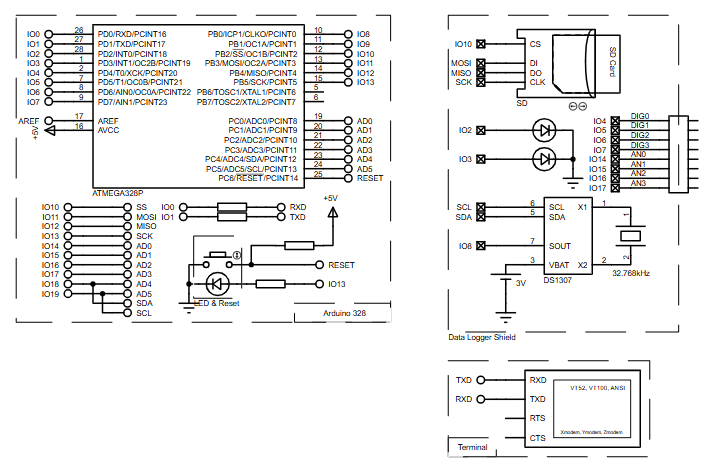
The ATmega328P communicates with the DS1307 RTC over the I2C bus using the Wire library.
On startup, the microcontroller initializes the RTC and checks whether it is running.
During operation, the system continuously reads the current date and time from the RTC.
This information is then sent to a serial terminal, including both human-readable time and Unix timestamp data.
The design simulates a typical data logger setup where time-stamped data is essential.
Block Diagram / Workflow Explanation
-
ATmega328P Microcontroller initializes I2C and serial communication
-
DS1307 RTC provides real-time date and time using a 32.768 kHz crystal
-
Battery-backed RTC ensures time retention during power loss
-
Serial Terminal displays formatted date, time, and Unix timestamp
-
Proteus Simulation visualizes the complete embedded workflow
This workflow mirrors how real-world data logging systems handle time-based events.
Key Features
-
Accurate real-time clock using DS1307 RTC
-
I2C-based communication with the microcontroller
-
Serial output of date, time, and Unix timestamp
-
Battery-backed time retention support
-
Fully testable Proteus simulation environment
-
Simple and expandable firmware structure
Components Used
-
ATmega328P microcontroller
-
Arduino Data Logger Shield
-
DS1307 Real-Time Clock (RTC)
-
32.768 kHz crystal oscillator
-
Backup battery (3V)
-
Serial terminal (Proteus)
Applications
-
Data logging systems with timestamps
-
Embedded systems requiring accurate timekeeping
-
Event logging and monitoring devices
-
DIY electronics learning projects
-
RTC-based automation systems
-
Educational microcontroller demonstrations
Explanation of Code (High-Level)
The firmware initializes serial communication for monitoring output and I2C communication for RTC access.
The RTC library handles low-level timing details, allowing the program to request structured date and time values.
In the main loop, the system reads the current time from the RTC and prints it in multiple formats.
Unix time calculations are included to demonstrate timestamp-based processing.
A delay ensures periodic updates without overloading the serial interface.
Source Code
Download
  Serial.begin(57600);
  Wire.begin();
  rtc.begin();

  if (! rtc.isrunning()) {
    Serial.println("RTC is NOT running!");
    // following line sets the RTC to the date & time this sketch was compiled
    //rtc.adjust(DateTime(F(__DATE__), F(__TIME__)));
    // This line sets the RTC with an explicit date & time, for example to set
    // January 21, 2014 at 3am you would call:
    // rtc.adjust(DateTime(2014, 1, 21, 3, 0, 0));
Proteus Simulation
In Proteus, the ATmega328P is connected to the DS1307 RTC via SDA and SCL lines.
The RTC crystal and backup battery ensure stable timekeeping.
The serial terminal displays live date and time output exactly as it would on real hardware.
This allows full verification of the working principle, circuit diagram, and firmware logic. The Arduino Data Logger RTC behaves in Proteus exactly like real hardware, making it ideal for testing time-based firmware logic.
FAQs
[ultimate-faqs Include_category=”arduino-data-logger-shield-&-ds1307″]Conclusion
This project provides a clean and practical introduction to RTC-based embedded systems using an ATmega328P.
It demonstrates real-world timekeeping, I2C communication, and serial monitoring in a Proteus simulation environment.
The design is easy to understand, modify, and expand for advanced data logging applications.
Overall, it delivers strong learning value for anyone exploring microcontroller projects and DIY electronics.Overall, this Arduino Data Logger RTC project strengthens practical knowledge of microcontroller-based timekeeping systems.
Complete File
Arduino Data Logger Shield & DS1307 using ATmega328P with Proteus Simulation
- How does the microcontroller communicate with the DS1307 RTC?
It communicates over the I2C bus using the Wire library. - Can the project retain time during power loss?
Yes, the DS1307 uses a backup battery to ensure time retention during power loss. - What outputs are shown on the serial terminal?
The serial terminal displays formatted date, time, and Unix timestamp. - Does the firmware check whether the RTC is running?
Yes, on startup the firmware checks whether rtc.isrunning() returns true and reports if the RTC is not running. - How is the RTC initialized in the code?
The code calls Wire.begin(), rtc.begin(), and checks rtc.isrunning(); optional rtc.adjust calls can set the time. - What is the purpose of Proteus simulation in this project?
Proteus simulation visualizes and tests the complete embedded workflow before moving to real hardware. - What time reference component does the DS1307 require?
The DS1307 uses a 32.768 kHz crystal oscillator for timekeeping. - How often does the system update the serial output?
The main loop reads the RTC and prints periodically with a delay to avoid overloading the serial interface.
