
Summary of Arduino AD8495 K-Type Thermocouple Amplifier using ATmega328P with Proteus Simulation
This project measures temperature with a K-Type thermocouple amplified by an AD8495 and read by an ATmega328P (Arduino) in Proteus simulation. The AD8495 conditions the thermocouple voltage for the MCU ADC; firmware converts ADC readings to Celsius and Fahrenheit and sends results via serial terminal. It’s intended for learning sensor interfacing, ADC usage, and signal conditioning, and is suitable for DIY and educational applications.
Parts used in the AD8495 K-Type Thermocouple Amplifier Project:
- ATmega328P (Arduino-compatible MCU)
- AD8495 K-Type Thermocouple Amplifier
- K-Type Thermocouple Sensor
- Resistors (for signal conditioning and biasing)
- Serial Terminal (Proteus Virtual Terminal)
- 3.3V / 5V Power Supply
Introduction
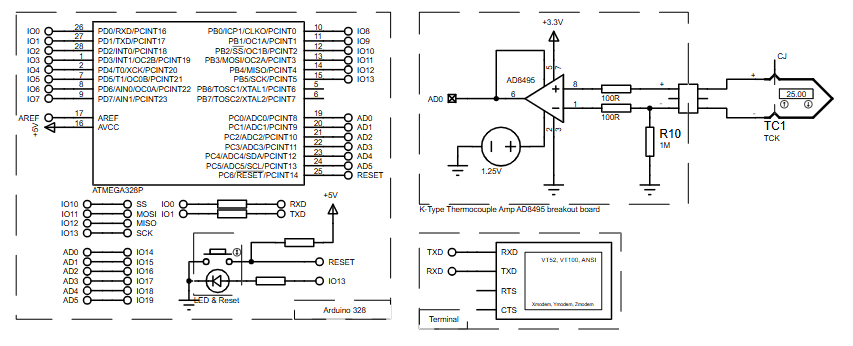
This microcontroller project demonstrates how to measure temperature using an AD8495 K-Type thermocouple amplifier interfaced with an ATmega328P (Arduino platform) and tested entirely in a Proteus simulation environment.
The system reads analog voltage from the AD8495, converts it into real-world temperature values, and displays results over serial communication.
It is a practical embedded systems project focused on sensor interfacing, ADC usage, and signal conditioning.
Such designs are widely used in DIY electronics, industrial monitoring, and laboratory instrumentation.
The project is simple, accurate, and ideal for learning the working principle of thermocouple-based temperature measurement.
How the Project Works (Overview)
A K-Type thermocouple produces a small voltage proportional to temperature.
The AD8495 amplifier conditions and amplifies this signal into a linear voltage suitable for a microcontroller’s ADC input.
The ATmega328P reads this voltage through its analog input pin, converts it into a digital value, and calculates the temperature using a calibration formula.
The processed temperature data is then transmitted via UART serial communication for monitoring.
Block Diagram / Workflow Explanation
-
K-Type Thermocouple senses temperature
-
AD8495 Amplifier converts thermocouple signal into a scaled analog voltage
-
ATmega328P ADC reads amplified voltage on analog pin
-
Firmware calculation converts ADC value to Celsius and Fahrenheit
-
Serial Terminal displays temperature readings
Key Features
-
Accurate temperature measurement using a K-Type thermocouple
-
AD8495 analog signal conditioning for stable ADC readings
-
ATmega328P internal ADC utilization
-
Real-time temperature output in °C and °F
-
Fully testable using Proteus simulation
-
Simple and readable Arduino firmware
Components Used
-
ATmega328P (Arduino-compatible MCU)
-
AD8495 K-Type Thermocouple Amplifier
-
K-Type Thermocouple Sensor
-
Resistors (signal conditioning & biasing)
-
Serial Terminal (Proteus Virtual Terminal)
-
3.3V / 5V Power Supply
Applications
-
Industrial temperature monitoring systems
-
DIY electronic thermometers
-
Embedded temperature logging devices
-
Educational sensor-interfacing projects
-
Furnace, heater, and process control prototypes
Explanation of the Code (High-Level)
The firmware uses the ADC module of the ATmega328P to sample the analog output of the AD8495 amplifier.
A fixed gain factor converts ADC steps into voltage.
A reference offset compensates for the AD8495 output bias.
The calculated voltage is converted into temperature using a linear formula.
Results are sent to a serial interface, allowing real-time observation in a terminal window.
Source Code
Download
// Arduino example code
int     analogPin = 0;
int     val = 0;      // variable to store the value read
float   temperature;  // Temperature value in celsius degree.
float   gain = 0.00488;
float   ref  = 1.25313;

void setup()
{ //  setup serial
  Serial.begin(9600);
}Proteus Simulation
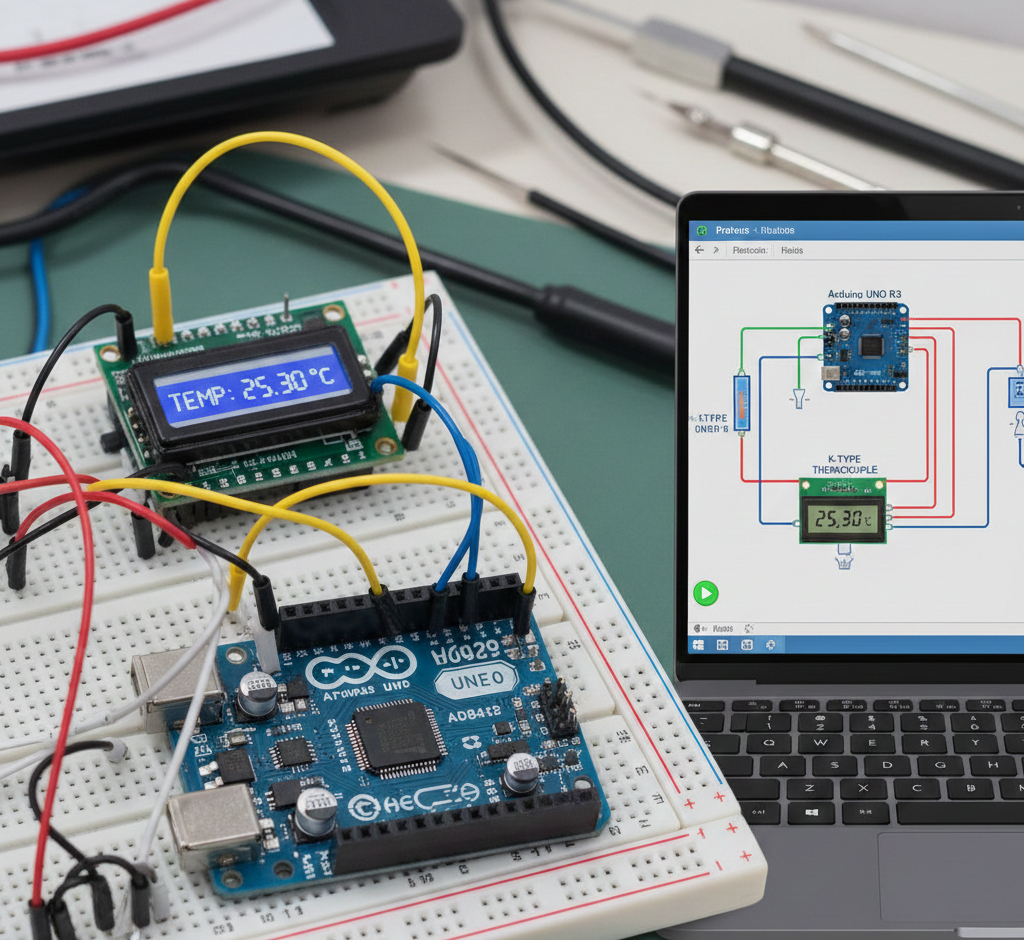
In the Proteus environment, the thermocouple signal is emulated and fed into the AD8495 amplifier.
The amplifier output connects to the ATmega328P ADC pin.
A virtual serial terminal displays temperature readings in real time, confirming correct firmware behavior and signal scaling.
FAQs
[ultimate-faqs Include_category=”arduino-ad8495-k-type-thermocouple-amplifier”]Conclusion
This project clearly demonstrates a practical embedded systems approach to temperature measurement using a thermocouple.
By combining the AD8495 amplifier, ATmega328P ADC, and Proteus simulation, it provides an excellent learning platform for sensor interfacing.
The design is simple, scalable, and ideal for both students and hobbyists exploring real-world microcontroller applications.
Complete File
Arduino AD8495 K-Type Thermocouple Amplifier using ATmega328P with Proteus Simulation
- How does the system read temperature from the thermocouple?
The K-Type thermocouple produces a voltage that the AD8495 amplifies; the ATmega328P ADC reads the amplified voltage and firmware converts it to temperature. - Can this project be tested without physical hardware?
Yes, the entire system is tested in the Proteus simulation environment with an emulated thermocouple signal. - What role does the AD8495 play?
The AD8495 conditions and amplifies the thermocouple signal into a linear voltage suitable for the microcontroller ADC. - Does the firmware provide temperature in multiple units?
Yes, the firmware calculates temperature in Celsius and Fahrenheit and outputs both via serial. - What microcontroller ADC is used?
The ATmega328P internal ADC is used to sample the AD8495 output voltage. - How are readings displayed?
Temperature readings are sent over UART and viewed on a virtual serial terminal in Proteus. - What calibration or offsets are applied?
The firmware uses a gain factor and a reference offset to convert ADC steps into voltage and compensate for AD8495 output bias. - Is example source code provided?
Yes, Arduino example code is provided in the article and downloadable as a complete source file.
