
Summary of BMP280 Pressure and Temperature Sensor using Arduino Uno with Proteus Simulation
This project shows how to interface a Bosch BMP280 pressure and temperature sensor with an Arduino Uno in a Proteus simulation, using Adafruit’s BMP280 library over I2C to read temperature, pressure, and estimate altitude, then output results to the Serial Monitor. It demonstrates initialization, configurable sampling, periodic data reads, and serial reporting for testing without physical hardware—suitable for students and hobbyists learning sensor interfacing and embedded simulations.
Parts used in the Arduino Uno BMP280 project:
- Arduino Uno (ATmega328P)
- Bosch BMP280 Pressure & Temperature Sensor
- I2C communication lines (SDA, SCL)
- Power supply (3.3V logic for sensor)
- Proteus Virtual Terminal (serial terminal)
- Proteus simulation environment
- Adafruit BMP280 library (software component)
Introduction
This microcontroller project demonstrates how to interface a Bosch BMP280 pressure and temperature sensor with an Arduino Uno using a Proteus simulation environment. The project focuses on reading environmental data such as temperature, air pressure, and approximate altitude using Adafruit’s BMP280 library.
It is a practical embedded systems example suitable for learning sensor interfacing, I2C communication, and serial monitoring.
By simulating the setup in Proteus, you can test the firmware behavior without physical hardware.
This project is ideal for students, hobbyists, and anyone exploring DIY electronics and practical electronics simulations.
It also serves as a clean reference design for real-world Arduino sensor applications.
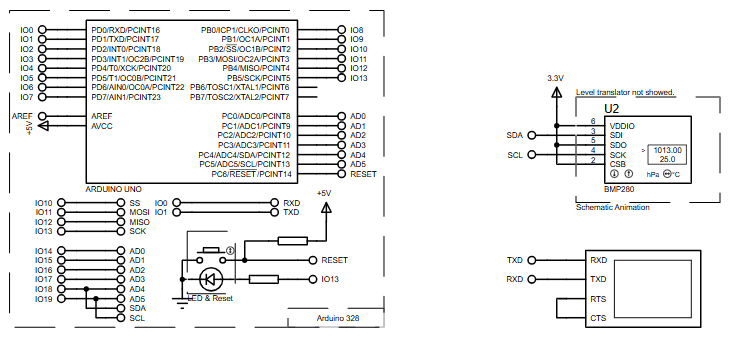
How the Project Works (Overview)
The Arduino Uno communicates with the BMP280 sensor using the I2C protocol.
Once powered, the Arduino initializes the sensor using Adafruit’s BMP280 library.
The sensor measures temperature and barometric pressure, which are then processed by the microcontroller.
An approximate altitude value is calculated internally based on a reference sea-level pressure.
All measured values are continuously sent to the Serial Monitor at fixed intervals for observation and debugging.
Block Diagram / Workflow Explanation
-
Power Supply (3.3V logic) powers the BMP280 sensor
-
Arduino Uno (ATmega328P) acts as the main controller
-
I2C Interface (SDA, SCL) transfers sensor data
-
BMP280 Sensor measures temperature and pressure
-
Arduino Firmware processes readings
-
UART Serial Output displays results on the terminal
The workflow starts with sensor initialization, followed by periodic data sampling, processing, and serial transmission.
Key Features
-
Uses Bosch BMP280 digital pressure and temperature sensor
-
I2C-based communication for minimal wiring
-
Proteus simulation support for virtual testing
-
Serial output for real-time data monitoring
-
Configurable oversampling and filtering settings
-
Altitude estimation using standard pressure reference
-
Clean and modular Arduino firmware
Components Used
-
Arduino Uno (ATmega328P)
-
Bosch BMP280 Pressure & Temperature Sensor
-
I2C communication lines (SDA, SCL)
-
Serial terminal (Proteus Virtual Terminal)
-
Power supply (3.3V logic for sensor)
Applications
-
Weather monitoring systems
-
Altitude measurement devices
-
Environmental data logging
-
Embedded sensor learning projects
-
IoT prototype development
-
Academic and lab-based simulations
Explanation of Code (High-Level)
The firmware begins by including required libraries for I2C, SPI, and BMP280 sensor handling.
The BMP280 object is created in I2C mode, simplifying wiring and configuration.
During setup():
-
Serial communication is initialized
-
The BMP280 sensor is detected and verified
-
Sensor sampling parameters are configured (oversampling, filter, standby time)
During loop():
-
Temperature is read in degrees Celsius
-
Pressure is read in Pascals
-
Altitude is calculated using a reference pressure
-
Data is printed to the serial terminal
-
A delay ensures periodic updates
This structure keeps the firmware readable, modular, and easy to extend.

Source Code
Download
#include
#include
#include

#define BMP_SCK  (13)
#define BMP_MISO (12)
#define BMP_MOSI (11)
#define BMP_CS   (10)

Adafruit_BMP280 bmp; // I2C
//Adafruit_BMP280 bmp(BMP_CS); // hardware SPI
//Adafruit_BMP280 bmp(BMP_CS, BMP_MOSI, BMP_MISO,  BMP_SCK);

void setup() {
  Serial.begin(9600);
  Serial.println(F("BMP280 test"));

  //if (!bmp.begin(BMP280_ADDRESS_ALT, BMP280_CHIPID)) {
  if (!bmp.begin()) {
    Serial.println(F("Could not find a valid BMP280 sensor, check wiring or "
                      "try a different address!"));
    while (1) delay(10);
Proteus Simulation
In Proteus, the Arduino Uno is connected to the BMP280 sensor via I2C lines.
A virtual serial terminal is used to observe temperature, pressure, and altitude values.
When the simulation runs, data updates every two seconds, confirming correct sensor communication and firmware execution.
This setup allows testing without physical hardware while preserving real-world behavior.
FAQs
[ultimate-faqs Include_category=”bmp280-pressure-and-temperature-sensor”]Conclusion
This Arduino Uno BMP280 project is a clean and practical example of sensor interfacing in embedded systems.
By combining Proteus simulation, structured firmware, and real-world sensor behavior, it offers strong learning value.
It’s an excellent starting point for environmental monitoring, DIY electronics, and advanced microcontroller projects.
Complete File
BMP280 Pressure and Temperature Sensor using Arduino Uno with Proteus Simulation
- How does the Arduino communicate with the BMP280 sensor?
The Arduino communicates with the BMP280 sensor using the I2C protocol, via SDA and SCL lines. - Can this project be tested without physical hardware?
Yes, the project is simulated in Proteus so you can test firmware behavior without physical hardware. - What library is used to interface with the BMP280?
Adafruit’s BMP280 library is used to initialize and read data from the sensor. - How often are sensor readings sent to the Serial Monitor?
Data updates every two seconds in the Proteus simulation, providing periodic serial output. - What measurements does the BMP280 provide?
The BMP280 measures temperature and barometric pressure, and the firmware estimates approximate altitude. - What voltage is required for the BMP280 sensor?
The BMP280 requires a 3.3V logic power supply as specified in the project. - How is altitude calculated in this project?
Altitude is calculated internally by the firmware using a reference sea-level pressure and the measured pressure. - What are the main steps performed in setup and loop?
In setup the Serial is initialized, the BMP280 is detected and configured; in loop temperature, pressure, and altitude are read and printed with a delay between updates.
