
Summary of Arduino Barometer, Thermometer & Altimeter using ATmega328P with Proteus Simulation
This project uses an ATmega328P (Arduino) and a Bosch BMP180 sensor to measure atmospheric pressure, temperature, and calculate altitude. Communication is via I2C, data are processed by Arduino firmware using the Adafruit BMP085 Unified Sensor Library, and results are shown on a virtual serial terminal in Proteus simulation. It demonstrates sensor interfacing, real-time data acquisition, and simulation-based testing for educational and DIY applications.
Parts used in the Arduino BMP180 pressure sensor project:
- ATmega328P (Arduino platform)
- Bosch BMP180 Pressure Transducer
- I2C interface connections (SDA, SCL)
- 3.3V power supply for sensor
- Virtual Serial Terminal (Proteus)
Introduction
This microcontroller project demonstrates a simple barometer, thermometer, and altimeter using an Arduino (ATmega328P) and the Bosch BMP180 pressure sensor.
The system measures atmospheric pressure, temperature, and altitude and displays results via the serial monitor during Proteus simulation.
It’s a practical embedded systems example showing I2C sensor interfacing, real-time data acquisition, and environmental sensing.This Arduino BMP180 pressure sensor project demonstrates a simple barometer, thermometer, and altimeter using an ATmega328P with Proteus simulation. This project is ideal for learning DIY electronics, sensor integration, and simulation-based testing before real hardware deployment.
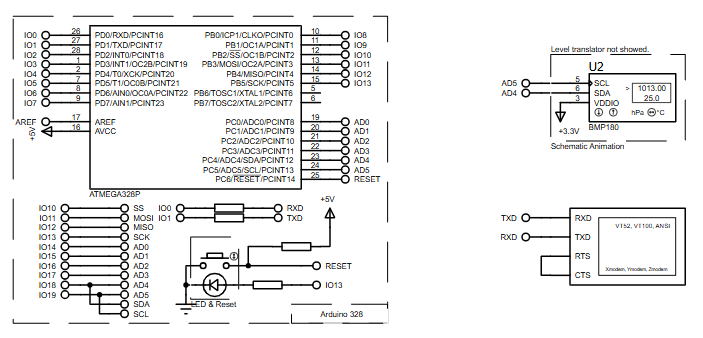
How the Project Works (Overview)
The ATmega328P communicates with the BMP180 pressure transducer over the I2C bus using Arduino AVR libraries.
The sensor continuously provides pressure data, from which temperature and altitude are calculated.
All values are processed by the microcontroller and sent to a serial terminal for monitoring in Proteus.
Block Diagram / Workflow Explanation
-
BMP180 Sensor measures atmospheric pressure and temperature
-
I2C Communication (SDA/SCL) transfers data to ATmega328P
-
Arduino Firmware processes raw sensor data
-
Altitude Calculation uses sea-level pressure reference
-
Serial Output displays pressure, temperature, and altitude
Key Features
-
Real-time pressure, temperature, and altitude measurement
-
I2C-based sensor communication
-
Unified sensor driver architecture
-
Serial monitoring in Proteus simulation
-
Works as barometer, thermometer, and altimeter
-
Simple and clean firmware structure
Components Used
-
ATmega328P (Arduino platform)
-
Bosch BMP180 Pressure Transducer
-
I2C interface (SDA, SCL)
-
3.3V power supply for sensor
-
Virtual Serial Terminal (Proteus)
Applications
-
Weather monitoring systems
-
Altitude measurement devices
-
Environmental data logging
-
Educational embedded systems labs
-
DIY electronics and sensor projects
Explanation of Code (High-Level)
The firmware uses the Adafruit BMP085 Unified Sensor Library to simplify sensor handling.
-
Wire Library: Manages I2C communication
-
Sensor Initialization: Verifies BMP180 presence
-
Sensor Metadata Display: Outputs sensor capabilities
-
Main Loop:
-
Reads pressure data
-
Reads temperature
-
Converts pressure to altitude using sea-level pressure
-
Sends formatted results to serial output
-
No low-level register handling is required, making the project beginner-friendly and portable.
Source Code
Download
{
  sensor_t sensor;
  bmp.getSensor(&sensor);
  Serial.println("------------------------------------");
  Serial.print  ("Sensor:       "); Serial.println(sensor.name);
  Serial.print  ("Driver Ver:   "); Serial.println(sensor.version);
  Serial.print  ("Unique ID:    "); Serial.println(sensor.sensor_id);
  Serial.print  ("Max Value:    "); Serial.print(sensor.max_value); Serial.println(" hPa");
  Serial.print  ("Min Value:    "); Serial.print(sensor.min_value); Serial.println(" hPa");
  Serial.print  ("Resolution:   "); Serial.print(sensor.resolution); Serial.println(" hPa");
  Serial.println("------------------------------------");
  Serial.println("");
  delay(500);
}Proteus Simulation
In Proteus, the BMP180 sensor communicates with the ATmega328P via I2C.
A virtual serial terminal displays pressure (hPa), temperature (°C), and altitude (meters) updating every second.
The simulation behaves like real hardware, making it useful for testing firmware logic safely.
FAQs
[ultimate-faqs Include_category=”arduino-barometer-thermometer-altimeter”]Conclusion
This Arduino BMP180 project is a solid embedded systems learning example combining sensor interfacing, data processing, and Proteus simulation.
It’s simple, practical, and easily expandable—perfect for students and hobbyists exploring microcontroller projects and environmental sensing.This Arduino BMP180 pressure sensor project is a practical way to learn sensor interfacing and environmental monitoring in embedded systems.
Complete File
Arduino Barometer, Thermometer & Altimeter using ATmega328P with Proteus Simulation
- How does the project communicate with the BMP180 sensor?
It uses the I2C bus (SDA and SCL) managed by the Wire library for communication. - Can the project display results without real hardware?
Yes, results are displayed on a virtual serial terminal within the Proteus simulation. - What measurements does the BMP180 provide?
The sensor provides atmospheric pressure and temperature, from which altitude is calculated. - How is altitude calculated in the project?
Altitude is derived by converting pressure to altitude using a sea-level pressure reference. - Does the firmware require low-level register handling?
No, the project uses the Adafruit BMP085 Unified Sensor Library so no low-level register handling is required. - What library manages I2C communication?
The Wire library manages I2C communication in the firmware. - What outputs are shown in the serial monitor?
The serial monitor displays pressure in hPa, temperature in °C, and altitude in meters. - Is this project suitable for beginners?
Yes, it is described as beginner-friendly with a simple and clean firmware structure. - What is the simulation update rate for displayed values?
The Proteus simulation updates the displayed values every second.
