
Summary of Adafruit Trellis Shield Latching Keyboard Test using ATmega328P with Proteus Simulation
This project demonstrates using an Adafruit Trellis Shield with an ATmega328P in Proteus to implement a latching LED keypad via I2C and the HT16K33. It covers initialization, interrupt-driven key detection, latching/momentary modes, LED updates, and simulation benefits for testing before hardware deployment.
Parts used in the Adafruit Trellis Shield Latching Keyboard Test:
- ATmega328P microcontroller
- Adafruit Trellis Shield
- HT16K33 LED driver
- I2C interface (SDA, SCL)
- Interrupt line (A2)
- Proteus VSM environment
Introduction
This microcontroller project demonstrates how to use the Adafruit Trellis Shield as a latching LED keyboard with an ATmega328P in a Proteus simulation environment.
The project focuses on reading button inputs over I2C and controlling LEDs in a clean, interactive way.
It is a practical embedded systems example for learning key scanning, LED control, and I2C communication.
By simulating the system in Proteus, developers can test behavior before moving to hardware.
This makes it ideal for students and hobbyists working with DIY electronics and Arduino-based designs.
How the Project Works (Overview)
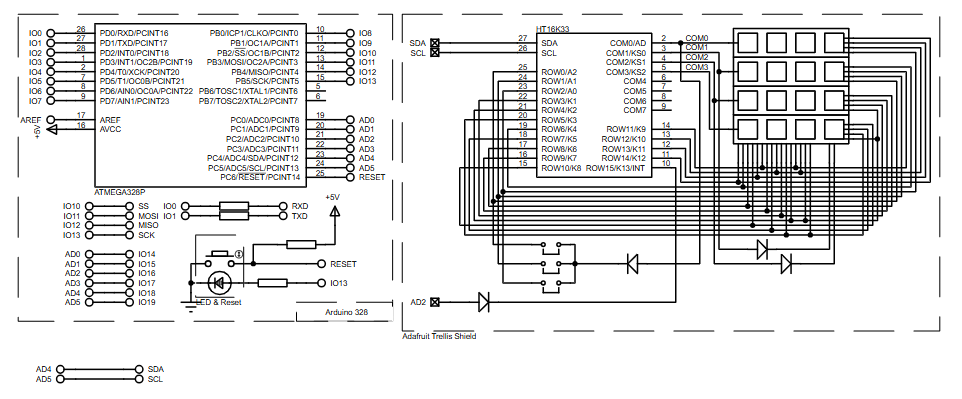
The ATmega328P communicates with the Adafruit Trellis Shield using the I2C protocol.
Each key press on the Trellis matrix is detected by the HT16K33 LED driver, which reports the event to the microcontroller.
The firmware processes key states and controls the corresponding LEDs based on the selected operating mode.
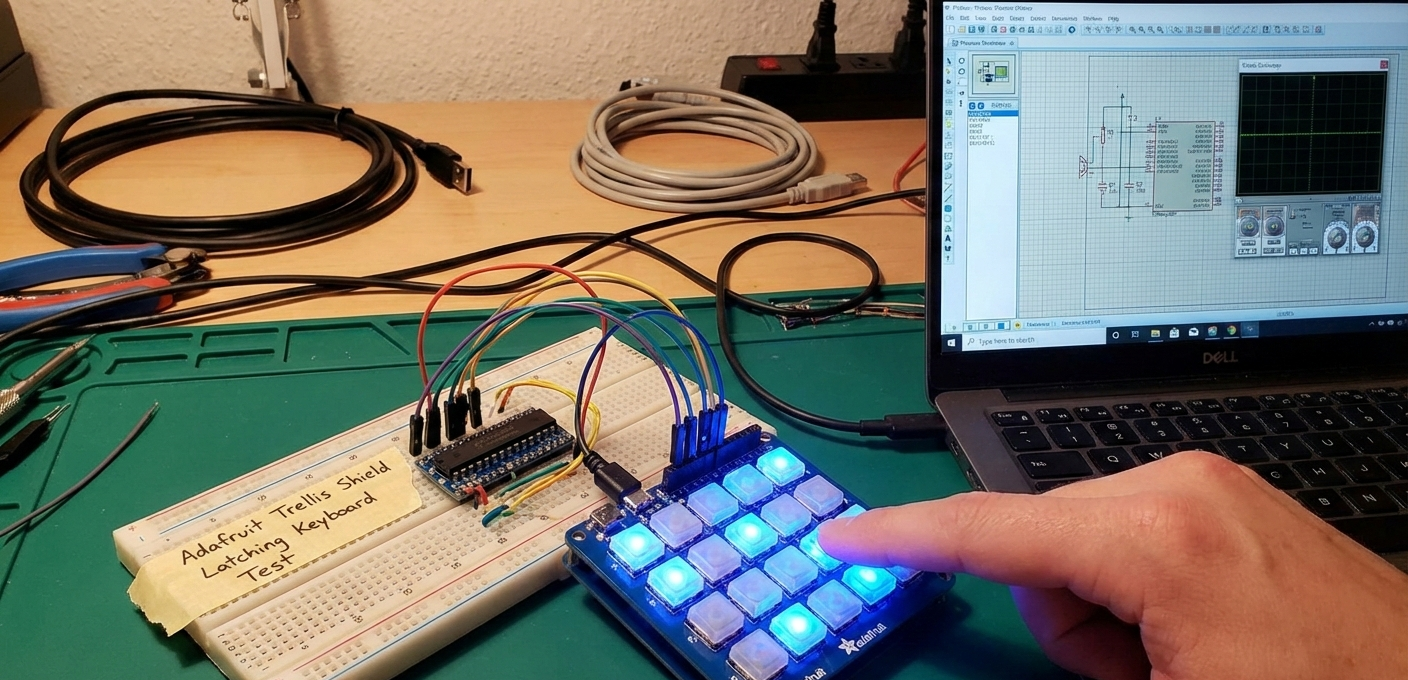
In latching mode, each button press toggles the LED state ON or OFF.
The entire interaction runs continuously inside the main loop, providing real-time feedback.
Block Diagram / Workflow Explanation
-
ATmega328P (Arduino Core) initializes I2C and serial communication
-
INT Pin (A2) detects keypad activity from the Trellis Shield
-
HT16K33 Controller manages the LED matrix and key scanning
-
Firmware Logic checks key states and updates LEDs
-
Proteus Simulation visually displays key presses and LED toggling
This workflow closely mirrors real hardware behavior while remaining fully testable in simulation.
Key Features
-
I2C-based keypad and LED control using HT16K33
-
Latching and momentary key operation modes
-
Supports up to 8 Trellis matrices (scalable design)
-
Interrupt-driven key detection for responsive input
-
Visual LED feedback for every key press
-
Fully compatible with Arduino AVR toolchain
Components Used
-
ATmega328P microcontroller
-
Adafruit Trellis Shield
-
HT16K33 LED driver
-
I2C interface (SDA, SCL)
-
Interrupt line (A2)
-
Proteus VSM environment
Applications
-
Custom LED keypads
-
Embedded user input panels
-
Menu navigation systems
-
MIDI or control surfaces
-
Human-machine interface (HMI) projects
-
Educational embedded systems labs
Explanation of Code (High-Level)
The firmware begins by initializing Serial, I2C, and the Trellis interface.
The Trellis library handles communication with the HT16K33 controller.
During setup, all LEDs are briefly turned ON and OFF to confirm connectivity.
Inside the loop, the program checks for key state changes using readSwitches().
When a key is pressed, the firmware toggles the corresponding LED in latching mode.
The display is updated using writeDisplay() to reflect changes instantly.
Source Code
Download
/***************************************************
  This is a test example for the Adafruit Trellis w/HT16K33

  Designed specifically to work with the Adafruit Trellis
  ----> https://www.adafruit.com/products/1616
  ----> https://www.adafruit.com/products/1611

  These displays use I2C to communicate, 2 pins are required to
  interface
  Adafruit invests time and resources providing this open source code,
  please support Adafruit and open-source hardware by purchasing
  products from Adafruit!

  Written by Limor Fried/Ladyada for Adafruit Industries.
  MIT license, all text above must be included in any redistribution
****************************************************/Proteus Simulation
In Proteus, the ATmega328P communicates with the Trellis Shield via SDA and SCL lines.
When a key is pressed, the INT pin triggers a read cycle.
LEDs respond instantly, toggling their state according to the firmware logic.
This allows accurate testing of keypad behavior, timing, and I2C communication without physical hardware.
FAQs
[ultimate-faqs Include_category=”adafruit-trellis-shield-latching-keyboard”]Conclusion
This project is a clean and practical example of using an Adafruit Trellis Shield with an ATmega328P in Proteus simulation.
It helps learners understand I2C communication, keypad scanning, and LED control in embedded systems.
The design is scalable, readable, and ideal for both learning and real-world interface applications.
Complete File
Adafruit Trellis Shield Latching Keyboard Test using ATmega328P with Proteus Simulation
- How does the ATmega328P communicate with the Trellis Shield?
It communicates over I2C using the SDA and SCL lines and the HT16K33 controller. - How are key presses detected?
Key presses are detected by the HT16K33 and signaled to the microcontroller via the INT pin (A2). - Does the firmware support latching and momentary modes?
Yes, the project supports both latching and momentary key operation modes. - What happens inside the main loop?
The loop checks key state changes with readSwitches(), toggles LEDs in latching mode, and updates the display with writeDisplay(). - Can multiple Trellis matrices be used?
Yes, the design supports up to 8 Trellis matrices for scalability. - How does the project confirm connectivity at startup?
During setup, all LEDs are briefly turned ON and OFF to confirm connectivity. - What benefit does Proteus simulation provide?
Proteus allows testing keypad behavior, timing, and I2C communication visually before moving to physical hardware. - Is the project compatible with Arduino tools?
Yes, it is fully compatible with the Arduino AVR toolchain.
