
Summary of GRBL CNC USB to TB6560 Interface using Arduino
The author modernized a CNC mill equipped with a TB6560 controller by replacing the obsolete parallel port interface with a USB-based Grbl system. An Arduino Duemilanove, flashed with Grbl firmware, was used to interpret G-code and drive stepper motors via the existing board. The project involved extensive research into the TB6560 schematic, initial breadboard prototyping, and finalizing a custom Eagle PCB for a permanent installation, successfully enabling jog control through a serial terminal.
Parts used in the GRBL CNC USB to TB6560 Interface:
- TB6560 controller board
- Arduino Duemilanove
- Grbl firmware
- Breadboard
- Eagle PCB
- GCODE parser
- Stepper motors
- LPT parallel port (original interface)
- VNC software (original setup)
I’ve had a CNC mill for a few years now, and while many homemade CNC mills use EasyDriver or Pololu, mine came with a sturdy, generic TB6560 controller board. For those unfamiliar, boards like this are interfaced using an old fashioned LPT parallel port, which was initially an annoyance, but quickly became impractical and a hassle, having to use an old PC with VNC installed. The board has plenty of power to push the steppers around, far more than any of the smaller / cheaper solutions had to offer I think, so I wanted to try and teach this board a few new tricks, and let me interface with it using a more modern interface.
Being as USB was the ideal interface, and from previous searching around, Grbl seems like a great solution. Grbl is [ an open source, embedded, high performance g-code-parser and CNC milling controller written in optimized C that will run on a straight Arduino ]… perfect. The basics of the project are, Arduino has a USB interface, which acts like a serial port. It accepts GCODE from the computer, and Grbl translates this into pulses, used by stepper controllers, pushing around stepper motors, while providing feedback when any limit or control switches are hit.
I dug up all the information I could find on my particular TB6560 controller board, including schematic and documentation, but being as how these are mass produced in China with several minor changes between each clone, the documentation was both helpful and misleading at times. Eventually, I had it wired up to a Grbl flashed Arduino Duemilanove, with a ton of loose wires between the two. And after a lot of adjusting of Grbl settings, I was jogging around my CNC via serial terminal, yay!
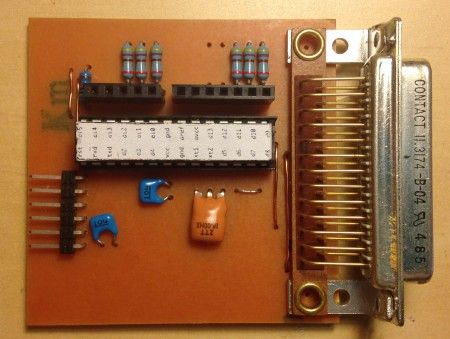
While all that is great, it was time to make this into a real, permanent install. First prototyped on breadboard, and then created in Eagle PCB, I have a working device I can leave attached to my mill.
For more detail: GRBL CNC USB to TB6560 Interface using Arduino
- What is the ideal interface for this project?
USB is identified as the ideal interface for connecting the system. - How does Grbl function within the project?
Grbl translates GCODE from the computer into pulses used by stepper controllers while providing feedback on limit switches. - Can this system work without an old PC?
Yes, the new setup replaces the need for an old PC running VNC with a modern USB connection. - What challenges were faced with the original documentation?
The documentation was sometimes misleading due to minor changes between mass-produced clones from China. - What steps were taken to make the install permanent?
The design was first prototyped on a breadboard and then created in Eagle PCB for a working device. - Does the TB6560 board provide sufficient power?
Yes, the board has plenty of power to push the steppers around compared to smaller solutions. - How is the Arduino utilized in this setup?
The Arduino acts like a serial port that accepts GCODE and runs the Grbl embedded controller. - What tool was used to test the initial wiring?
A serial terminal was used to jog the CNC machine after adjusting Grbl settings.
