
Summary of CAN-USB Interface
This project describes a simple CAN bus monitor built around the Nuvoton NUC140LC1CN microprocessor. It features USB connectivity, LAWICEL protocol compatibility, and support for both 11-bit and 29-bit CAN frames. The device includes status LEDs for USB, activity, and errors, and utilizes an internal FIFO buffer. Firmware updates are performed via a flash-resident mass-storage bootloader activated by a jumper.
Parts used in the CAN-USB Interface:
- NUC140LC1CN 32K Cortex-M0 microprocessor
- TJA1051T CAN transceiver chip
- Three status LEDs (D1, D2, D3)
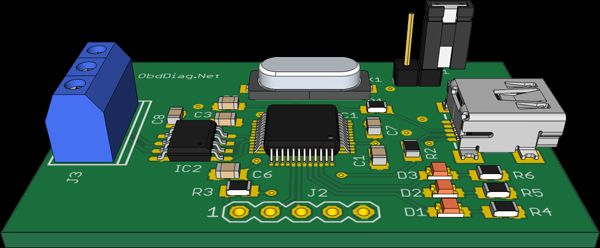
- J2 connector for ARM Serial Wire Debug
- Nuvoton ICP programmer
- JP1 jumper for bootloader activation
Overview
This project started out from a need build a simple device for monitoring the CAN bus. I chose the NUC140LC1CN 32K Cortex-M0 microprocessor from Nuvoton for major reason – it has both USB and CAN peripherals.
Features
- Simple design
- Compatible with the LAWICEL CANUSB protocol
- Exposing itself as USB FTDI device
- Supporting CAN 2.0A 11-bit and CAN 2.0B 29-bit frames
- Has internal FIFO CAN message buffer
- Self powered from USB port
- Flash-resident USB mass-storage device (MSD) bootloader for firmware updates
- Firmware is available for download
The schematic
To enable the NUC140 CAN peripheral to communicate with CAN bus a CAN transceiver is required. The TJA1051T chip from NXP solves the purpose. The NUC140 device is capable operating from 5V power supply, there is no need for additional 3.3V voltage regulator. This handy combination makes a simple task implementing CAN bus interface. There are three status LEDs:
- D1 is the status of USB connectivity to the host
- D2 shows the CAN bus activity
- D3 indicates CAN errors
The NUC140 doesn’t have built-in bootloader and the only way to program it is using ARM Serial Wire Debug (SWD) interface (J2 connector) and Nuvoton ICP programmer. And yes, if bootloader is already pre-programmed it could be activated. That is the purpose of JP1 jumper. Connecting the JP1 before powering the interface will trigger the bootloader.
Bootloader
The NUC140LC1 flash memory is divided to two sections, one is for executing user program code (APROM) with the size of 32K and another one for bootloader (LDROM). The LDROM size is only 4K, making a challenge to build a fully-functional USB bootloader. I have used the mass-storage device (MSD) bootloader provided by Nuvoton. Connecting jumper JP1 will start it . As the result a removable drive should be visible in the host file system with a size 32KB. Just copy and paste or drag and drop the CAN-USB firmware update to the bootloader drive. Unplug the USB cable, remove the jumper and plug it in again. The new firmware update should now be running.
For more detail: CAN-USB Interface
- Why was the NUC140LC1CN chosen for this project?
It was selected because it possesses both USB and CAN peripherals. - How does the device communicate with the host computer?
It exposes itself as a USB FTDI device and supports the LAWICEL CANUSB protocol. - What types of CAN frames does this interface support?
The device supports CAN 2.0A 11-bit and CAN 2.0B 29-bit frames. - How is the device powered?
The device is self-powered directly from the USB port. - Which chip is required to connect the microprocessor to the CAN bus?
The TJA1051T chip from NXP serves as the necessary CAN transceiver. - What is the function of the JP1 jumper?
Connecting the JP1 before powering the interface triggers the flash-resident bootloader. - How can firmware be updated on this device?
Firmware is updated by copying the update file to the removable drive visible when the bootloader is active. - Can the device operate without an external voltage regulator?
Yes, the NUC140 operates from a 5V power supply, eliminating the need for a 3.3V regulator.
