
Summary of Save data of temperature and humidity on MySQL with Arduino Uno and Wifly
This article details a project to monitor orchard temperature and humidity using an Arduino UNO with a WiFly Shield, DS18B20 sensor, and Grove Moisture sensor. Data is transmitted via PHP scripts to a MySQL database hosted on a web server like the QNAP TS-110. The system requires basic programming knowledge in PHP and MySQL to configure three specific files for connection, data insertion, and sensor reading.
Parts used in the Orchard Monitoring System:
- Arduino UNO or similar board
- WiFly Shield
- Grove - Moisture sensor
- Six Jumper Wires
- DS18B20 Temperature Sensor with metal tip
- One protoboar
- Server WEB with PHP and database MySQL (e.g., QNAP TS-110)
Hello guys, i make this instructable for the people that liked the electronics and the botanic, with this you have the data about the temperatura and the humidity of your orchard and register this in a data base MySQL.
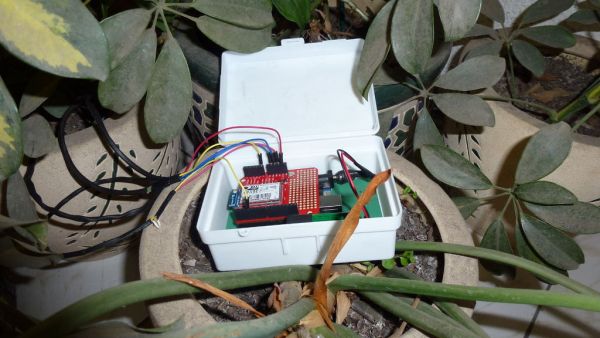
For this proyect you need some knowledge of programing in PHP and MySQL, we will make three archive .php, but this I’ll explain in the following steps.
Step 1: You need this
For this project, you need:
Arduino UNO or similar board ($29.95)
http://www.sparkfun.com/products/11021
WiFly Shield ($89.95)
http://www.sparkfun.com/products/9954
Grove – Moisture sensor ($4.99)
http://www.seeedstudio.com/depot/grove-moisture-sensor-p-955.html?cPath=144_147
Six Jumper Wires ($4.50)
http://www.sparkfun.com/products/9387
DS18B20 Temperature Sensor with metal tip ($10.59)
http://www.olimex.cl/product_info.php?cPath=21_138&products_id=872&product__name=Breadborad_jumper_wire_pack
If only need, One protoboar ($9.58)
http://www.olimex.cl/product_info.php?currency=USD&products_id=170&product__name=Proto_Board_Bread_board
AND….
you need a server WEB, with PHP and database MySQL. I used the NAS of QNAP TS-110, is perfect for this project.
Step 2: Setting the temperature sensor and humidity
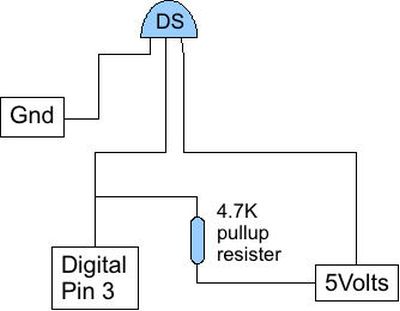
DS18B20 sensor is connected as follows. The position pin of the sensor Grove
Step 3: Connecting all in Arduino
Now, we will connect the two sensors on the Arduino shield Wifly:
-For the temperature sensor, the pin order is: GND-VCC in 5v power – SIG in digital pin 3.
-For the Moisture sensor, the pin order is: GND – 3.3V VCC in power – SIG in the analog pin 0.
Step 4: Preparing the database Mysql
CREATE TABLE `your_database`.`tempmoi` (
`id` INT( 255 ) NOT NULL AUTO_INCREMENT ,
`temp1` VARCHAR( 255 ) NOT NULL ,
`moi1` VARCHAR( 255 ) NOT NULL ,
PRIMARY KEY ( `id` )
) ENGINE = MYISAM ;
——————————————————————-
Step 5: Preparing for PHP files
You make three files:
conec.php
In this file will connect to our database
CODE:
<?php
function Conection(){
if (!($link=mysql_connect(“your_ipserver”,”your_user”,”your_pass”))) {
exit();
}
if (!mysql_select_db(“your_database”,$link)){
exit();
}
return $link;
}
?>
—————————————————————————————————
add.php
This file allows us to send the data to our table “tempmoi” located in our database, where “temp1” is equivalent to the temperature data and “moi1” is equivalent to the humidity data. This file also allows us to Arduino send data to the base.
http://www.sparkfun.com/products/11021
WiFly Shield ($89.95)
http://www.sparkfun.com/products/9954
Grove – Moisture sensor ($4.99)
http://www.seeedstudio.com/depot/grove-moisture-sensor-p-955.html?cPath=144_147
Six Jumper Wires ($4.50)
http://www.sparkfun.com/products/9387
DS18B20 Temperature Sensor with metal tip ($10.59)
http://www.olimex.cl/product_info.php?cPath=21_138&products_id=872&product__name=Breadborad_jumper_wire_pack
If only need, One protoboar ($9.58)
http://www.olimex.cl/product_info.php?currency=USD&products_id=170&product__name=Proto_Board_Bread_board
AND….
you need a server WEB, with PHP and database MySQL. I used the NAS of QNAP TS-110, is perfect for this project.
For more detail: Save data of temperature and humidity on MySQL with Arduino Uno and Wifly
- What components are required to build this monitoring system?
You need an Arduino UNO, WiFly Shield, Grove moisture sensor, six jumper wires, a DS18B20 temperature sensor, a protoboar if needed, and a web server running PHP and MySQL. - How do you connect the DS18B20 temperature sensor to the Arduino?
The pin order is GND, VCC connected to 5v power, and SIG connected to digital pin 3. - How do you connect the moisture sensor to the Arduino shield?
The pin order is GND, 3.3V VCC connected to power, and SIG connected to analog pin 0. - What SQL code is needed to create the database table?
You must run a CREATE TABLE command named tempmoi with columns id, temp1, and moi1 using the MYISAM engine. - How many PHP files are required for this project?
You need to make three archive .php files: conec.php, add.php, and a third file implied by the setup process. - What is the function of the conec.php file?
This file connects to the database using mysql_connect and selects the specific database. - What does the add.php file allow the system to do?
It allows sending data from the Arduino to the tempmoi table where temp1 holds temperature and moi1 holds humidity. - Can I use a device other than a standard PC as the server?
Yes, the author used a NAS of QNAP TS-110 which is described as perfect for this project.
