
Summary of DIY: BUILD A CONTROLLER WITH A KNOB THAT CAN EASILY CHANGE THE VOLUME OF ANY APP ON YOUR PC
Ruben Henares designed a Maxmix-style controller with a stylist knob that lets you select apps and adjust individual app volume without navigating menus. The encoder/button knob selects an app on an OLED display; press and rotate to change volume, and an optional LED ring adds lighting. The build uses 3D printed parts and off-the-shelf electronics, costs about $25 including printing and shipping, and takes roughly 25 minutes to assemble.
Parts used in the Maxmix controller:
- 3D printed enclosure and knob parts
- Rotary encoder with push button
- OLED display
- LED ring (optional)
- Microcontroller or control board
- Wiring and connectors
- Power supply or USB cable
- Screws or fasteners
Ruben Henares has designed a Maxmix controller with a stylist knob that could save us the stress of having to always go through the menus and on-screen sliders to change the volume of individual apps on our PCs.
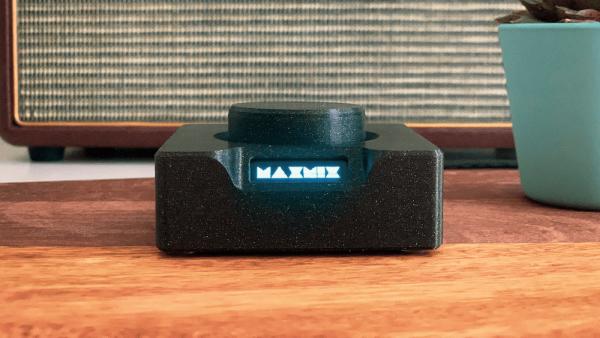
The knob on the controller takes an input from the encoder/button to display the desired app where volume is to be adjusted. All we need to do is to just turn the knob to select the particular app, push down and rotate to turn the volume up or down. To switch to another program, press the knob down and repeat the same process, simple!
Speaking about the ease of replicating the project, Reuben said:
“It uses a combination of 3D printed parts and off-the-shelf electronics components, and all parts can be easily found and ordered online!. The total cost of the parts is ~$25.00 USD including 3D printing and shipping and it takes around 25 minutes to build”.
The overall build is such a great design with an OLED screen located by the side of the controller where the current app status is shown and an optional LED ring responsible for giving some extra lightning effects to the controller.
Read more: DIY: BUILD A CONTROLLER WITH A KNOB THAT CAN EASILY CHANGE THE VOLUME OF ANY APP ON YOUR PC
- How does the knob select and adjust app volume?
The encoder/button knob is turned to display and select the desired app on the OLED, then pressed and rotated to change that app's volume. - Can this project be easily replicated?
Yes. It uses 3D printed parts and off-the-shelf electronics that can be easily found and ordered online. - How long does it take to build the controller?
The build takes around 25 minutes to assemble. - What is the total cost of parts for the project?
The total cost of parts is about $25.00 USD including 3D printing and shipping. - Does the controller show which app is selected?
Yes. An OLED screen located by the side of the controller shows the current app status. - Is there any lighting option for the controller?
Yes. An optional LED ring provides extra lighting effects for the controller. - What types of components are used in the build?
The build combines 3D printed parts with off-the-shelf electronic components like an encoder, OLED display, microcontroller, and optional LED ring.
