
Summary of Arduino – LCD 1602A I2C – PASSWORD PROTECTED DOOR ACCESS With Relay – KY-019
This article details a DIY project to build a password-protected door access system using an Arduino Uno, a 4x4 keypad, and an LCD 1602 with I2C. The system controls a 1-channel relay (KY-019), demonstrated here with a lamp instead of an actual electric strike lock. Users can input codes via the keypad to trigger the relay, which is managed through specific Arduino libraries.
Parts used in the Password Protected Door Access System:
- Arduino Uno (RobotDyn Uno)
- 1 Channel Relay KY-019
- Keypad 4x4
- LCD 1602 with I2C
- Electrical Strike Lock
Hello world! Today i made a simple code to control a electric strike lock with a Password/ Access Code using a 1 channel relay. I don’t have such a lock but i demonstrated it with a lamp attached to the relay. Check the next step for the schematic code & Parts list.
(I know! I wrote access wrong in the video..don’t mind the typo..lol.)
Step 1: Schematic, Code & Parts List
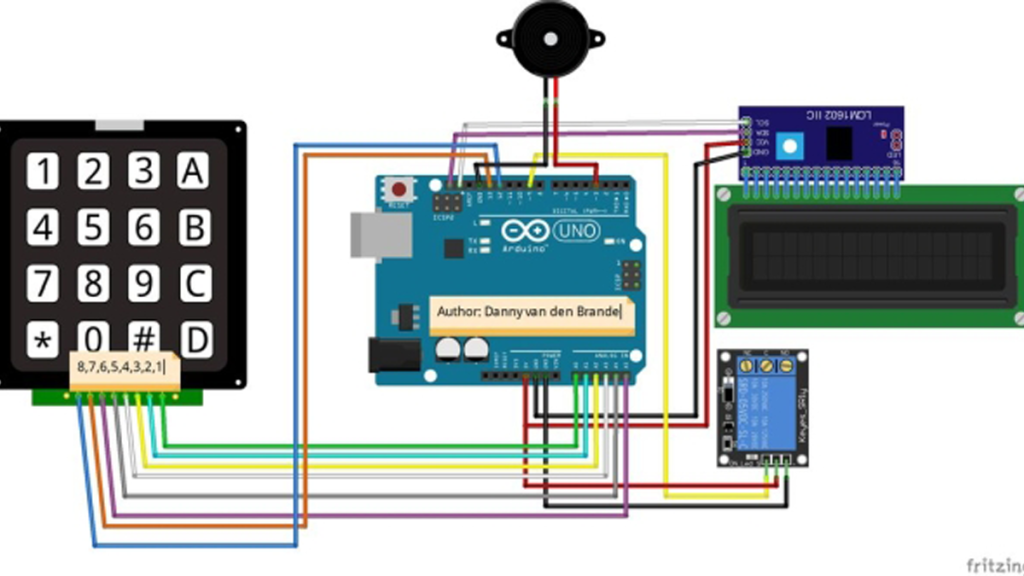
You need these following librarys
- password.h
- LiquidCrystal_I2C.h
- Keypad.h
Wire it up like the schematic and it should work after uploading,
if your not seeing anything, try change your I2C Address i will include a Code to scan your address.
You can change this at the line shown below which you can find on line 14 of the code.
- #define I2C_ADDR 0x27
Most common I2C addresses.
- PCF8574 = 0x20,
- PCF8574A = 0x38,
- PCF8574AT = 0x3F
- PCF8574T = 0x27
Parts list:
- Arduino uno, I used the RobotDyn Uno.
- 1 Channel Relay KY-019
- Keypad 4×4
- LCD 1602 with I2C
- Electrical Strike Lock (Not needed to test the code, you will see if relay go’s on or off.)
Good luck!
Source: Arduino – LCD 1602A I2C – PASSWORD PROTECTED DOOR ACCESS With Relay – KY-019
- How do I fix display issues if nothing appears on the screen?
Try changing the I2C address in the code. - Which line should I edit to change the I2C address?
You can change it at line 14 of the code. - What is the default I2C address defined in the code?
The default address is 0x27. - Can I test this project without an electrical strike lock?
Yes, you can demonstrate the relay activation using a lamp instead. - Which libraries are required for this project?
You need password.h, LiquidCrystal_I2C.h, and Keypad.h. - What are some common I2C addresses mentioned in the article?
Common addresses include 0x20, 0x38, 0x3F, and 0x27. - Does the article mention a specific brand for the Arduino board?
The author used a RobotDyn Uno but lists Arduino Uno generally.
