
Summary of ARDUINO EXTERNAL CIRCUIT CONNECTION CHARTS
This article compiles essential circuit diagrams and connection guides for Arduino projects, catering to beginners and enthusiasts. It details wiring for various electronic components including sensors, motors, displays, and communication modules. The resource covers specific setups like button inputs, LED arrays, motor drivers (DC, stepper, servo), voltage converters, and interface protocols such as I2C and RS485. It also includes reference data on resistor color codes and component testing to facilitate successful hardware integration.
Parts used in Arduino Basic Connections:
- Transistors
- LEDs
- Dual LEDs
- Dual Color LED
- Motors
- MOSFETs
- Arduino Relay
- Buzzer
- Sound Amplifier
- Triac
- Speaker
- DC Motor
- RGB LED Strip
- Encoder
- Bidirectional Voltage Level Converter 3.3V to 5V
- TTL / CMOS converter
- Voltage divider
- Microphone
- Servo Motor
- Port Replication
- 7 Segment Display
- Multiplexer
- LED Array
- LCD HITACHI 44780
- NOKIA LCD
- MAX7221
- Unipolar Stepper Motor
- Bipolar Stepper Motor
- Graphical LCD
- SD Card
- Temperature Sensor LM35
- RTC DS1307
- Video VGA Connection
- Keypad
- PS2 Keyboard
- IR Receiver
- IR Transmitter
- MIDI Interface
- Digital Temperature Sensor DS18B20
- Rain Sensor
- AC input
- Port Expander PCF8574xx
- Shift Register 74HC595
- Motor Drive L298
- Stepper Drive L293
- EEPROM
- Distance Sensor
- Digital Potentiometer MCP4161
- DAC MCP4921
- RS485 Node
- DMX Controller
- Ceramic Capacitor
- Polyester Film-Mylar Capacitor
- Rotary Encoder
- Logical Analyzer
- Component Tester
- Potentiometer
- Photoresistor
- Optocoupler
- Resistors
- Capacitors
- Push Button
Arduino transistors, LEDs, motors, MOSFETs, various electronic components, circuit connection diagrams that will be of great use for Arduino projects, Arduino circuits or those who are new to Arduino programming … Circuit diagrams are… Electronics Projects, Arduino External Circuit Connection Charts “arduino projects, “
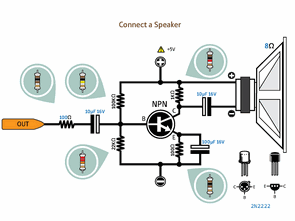
Arduino transistors, LEDs, motors, MOSFETs, various electronic components, circuit connection diagrams that will be of great use for Arduino projects, Arduino circuits or those who are new to Arduino programming … Circuit diagrams are simple to understand Detailed studies on the color codes of the resistors used in Arduino circuit connections ….
ARDUINO CONNECTION DIAGRAM LIST
Arduino Button GND connection, Button 5V connection, Button 12V connection, Built-in pullup, Using potentiometer, Photoresistor, Optocoupler inputs
Arduino Led, Lamp, Dual LEDs, Dual Color LED Connections, Arduino Relay, Mosfet, Buzzer, Sound Amplifier Connections, Arduino Triac, Speaker Connections, Arduino DC Motor, RGB Led Strip Led, Encoder Connections
Bidirectional Voltage Level Converter 3.3V to 5V, Bidirectional Voltage Level Transformer 3.3V to 5V with TTL / CMOS converter, TTL / CMOS converter (6 inputs / outputs) with voltage divider,
Arduino Microphone, Arduino Servo Motor Connections, Arduino Port Replication, 7 Segment Use, Arduino 7 Segment (Common Anode), Multiplexer, LED Array
Arduino LCD HITACHI 44780, Arduino I2C with an LCD HITACHI 44780, Arduino NOKIA LCD (Basic) with 7 segments use with Arduino MAX7221 (Common Anode)
Arduino Unipolar stepper motor drive (Basic 1), Arduino A Bipolar stepper motor drive (Basic 1), Graphical LCD connection via Arduino I2C
Arduino SD Card, Simple 3.3V Power Supply Connection, Arduino Temperature Sensor (LM35), RTC (DS1307), Video, VGA Connection
Arduino Keypad, PS2 Keyboard Connections, Arduino IR Receiver, IR Transmitter Link, Arduino MIDI Interface, Multiple Buttons Using 1 Analog Input
Digital Temperature Sensor (DS18B20), Simple Rain Sensor with Arduino, AC input, Port Expander (PCF8574xx), Shift (74HC595), Motor Drive (L298), Stepper Drive (L293)
EEPROM connection via I2C, Arduino Distance Sensor, Digital Potentiometer (MCP4161), DAC (MCP4921)
RS485 Node, DMX Controller (Basic), Resistor Color Codes, Ceramic Capacitor Codes, Polyester Film-Mylar Capacitor Code, Push Button Default, Simple Rescue, Rotary Encoder
Arduino Logical Analyzer, Current Sensitivity, Arduino Component Tester (Basic), Simple Transistor Comparison Table
EXAMPLE ARDUINO CONNECTION SCHEMES
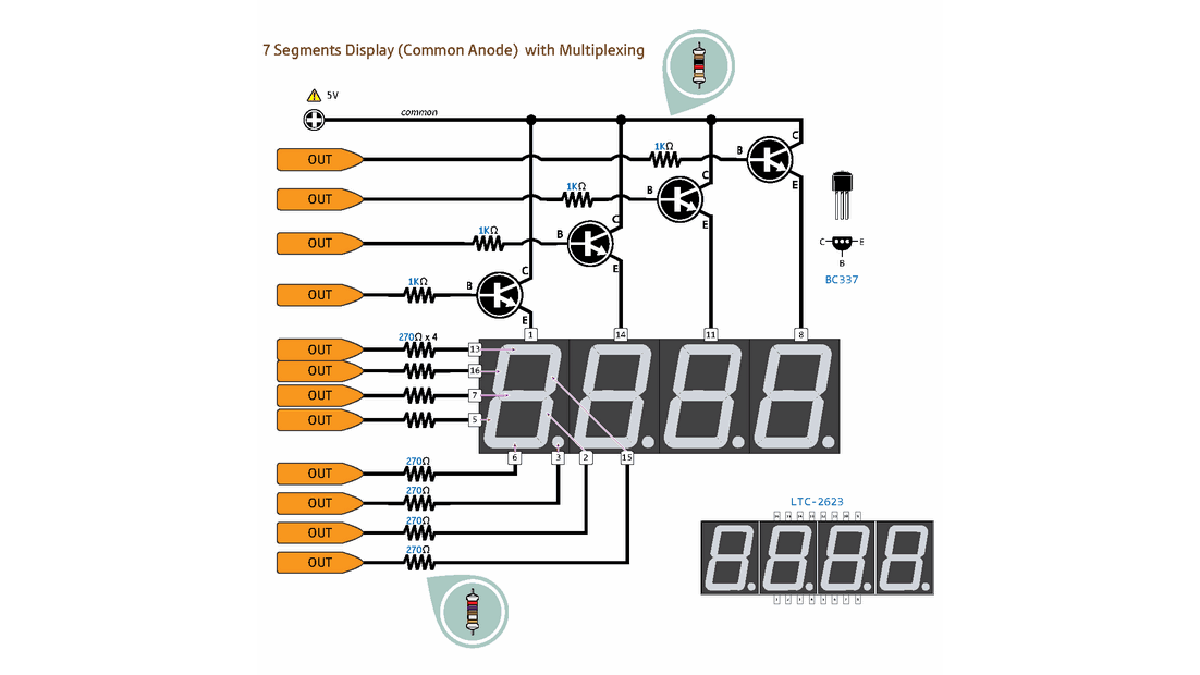
source: http://www.pighixxx.com/abc-arduino-basic-connections/
- What components are included in the Arduino connection list?
The list includes transistors, LEDs, motors, MOSFETs, relays, buzzers, speakers, DC motors, RGB LED strips, encoders, voltage converters, microphones, servos, 7 segment displays, multiplexers, LCDs, stepper motors, SD cards, temperature sensors, RTCs, video interfaces, keypads, keyboards, IR receivers, rain sensors, port expanders, shift registers, EEPROM, distance sensors, DACs, RS485 nodes, and capacitors. - How can I connect a Bidirectional Voltage Level Converter?
You can use a Bidirectional Voltage Level Converter or Transformer to convert between 3.3V and 5V with TTL or CMOS conversion capabilities. - Which stepper motor drives are mentioned for Arduino projects?
The article mentions driving both Unipolar and Bipolar stepper motors using basic configurations and specifically lists the L293 Stepper Drive. - Can I connect an SD card to an Arduino?
Yes, the guide includes an Arduino SD Card connection scheme among its examples. - What temperature sensors are supported in these circuits?
The article supports the Analog Temperature Sensor LM35 and the Digital Temperature Sensor DS18B20. - How do I handle AC input connections?
The provided list includes AC input as one of the connection schemes available for Arduino projects. - Is there information on Resistor Color Codes?
Yes, the resource provides detailed studies on the color codes of resistors used in Arduino circuit connections. - What display options are available for Arduino?
Available display options include the LCD HITACHI 44780, NOKIA LCD, Graphical LCD via I2C, and 7 Segment displays with Common Anode support. - Can I use a PS2 keyboard with this setup?
Yes, the article explicitly lists PS2 Keyboard Connections as part of the Arduino connection schemes. - Are there tools for testing components listed?
Yes, the content includes a section on an Arduino Component Tester and a Simple Transistor Comparison Table.
