
Summary of SmartQ Notification with Azure IOT Hub and Virtual Shields
SmarQ eliminates long queue waits by allowing customers to take a number remotely and receive real-time status updates. The system uses voice commands via the Virtual Shields for Arduino app to manage the queue, notifying customers when their turn approaches through Azure IoT Hub and Notification Hubs.
Parts used in the SmarQ project:
- Smart Queue Universal Windows app
- Virtual Shields for Arduino app
- ProcessDeviceToCloudMessage app
- ProcessD2CInteractiveMessages app
- Azure IoT Hub
- Azure Queue
- Azure Storage
- Notification Hub
Waiting hours in queue is history, SmarQ will update you the current queue status and alarm you when it is almost your turn to be served.
Story
Waiting hours in queue for your turn to be attended is a waste of time. SmarQ allows you to take a queue number with a press of button. You can go away for a while to do other business in the middle of the waiting. SmarQ will update you the current queue status and notify you when it is almost your turn to be served.

Current implementation allows a queue attendant to speaks to the Virtual Shields for Arduino app in order to manage the queue number. A notification will be sent to the customers whenever the queue number changes. Hence the customers can estimate how soon they will be served.
This project currently consists of the following 3 parts:
- Smart Queue Universal Windows app
- Virtual Shields for Arduino app
- ProcessDeviceToCloudMessage and ProcessD2CInteractiveMessages apps
The project includes the use of Azure IoT Hub, Queue and Azure Storage and Notification Hub.
SmartQueueUniversalWindows app
This app notifies a customer the current queue number being served so that the customer can manage the time needed to be presented at the customer counter.
Please follow this link Get started with Notification Hubs for Windows Store Apps to build this app. I have added some codes at the code section below or get from GitHub. I use the Visual Studio Community 2015.
Important steps:
- Register your app for the Windows Store
- Configure your notification hub
- Connect your app to the notification hub
Virtual Shields for Arduino App
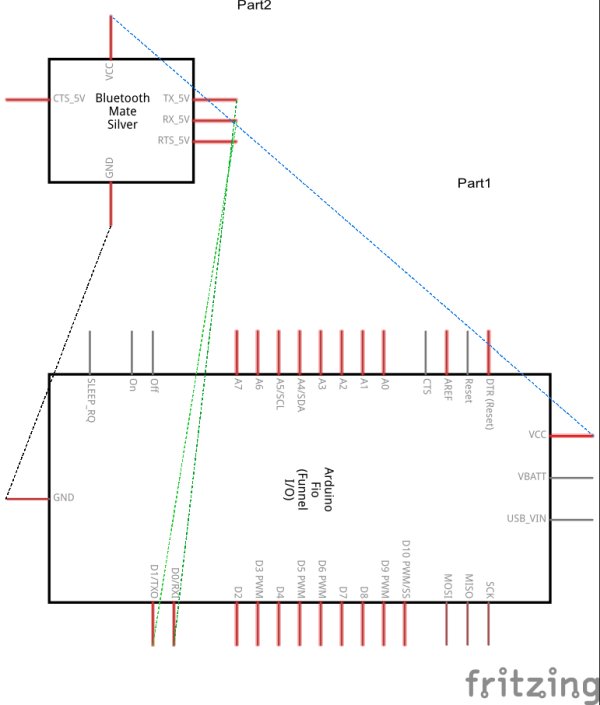
Queue attendant uses this app to manage the queue. A attendant will speak to the app to get the next queue number to be served. This app can be installed from Windows Store.
ProcessDeviceToCloudMessages and ProcessD2CInteractiveMessages Apps
Both of the above are console apps. Follow the instructions in this tutorial (How to process IoT Hub device-to-cloud messages) to build these apps.
Read more: SmartQ Notification with Azure IOT Hub and Virtual Shields
- How does SmarQ help customers waiting in line?
SmarQ allows customers to take a queue number with a button press, go away to do other business, and receive notifications when it is almost their turn. - Can queue attendants use voice commands?
Yes, the current implementation allows a queue attendant to speak to the Virtual Shields for Arduino app to manage queue numbers. - What happens when a queue number changes?
A notification is sent to the customers so they can estimate how soon they will be served. - Which apps are part of the SmarQ project?
The project consists of the Smart Queue Universal Windows app, Virtual Shields for Arduino app, ProcessDeviceToCloudMessage app, and ProcessD2CInteractiveMessages app. - Does the SmartQueueUniversalWindows app notify customers?
Yes, this app notifies a customer of the current queue number being served so they can manage their time at the counter. - How can I build the SmartQueueUniversalWindows app?
You should follow the link to Get started with Notification Hubs for Windows Store Apps and use Visual Studio Community 2015. - What steps are required to connect the app to the notification hub?
Important steps include registering your app for the Windows Store, configuring your notification hub, and connecting your app to the notification hub. - Where can I find the code for the Smart Queue Universal Windows app?
Code is provided in the code section below or available on GitHub.
