
Summary of 7 Segment Display Interfacing with Arduino
This tutorial explains how to interface a seven-segment display with an Arduino Uno to count from 0-9 and reset. It details the differences between common cathode and common anode displays, lists necessary hardware and software components, and provides specific pin connections for wiring the display to the microcontroller.
Parts used in the Seven Segment Display Counter:
- ARDUINO UNO
- Power supply (5v)
- HDSP5503 seven segment display (two pieces)
- 47uF capacitor
- 100Ω resistor
In this tutorial we are going to interface a seven segment display to ARDUINO UNO. The display counts from 0-9 and resets itself to zero. Before going further, let us first discuss about seven segment displays.
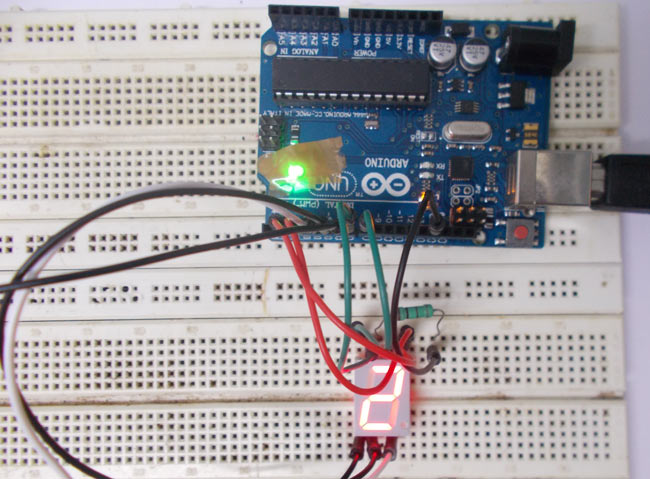
A seven segment display got its name from the very fact that it got seven illuminating segments. Each of these segments has a LED (Light Emitting Diode), hence the lighting. The LEDs are so fabricated that lighting of each LED is contained to its own segment. The important thing to notice here that the LEDs in any seven segment display are arranged in common anode mode (common positive) or common cathode mode (common negative).
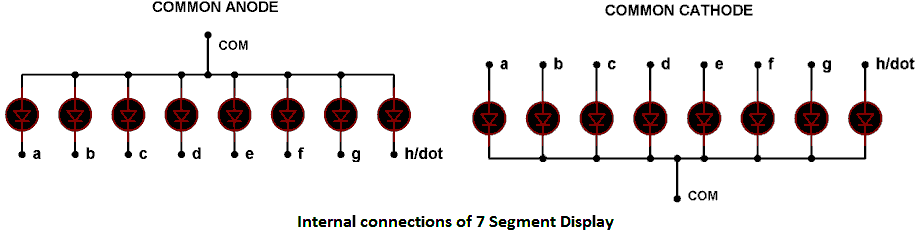
The circuit connection of LEDs in common cathode and common anode is shown in above figure. Here one can observe that, in CC the negative terminals of every LED is connected together and brought out as GND. In CA the positive of every LED is connected together and brought out as VCC. These CC and CA come in very handy while multiplexing several cells together.
Components Required
Hardware: ARDUINO UNO , power supply (5v), HDSP5503 seven segment display (two pieces) (any common cathode will do ), 47uF capacitor (connected across power supply).
Software: arduino IDE (Arduino nightly)
Circuit Diagram and Working Explanation
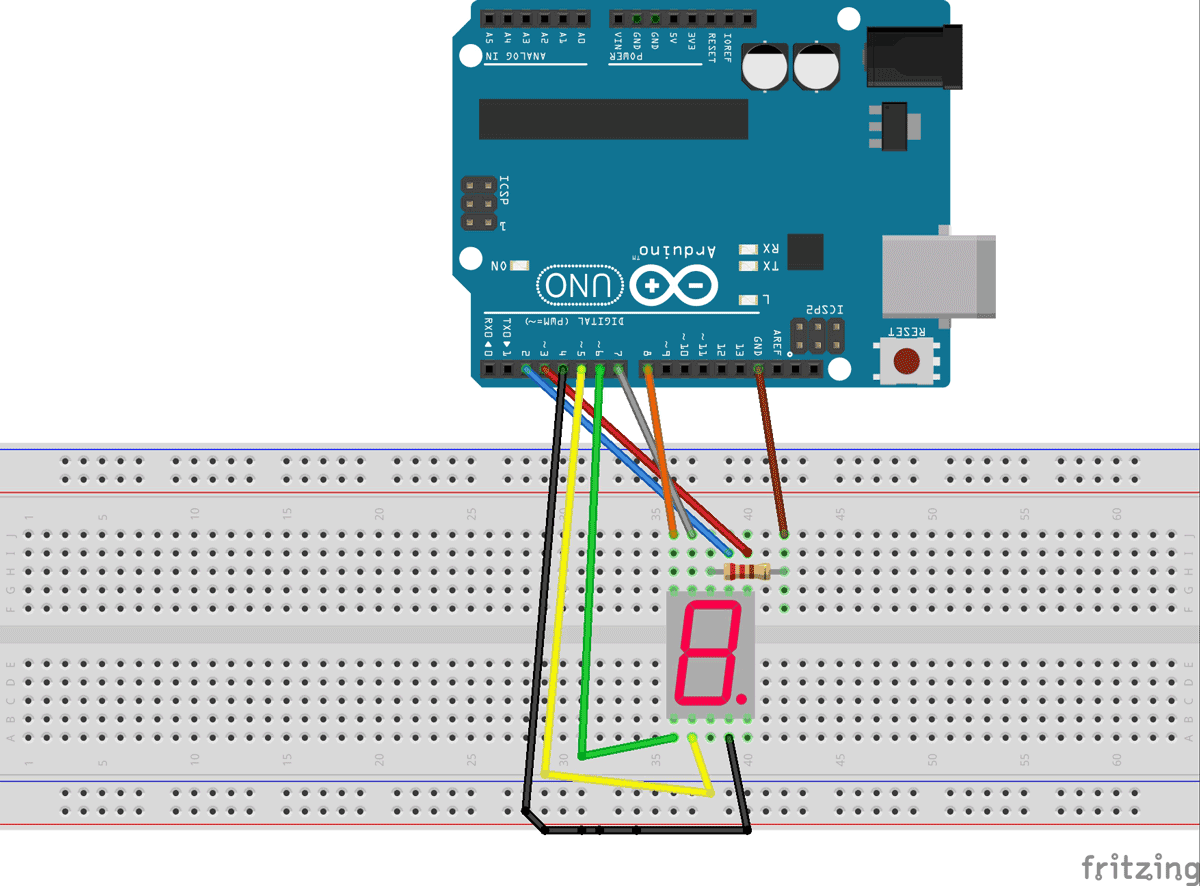
The connections which are done for 7 segment display are given below:
PIN1 or E to PIN 6 of ARDUINO UNO
PIN2 or D to PIN 5
PIN4 or C to PIN 4
PIN5 or H or DP to PIN 9 ///not needed as we are not using decimal point
PIN6 or B to PIN 3
PIN7 or A to PIN 2
PIN9 or F to PIN 7
PIN10 or G to PIN 8
PIN3 or PIN8 or CC to ground through 100Ω resistor.
Now to understand the working, consider a seven segment display is connected to a port, so say we have connected “A segment of display to PIN0”, “B segment of display to PIN1”, “A segment of display to PIN3”, “A segment of display to PIN4”, “A segment of display to PIN5”, “A segment of display to PIN6”. And is common ground type as shown in figure.
Read More: 7 Segment Display Interfacing with Arduino
- What is the main function of the project described?
The display counts from 0-9 and resets itself to zero. - How are the LEDs arranged in a seven segment display?
They are arranged in common anode mode or common cathode mode. - Which software is required for this project?
Arduno IDE (Arduino nightly) is required. - Can any common cathode display be used instead of HDSP5503?
Yes, any common cathode will do. - Where should the 47uF capacitor be connected?
It should be connected across the power supply. - Does the decimal point need to be connected for this tutorial?
No, it is not needed as we are not using the decimal point. - What happens if the negative terminals of every LED are connected together?
This creates a common cathode configuration where they are brought out as GND. - What is the purpose of the 100Ω resistor in the circuit?
It connects the common cathode pins to ground.
