
Summary of Arduino GPS Clock
This article explains how to build a highly accurate GPS clock using an Arduino Uno and a GPS module. By parsing the $GPRMC sentence from satellite data, the system extracts precise time and date information in UTC. The project then converts this UTC time to Indian Standard Time by adding 5 hours and 30 minutes, displaying the result on a 16x2 LCD screen with millisecond precision.
Parts used in the GPS Updated Clock:
- Arduino Uno
- GPS Module
- 16x2 LCD
- Connecting wires
- Power supply
There are many GPS satellites around the Earth which are used to provide the exact location of any place. Along with the location coordinates (Latitude and Longitude), it also provide other data like time, date, altitude, direction tracking angle etc. We have already learned to read this GPS data from Satellite using Arduino. So we are going to make a GPS clock using the ‘Time and Date’ data from the GPS satellite. GPS Updated Clock is very accurate and provides the real time data with precision of milliseconds.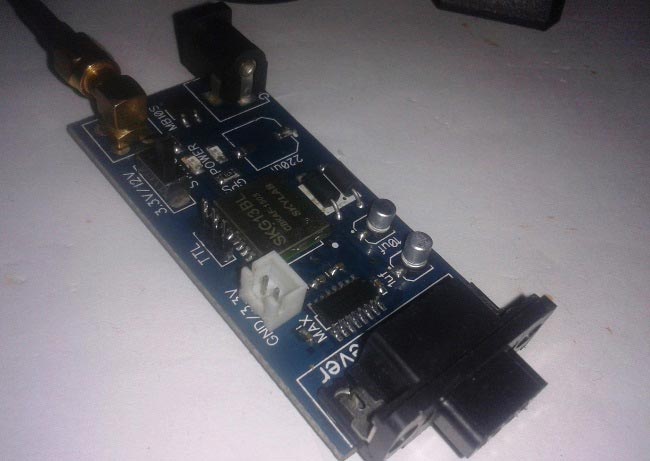
Components:
- Arduino Uno
- GPS Module
- 16×2 LCD
- Connecting wires
- Power supply
Working Explanation:
GPS module sends the data in NMEA format, see the output of GPS data in below screenshot. NMEA format consist several sentences, in which we need one sentence to extract the Date and Time. This sentence starts from $GPRMC and contains the coordinates, time and other useful information. This $GPRMC is referred to Recommended minimum specific GPS/Transit data, and the length of this string is about 70 characters. We have previously extracted $GPGGA string in Vehicle Tracking System to find the Latitude and Longitude Coordinates. 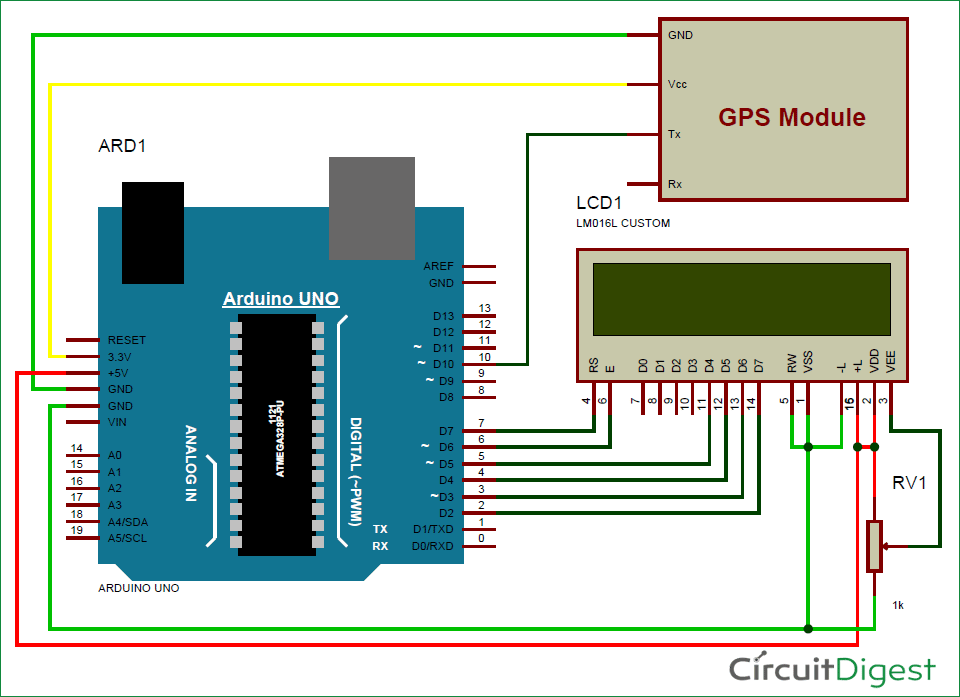
And $GPRMC string mainly contains velocity, time, date and position
$GPRMC,123519.000,A,7791.0381,N,06727.4434,E,022.4,084.4,230394,003.1,W*6A
$GPRMC,HHMMSS.SSS,A,latitude,N,longitude,E,speed,angle,date,MV,W,CMD
|
Identifier |
Description |
|
RMC |
Recommended Minimum sentence C |
|
HHMMSS.SSS |
Time in hour minute seconds and milliseconds format. |
|
A |
Status // A=active and V= void |
|
Latitude |
Latitude 49 deg. 16.45 min. North |
|
N |
Direction N=North, S=South |
|
Longitude |
Longitude(Coordinate) |
|
E |
Direction E= East, W=West |
|
Speed |
speed in knots |
|
Angle |
Tracking angle in degrees |
|
Date |
DATE in UTC |
|
MV |
Magnetic Variation |
|
W |
Direction of variation E/W |
|
CMD (*6A) |
Checksum Data |
We can extract Time and Date from $GPRMC string by counting the commas in the string. With the help of Arduino and programming, we find $GPRMC string and stores it in an array, then Time (24 hours format) can be found after one comma and Date can be found after nine commas. Time and date are further saved in strings.
A GPS satellite provides Time and date in Coordinated Universal Time (UTC), so we need to convert it accordingly. To convert in according to Indian time, we have added 5:30 in UTC time, as Indian time is 5 and half hours ahead of UTC/GMT.
- What is the primary function of the GPS Updated Clock?
The project creates a highly accurate clock that provides real-time data with millisecond precision using time and date data from GPS satellites. - How does the GPS module send data?
The GPS module sends data in NMEA format, which consists of several sentences including the $GPRMC string. - Which specific NMEA sentence is used to extract time and date?
The $GPRMC sentence, also known as Recommended Minimum specific GPS/Transit data, is used to extract the Date and Time. - How can one locate the time within the $GPRMC string?
The time in 24-hour format is found after counting one comma in the $GPRMC string. - How is the date located in the $GPRMC string?
The date is found after counting nine commas in the $GPRMC string. - What time standard do GPS satellites provide?
A GPS satellite provides Time and date in Coordinated Universal Time (UTC). - How is UTC converted to Indian Standard Time in this project?
To convert to Indian time, 5 hours and 30 minutes are added to the UTC time received from the satellite. - Can the GPS clock display milliseconds?
Yes, the GPS Updated Clock provides real-time data with a precision of milliseconds.
