
Summary of Electronic Circuit: photocell and LED
The article explains using an Arduino `cmd_response` sketch to interface with sensors like a photocell and LED via Python or EPICS. It details building a voltage divider circuit to measure light intensity, connecting the analog output to A0, and controlling LED brightness through digital pins using PWM. The system enables remote data reading and closed-loop feedback control for constant lighting.
Parts used in Arduino Sensor Control Project:
- Arduino board
- Photocell (cadmium-sulfide photosensitive resistor)
- Resistor R2
- Resistor R3
- LED
- Limiting resistor for LED
- Analog IN channel A0
- DIGITAL pins
- Python program sequence.py
- EPICS integration tools
The cmd_response sketch is very general with respect to the ANALOG IN and DIGITAL I/O of the Arduino boards. We can use it to read a wide variety of sensors from remote computer systems.
First, we demonstrate how the Arduino cmd_response sketch works, we construct some simple sensor circuits and then communicate with our Arduino with a Python program (see: Example: Python program sequence.py).
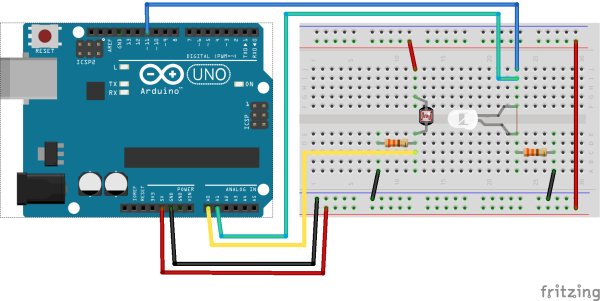 Later, we integrate the Arduino with EPICS (see: Example: Constant Lighting with EPICS). Finally, we maintain a constant sensor value (photocell) by adjusting an LED’s brightness using a PID loop in EPICS (see: Example: Feedback using the epid record).
photocell
The photocell is a cadmium-sulfide photosensitive resistor. [1] It is an inexpensive device that measures the amount of light reaching its active surface. The resistance of the photocell, R2, changes as the intensity of light changes.
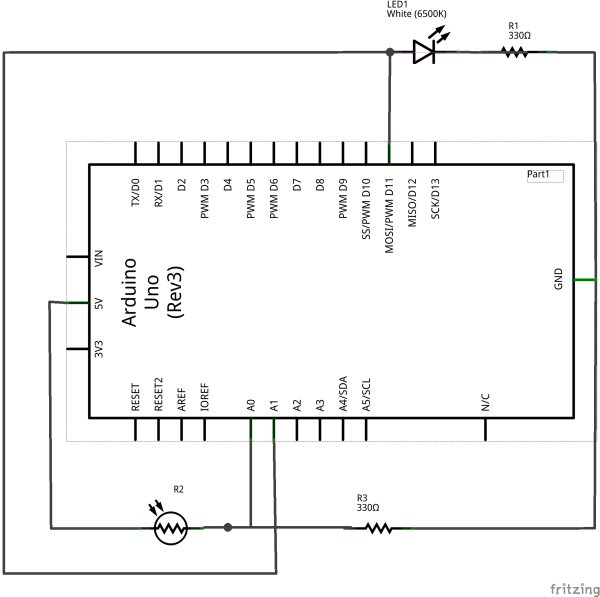
An easy way to sense this resistance is to build a simple voltage divider circuit such as the next figure and measure voltage, VP at the midpoint of the circuit between R2 and R3.
Since the resistance of the photocell, R2, drops with increasing light intensity, we choose to put it closer to the supply voltage, Vcc[2]. As the light intensity increases, VP will increase towards Vcc. The other resistor, R3, is chosen to limit the maximum current through the divider as R2 tends towards zero.
Voltage divider circuit with the photocell (photocell-schem.png)
| connection: | We’ll connect VP to ANALOG IN channel A0. |
|---|
| [1] | photocell: http://en.wikipedia.org/wiki/Photoresistor |
| [2] | Take Vcc from the Arduino’s 5 VDC supply. |
 LED
LED
The LED is an inexpensive device that generates light when a current is passed through it. A resistor is used to limit the current which flows through the LED as it is driven from one of the DIGITAL pins on the Arduino. Arduino has an example to vary the intensity of the LED using pulse-width modulation and the analogWrite() function. [3]
For more detail: Electronic Circuit photocell and LED
- How does the photocell resistance change?
The resistance of the photocell drops as the light intensity increases. - What circuit is used to sense the photocell resistance?
A simple voltage divider circuit is built to measure the voltage at the midpoint between the resistors. - Where should VP be connected on the Arduino?
VP is connected to ANALOG IN channel A0. - Can the Arduino vary LED intensity?
Yes, the Arduino uses pulse-width modulation and the analogWrite function to vary LED intensity. - What is the purpose of resistor R3?
R3 is chosen to limit the maximum current through the divider as the photocell resistance tends towards zero. - Does the system support remote communication?
Yes, the system communicates with remote computer systems using a Python program. - How is constant sensor value maintained?
A PID loop in EPICS adjusts the LED's brightness to maintain a constant sensor value. - What power supply is used for Vcc?
Vcc is taken from the Arduino's 5 VDC supply.
