
Summary of Arduino weather station part 2 using arduino
This article describes an indoor LCD weather display built using an Atmega328 Arduino microcontroller. It fetches real-time data via an Ethernet module to show temperature, humidity, wind pressure, and sky conditions on a graphic LCD. The design features dual voltage regulators for 3.3V operation and utilizes serial communication to minimize pin usage on the display controller.
Parts used in the Indoor LCD Weather Display:
- Atmega328 Arduino MCU
- Two LP2950 voltage regulators
- Four buttons
- ENC28J60 Ethernet module
- LCD12864 graphic display module with ST7920 controller
Sometimes I just do not have time to connect to the internet and check current weather conditions. This is the reason why I made this indoor LCD weather display based on Atmega328 Arduino MCU. The circuit board consists of two LP2950 voltage regulators, MCU, four buttons, ENC28J60 Ethernet module and LCD12864 graphic display module.
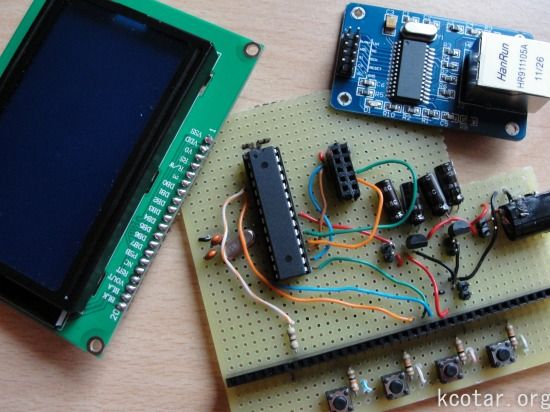
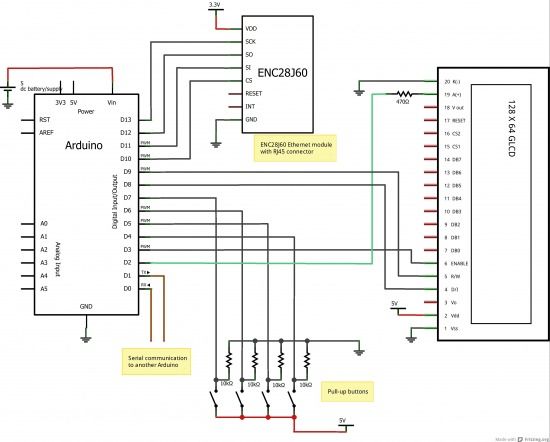
The Ethernet module is used to connect to this website and to download current data. With it I am not limited to use only at home, but it can be used in any place with internet access. The input voltage is 3V3 so this is the reason why I have two voltage regulators. The connection to MCU is established using SCK, MISO, MIMO and SS digital pins.
The LCD12864 display uses ST7920 controller that has the option of parallel and serial communication. Serial communication is preferred because it uses only three digital pins (3, 8 and 9) instead of ten or more for parallel. Another advantage with this display is that it can be used in graphic mode. With it you can control individual pixels on screen. I used this to draw the sun or clouds depending on a outside conditions.
LCD display in action. On the first screen you can see the current weather data (temperature, humidity, wind pressure, cloud coverage and sky temperature), the time when they were recorded and if the change from earlier time is positive, negative or constant. On the second picture the display is showing maximum and minimum within certain period and they can even be reset. All the captions are in Slovene language. More pictures can be found in gallery.
For more detail: Arduino weather station part 2
-
Why were two voltage regulators used?
The input voltage is 3V3, which necessitates the use of two LP2950 voltage regulators. -
How does the device connect to the internet?
It uses an ENC28J60 Ethernet module to download current weather data from a website. -
Which pins are used for the Ethernet connection?
The connection to the MCU is established using SCK, MISO, MIMO, and SS digital pins. -
Why was serial communication chosen for the LCD?
Serial communication is preferred because it uses only three digital pins instead of ten or more required for parallel mode. -
What specific pins control the LCD in serial mode?
The LCD uses digital pins 3, 8, and 9 for serial communication. -
Can the display show individual pixels?
Yes, the LCD can be used in graphic mode to control individual pixels for drawing icons like suns or clouds. -
What weather data is shown on the first screen?
The first screen displays temperature, humidity, wind pressure, cloud coverage, sky temperature, and the recording time. -
What information appears on the second screen?
The second screen shows maximum and minimum values within a certain period, which can be reset.
