
Summary of How to build an open WiFi finder using ESP8266 and two coin batteries
This article details the construction of a low-cost, open-source WiFi finder using the ESP8266 microcontroller. The author shares software tools and hardware components required to build the device, which is powered by coin batteries. The guide covers flashing NodeMCU firmware onto the module via a USB-to-TTL converter and logic level shifter, followed by uploading Lua scripts to enable WiFi scanning capabilities.
Parts used in the Open WiFi Finder:
- ESP8266 01 variant
- USB to TTL serial converter
- Logic level converter 5V to 3.3V
- Two coin batteries CR2450
- Soldering equipment or protoboard
- Few wires
- Tape
n the past few months ESP8266 has created a real revolution in the IoT space. I’m using it in a project that will hit Indiegogo in a month or so and you, of course will support me ☺ During the development process I’ve learned a lot and I want to share a part of it. Let’s build cheap open WiFi finder together!
Software
NodeMcu firmware https://github.com/nodemcu/nodemcu-firmware
ESP8266 flasher http://www.xess.com/blog/esp8266-reflash/
ESPlorer http://esp8266.ru/esplorer/
Actual scripts https://github.com/kstevica/ESP8266-WiFi-Finder
Hardware
ESP8266 01 variant http://www.ebay.com/itm/ESP8266-Serial-WIFI-Wireless-Transceiver-Module-Send-Receive-LWIP-AP-STA-A-/201205524305?pt=LH_DefaultDomain_0&hash=item2ed8c8a751
USB to TTL serial converter http://www.ebay.com/itm/USB-To-RS232-TTL-PL2303HX-Auto-Converter-Module-Converter-Adapter-For-arduino-/180953299346?pt=LH_DefaultDomain_0&hash=item2a21a83992
Logic level converter 5V to 3.3V http://www.banggood.com/Logic-Level-Converter-Bi-Directional-IIC-4-Way-Level-Conversion-Module-p-938774.html
Two coin batteries CR2450 http://www.ebay.com/itm/5-x-CR2450-2450-DL2450-ECR2450-5029LC-Cell-Button-Battery-/221674539224?pt=AU_Electronics_Batteries_Chargers&hash=item339cd508d8
Soldering equipment (you can use protoboard to avoid soldering)
Few wires http://www.banggood.com/buy/Dupont.html
Tape
Let’s start!
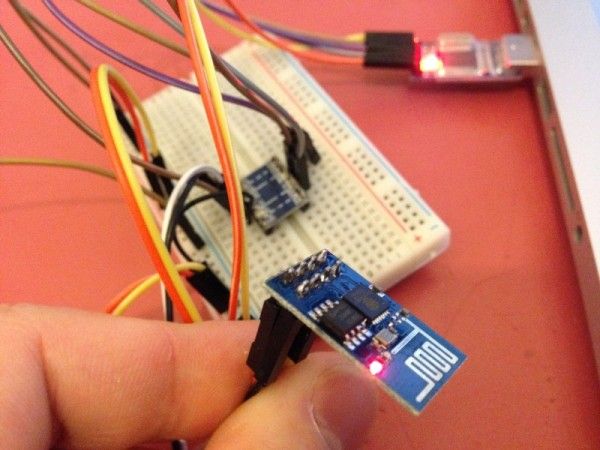
Download ESP8266 flasher and ESPlorer. Connect USB to TTL adapter with ESP8266 using logic level converter:
USB 5V to LLC high voltage
USB 3.3V to LLC low voltage
USB GND to LLC high GND
LLC high GND to LLC low GND
USB TX to LLC HV1
USB RX to LLC HV2
ESP8266 VCC to LLC low voltage
ESP8266 GND to LLC low GND
ESP8266 TX to LLC LV2
ESP8266 RX to LLC LV1
ESP8266 CH_PD to LLC low voltage
And you’re almost ready to go ☺ Connect ESP8266 GPIO0 to LLC low GND to put ESP8266 into firmware flash mode and restart it, simple disconnect VCC pin. Start ESP8266 flasher, select firmware file from nodemcu folder (pre_build/latest), enter COM port of your USB to TTL module and start flashing. If everything is ok, you should see the message “Erasing flash”. If not, check the wiring and try again. After successful flash, disconnect the GPIO0 pin and restart the ESP8266 module. Congratulations, you’re ready to upload LUA sketches on your ESP8266!
For more detail: How to build an open WiFi finder using ESP8266 and two coin batteries
- What software tools are required for this project?
You need NodeMcu firmware, ESP8266 flasher, ESPlorer, and the actual scripts from the provided GitHub repository. - How do I connect the USB to TTL adapter to the ESP8266?
Connect them using a logic level converter by linking specific voltage and ground pins between the USB adapter and the ESP8266. - Can I avoid soldering during assembly?
Yes, you can use a protoboard instead of soldering equipment to assemble the connections. - How do I put the ESP8266 into firmware flash mode?
Connect GPIO0 to LLC low GND and then restart the module by disconnecting and reconnecting the VCC pin. - Which power source is recommended for the device?
The project uses two coin batteries CR2450 to power the unit. - What message indicates successful firmware flashing?
A successful flash process displays the message Erasing flash on your screen. - What type of script files are uploaded after flashing?
LUA sketches are uploaded to the ESP8266 once the firmware is successfully installed.
