
Summary of How to wire an arduino-based 3-axis CNC machine using arduino
This article details the electronics assembly for a 3-axis CNC milling machine using an Arduino Duemilanova, three NEMA 17 stepper motors, and Sparkfun EasyDrivers. The author explains wiring Cat5 cables to connect components, soldering power and ground lines, and testing individual steppers with custom code.
Parts used in the 3-Axis CNC Milling Machine:
- Arduino Duemilanova
- 3 NEMA 17 stepper motors
- 3 EasyDrivers from Sparkfun
- Cat5 cable
- 12V power supply
- Soldering iron
- Electrical tape
- Female plug
I’ve seen a number of tutorials about how to build the platform for a 3-axis CNC milling machine. I have not seen anyone tackle the tricky subject of the electronics.
Here now is my attempt to do so.
Step 1: Parts
You’ll need:
– an arduino. I chose duemilanova. (depends on the board you get)
– 3 stepper motors. I chose NEMA 17s . ($15/ea)
– 3 EasyDrivers from Sparkfun . ($15/ea)
– some Cat5 ($2?)
– a 12V power supply for the steppers ($5?)
– a soldering iron
– some electrical tape
– an optional female plug is not a bad idea (<$1)
TIP: Don’t get a 6ft or 10ft Cat5 cable. Buy your cat5 by the foot from any computer or electronics store. That stuff has one wire inside instead of lots of little fibers. Little fibers are a huge pain to work with.
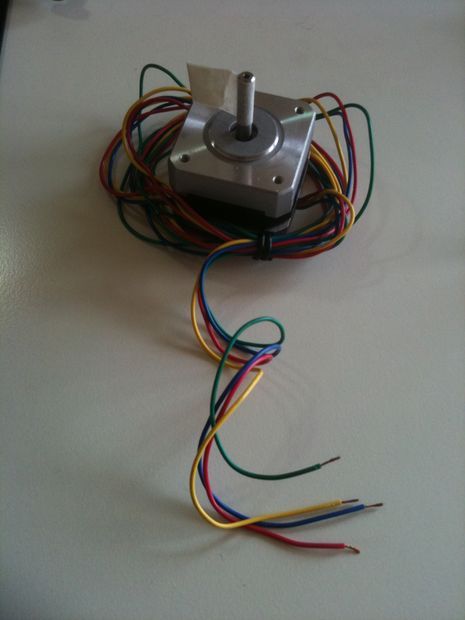
Step 2: Wire the stepper motor to the EasyDriver
Now we’ll wire up each of the EasyDrivers.
Remove some of the interior wire from the Cat5 and strip the ends. For each servo you will need two normal pairs of white/colored and one oddball of a white and two colored. In all, you’ll have to strip 14 ends.
PCB soldering is easy, once you get used to it. There are many other tutorials that cover the subjct. Follow the image as indicated. Your color combinations for the servo may be different. I had to google for a long time to find this page with the color codes for my model.
TIP: “Do NOT connect or disconnect a motor while the driver is energized. This will cause permanent damage.” — Sparkfun
Next we’ll wire the power sources and the arduino.
Step 3: Soldering and wiring.
I’ve done this all in one step, but feel free to wire each EasyDriver one at a time, check that it works, and then unplug it from the power and do the next one.
All 3 GND wires from the EasyDrivers are soldered to a single line, which goes to GND on the arduino.
All the positive leads from the stepper power are soldered to a single line.
All the negative leads from the stepper power are soldered to a single line.
TIP: Remember to put the plug cover on the wire BEFORE you solder everything together. Then slide the cover down and over the soldering.
TIP: Don’t forget to have everything disconnected while you solder!
Solder the positive and female lines to the female plug.
Double check you didn’t wire the board power to the stepper power. That would be bad.
Do you have a multimeter? This would be a good time to check your connections.
Plug in the power. The +5v light in the corner of each board should light up.
Now the wiring is done, time to test it with some code.
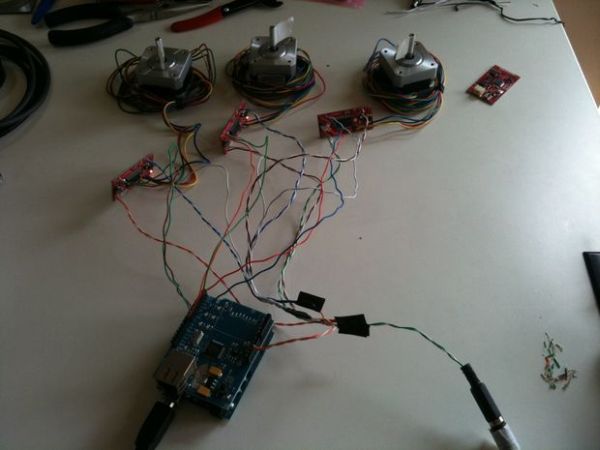
Step 4: Testing one stepper
UPDATE: I’ve been playing with my steppers and I wrote this little piece of code to play with just a single stepper.
Change the DIR/STEP pins as you see fit. If you put the stepper on a hollow flat surface like a desk top it will sound like a tiny formula 1 race car.
// for duemilanove atmega328 arduino board + easydriver stepper controller
// [email protected] 2010-06-15
#define DIR1_PIN (12)
#define STEP1_PIN (13)
#define DELAY (1600/10)
#define BAUD (9600)
void setup() {Serial.begin(BAUD);
pinMode(DIR1_PIN,OUTPUT);
pinMode(STEP1_PIN,OUTPUT);}
void loop() {int i,j=DELAY;
digitalWrite(DIR1_PIN, LOW); // Set the direction.
delayMicroseconds(DELAY);
Serial.println(“>>”);
For more detail: How to wire an arduino-based 3-axis CNC machine
- Which Arduino board did the author choose?
The author chose the Duemilanova. - What type of stepper motors are recommended?
NEMA 17 motors are selected for this project. - Can I disconnect a motor while the driver is energized?
No, doing so will cause permanent damage to the equipment. - How many wire ends must be stripped from the Cat5 cable?
You need to strip 14 ends in total for each servo connection. - What should you do before soldering everything together?
Remember to put the plug cover on the wire before soldering. - What light indicates the board is receiving power?
The +5v light in the corner of each board should light up. - What happens if you wire the board power to the stepper power?
This would be bad and potentially damaging. - Is it better to wire all drivers at once or one at a time?
You can do all in one step or wire each EasyDriver one at a time to check functionality.
