
Summary of Simple RC car for beginners (Android control over Bluetooth)
This project builds a Bluetooth-controlled Android RC car using an Arduino controller. The user operates the vehicle via three methods: tilting an Android device with an accelerometer, on-screen buttons, or touch gestures. The system calculates motor speeds based on tilt sensitivity and transmits PWM commands via Bluetooth to an L298N driver connected to DC motors.
Parts used in the Android Bluetooth Car:
- Android device with accelerometer and Bluetooth
- USB Host adapter (for devices lacking built-in Bluetooth)
- Dual or four DC motor chassis
- Arduino-compatible controller supporting 2 PWM and UART
- HC-06 Bluetooth module (alternatives: HC-05, HC-07)
- L298N Dual Bridge DC stepper Motor Driver
- EEPROM memory for storing settings
- Additional components for lights or sound
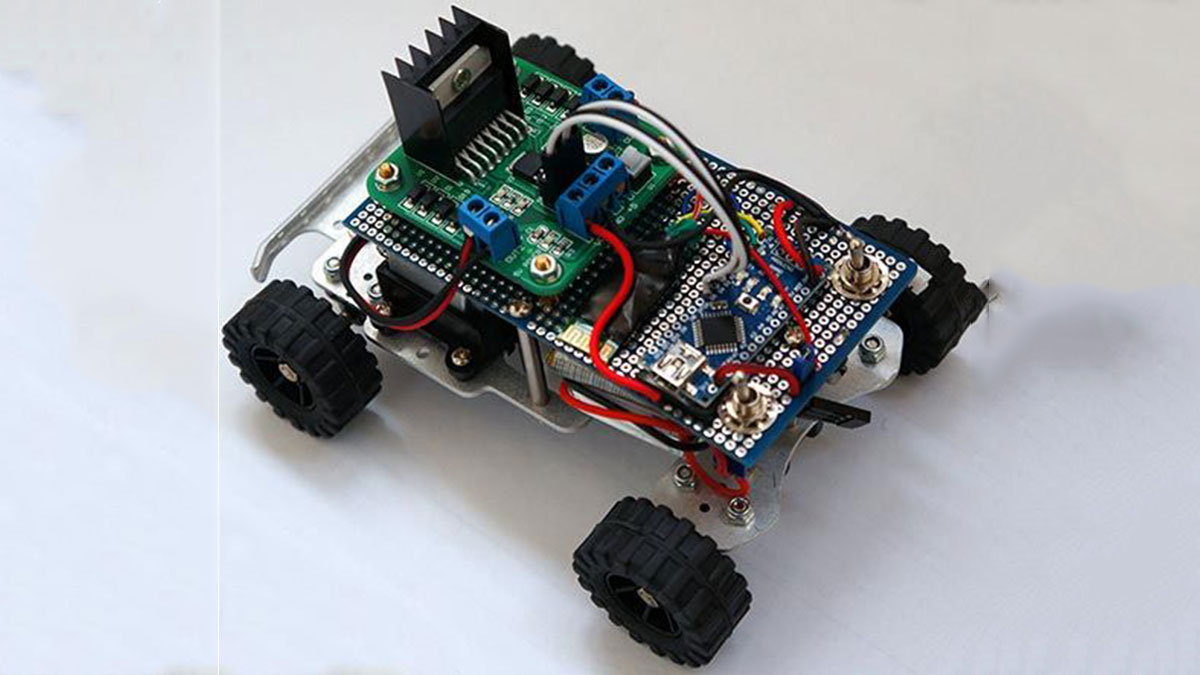
This is a simple project of Android Bluetooth Car with Bluetooth control. Arduino controller is used
To control the car used Android-device with a built-in accelerometer. Tilt forward – car goes forward, tilt to the left – car turns to the left, tilt back – car goes back. Speed of movement or rotation depends on how much you tilt the device. Sensitivity and value of the tilt set in the configuration Android-apps. Also are provided a normal way to control: the buttons on the screen. In addition to all I implemented the touch control. Total 3 ways to control the RC Car.
Capabilities of the device you can see on the video above
Step 1: Android device
Parts needed
1. Android device
The most important part – Android device with accelerometer and Bluetooth: tablet, smartphone and other… As an Android device, I used a cheap Chinese tablet “Ainol Aurora” with an external USB-Bluetooth module (because its not have own), connected via USB Host.
Step 2: DIY Car Chassis
2. DIY Car Chassis
We also need any chassis with 2 or 4 DC motors. You can use an old RC toy car. As a platform I used a small RC DIY platform, bought on eBay for $ 25. To control described in this project is most suitable track chassis.
Step 3: Controller (MCU)
3. Controller (MCU)
You need Arduino-compatible controller
Controller must support 2 PWM and UART.
Step 4: Bluetooth module
4. Bluetooth module
As a Bluetooth module uses cheap Chinese module HC-06 (6-8$ on eBay). Instructions guide on connecting bluetooth module to Arduino is here.
You can use HC-05, HC-07 and other serial Bluetooth modules
Step 5: Motor Driver
5. Motor Driver
I used L298N Dual Bridge DC stepper Motor Driver module. It cost 4-5$ on eBay.
Step 6: Other parts
6. Other parts
Step 7: Theory
Theory
All calculations are performed in the Android-application, and immediately calculate the values 2‹2‹of the PWM for the left and right motor. Application has flexible settings, such as the range of the PWM, the sensitivity of tilt, the minimum threshold for the PWM and other. Example commands transmitted by Bluetooth:
L-255\rR-120\r
L – the command to the left engine, R – for the right
A dash means the motor rotation to move back
255 – PWM value (for Arduino is the maximum speed of rotation)
\r – end of command.
On this command RC car will move forward and slightly rotated to the right, as right engine rotates slowly left.
L255\rR-255\r
On this command the left engine will rotate back and forward right, forcing a car to rotate around its axis counterclockwise.
H1\r
Command is an additional channel to which you can connect for example lights, sound, etc.
Symbols command L, R and H can be defined in the settings of Android-applications.
In the MCU control program provides a timer that shuts off the engine if the last command was received more than n-seconds ago. The data are stored in the EEPROM memory of the controller and can be changed from Android device. The range of this setting is from 0.1 seconds to 99.9 seconds. This setting can be disabled. To work with EEPROM provides commands: Fr – reading values 2‹2‹and Fw – record values.
Electronics
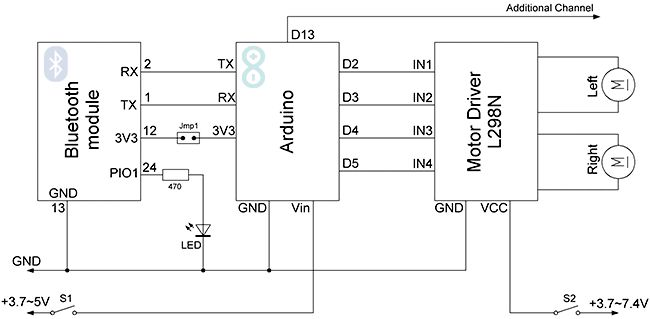
Block diagram see on picture above
Step 8: Android Application
As we can see, the Arduino connects to Bluetooth module and a motor driver with two or four connected motors.
Android Application
The application for Android was written in Eclipse IDE. All sources of the project and the project for Eclipse, you can download below. Android version on your device must be > 3.0.
The application contains several activity. Main activity is a home screen with buttons running different operating modes and settings
There are 3 control modes Bluetooth-car: from accelerometer, screen buttons and touch-control.
Android application settings
Screenshot of settings CxemCar Android application version 1.0
MAC address
To establish a connection with the RC Car’s Bluetooth module, you must set MAC-address in the application settings. But first, you must configure the pair the devices on Android-device: open Settings -> Bluetooth and click “Search for devices”. When the phone finds our Bluetooth-module, click them and enter password for pairing (usually “1234”)
To know Bluetooth module MAC-address possible from any application, such as Bluetooth Terminal. To do this, click “Connect a device – Secure” and in the resulting window, click the button “Scan for devices”. Software will be scans the Bluetooth devices and displays them MAC-address.
For more detail: Simple RC car for beginners (Android control over Bluetooth)
- How does the Android device control the car?
The device uses its built-in accelerometer where tilting forward moves the car forward, tilting back moves it backward, and tilting left or right turns the car. - What are the three ways to control the RC car?
The car can be controlled by tilting the device, using screen buttons, or utilizing touch control. - Does the speed of movement depend on the tilt angle?
Yes, the speed of movement or rotation depends on how much you tilt the device. - Can I change the sensitivity of the tilt?
Yes, sensitivity and value of the tilt are set in the configuration of the Android application. - Which Bluetooth modules are compatible with this project?
The project uses an HC-06 module, but HC-05, HC-07, and other serial Bluetooth modules can also be used. - What is the function of the H1 command in the theory section?
H1 is an additional channel command used to connect devices like lights or sound. - How long can the engine stay off after the last command?
The MCU timer shuts off the engine if no command is received within a configurable range from 0.1 seconds to 99.9 seconds. - What minimum Android version is required for the application?
The Android version on the device must be greater than 3.0 to run the application.
