
Summary of Minimal Arduino with ATmega8
This article explains how to build a compact "Minimal Arduino" using an old ATmega8 chip and four simple components. It details the circuit design, which relies on an internal 8MHz oscillator without USB-to-serial support, requiring an external FTDI cable for programming. The guide covers installing a modified bootloader optimized for the ATmega8's memory and speed, then provides instructions for flashing it using an AVRISPmkII programmer or an existing Arduino board.
Parts used in the Minimal Arduino:
- ATmega8 chip
- single 10k resistor
- single 0.1uF capacitor
- tiny breadboard
- some hookup wire
Like me, you may have a few old Arduino boards or ATmega8 chips (in the boards) laying around from when you were first playing with Arduino. Those chips can still be really useful as the heart of a tiny “Minimal Arduino” setup.
A normal Arduino board contains support components that make it easy to use. If you want a smaller footprint, you can get one of the many Arduino work-alike boards. But if you want a really small footprint, and reuse your old parts, you can make an Arduino board using just five components:
– ATmega8 chip
– single 10k resistor
– single 0.1uF capacitor
– tiny breadboard
– some hookup wire
(On the left, an IR remote controlled BlinkM. On the right an IR remote controlled RGB LED)
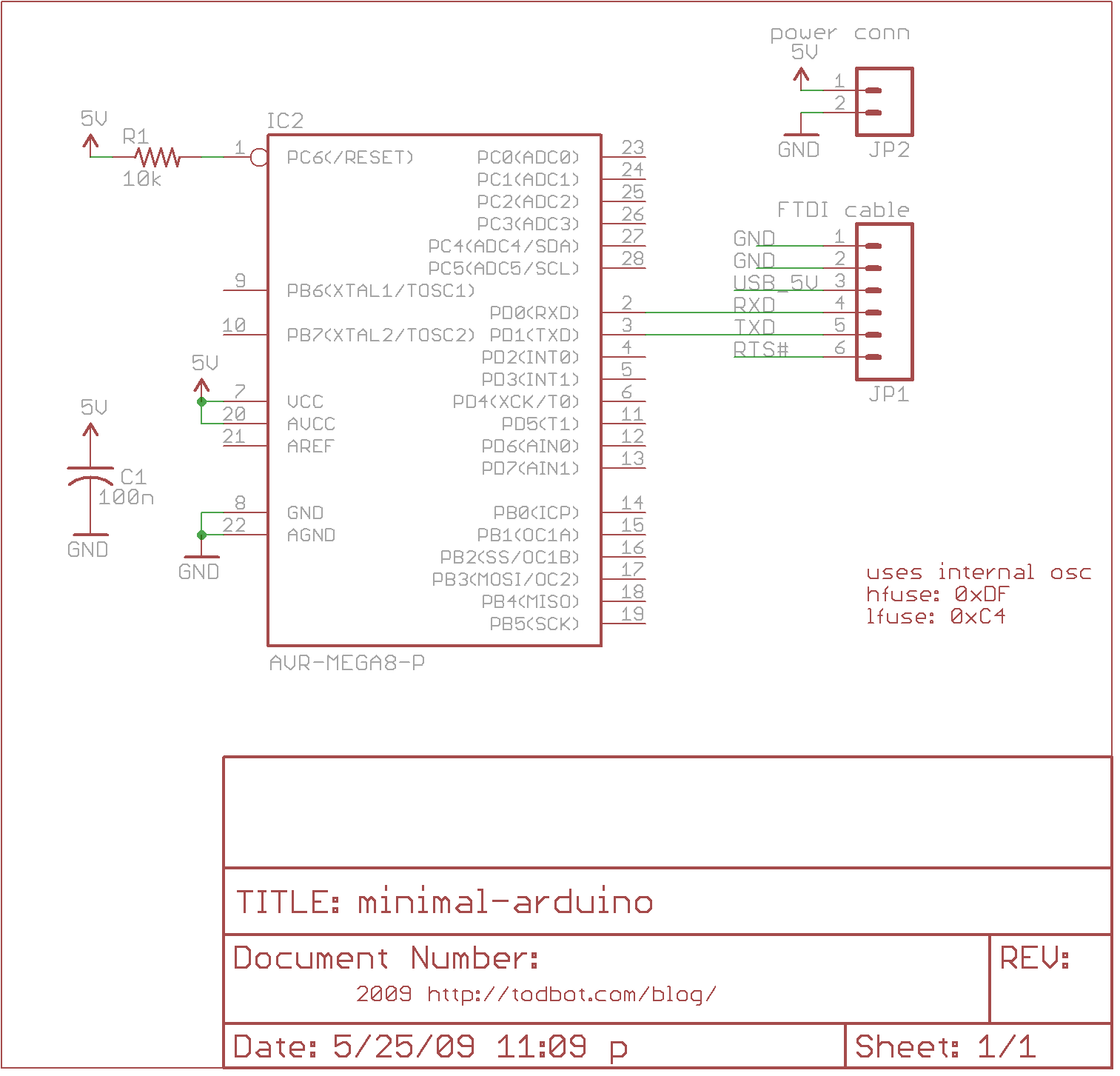
The Circuit
The minimal Arduino circuit is dead simple. It relies on the internal 8MHz oscillator (like the Lilypad Arduino). And like the Lilypad, it doesn’t include a USB-to-serial. You have to provide that with a FTDI USB-to-serial cable or with an old Arduino board.
Eagle-format minimal-arduino.sch file
Getting the Arduino bootloader into the ATmega8
While the circuit is very similar to a Lilypad Arduino, the chip used is different. The ATmega8 has less memory and must be programmed slightly differently than the Lilypad’s ATmega168.
So a modified Arduino bootloader needs to be programmed into the ATmega8. The bootloader is a small program on the chip that listens to the serial port on power up and can reprogram the rest of the chip if instructed to. Here, a variant of the standard “Arduino NG” bootloader is used. The modifications are:
– uses internal 8MHz oscillator (no external part required)
– serial speed is 38400 instead of 19200 for faster uploads
Files for Minimal Arduino ATmega8 bootloader:
– atmega8_noxtal.zip
Unzip this file into the “arduino-0015/hardware/bootloaders” directory of your Arduino installation to create the directory “atmega8_noxtal”. The zip file contains:
– ATmegaBOOT.hex — the actual bootloader to program
– ATmegaBoot.c — the source code of the bootloader
– Makefile — Makefile to produce & program the bootloader
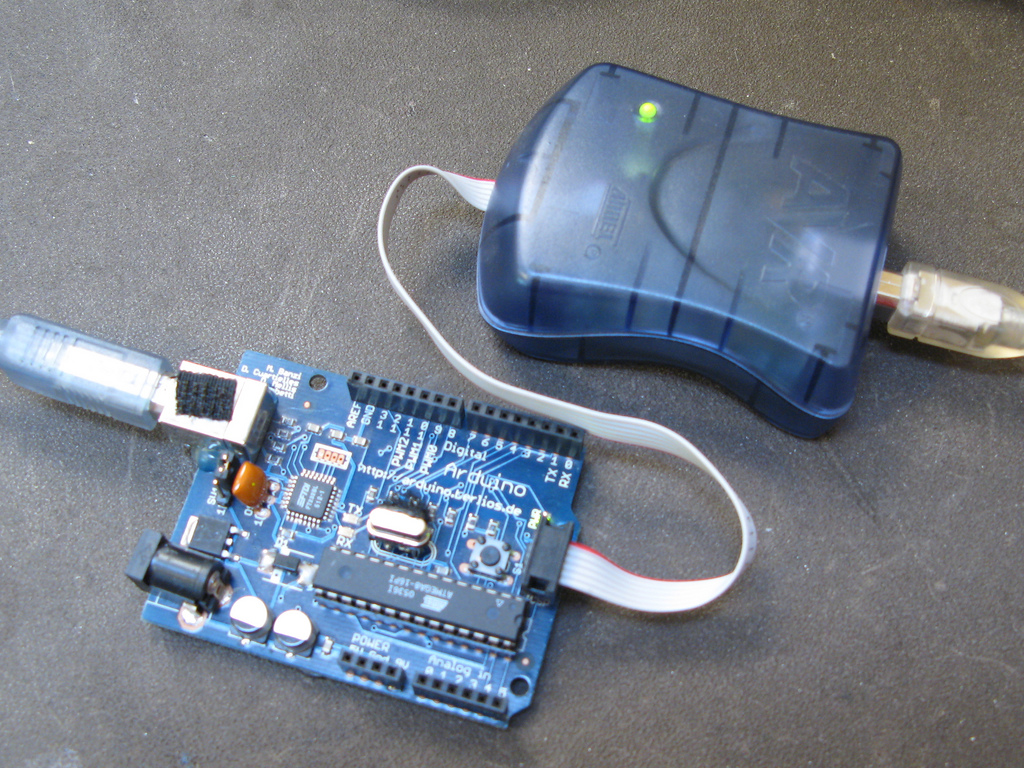
Actually programming the bootloader to the ATmega8 chip can be done in a few ways. I prefer using an AVRISPmkII programmer and an old Arduino board. Seat the ATmega8 into the Arduino, plug the AVRISP into the 6-pin “ICSP” header, plug both into USB, and program the ATmegaBOOT.hex file. If you are familiar with the command-line, go into the “atmega8_noxtal” directory and type “make isp” to program. If not, you can have the Arduino software program it for you once you tell it about this new kind of Arduino board.
For more detail: Minimal Arduino with ATmega8
- How can I create a smaller footprint Arduino setup?
You can make an Arduino board using just five components including an ATmega8 chip. - Does the minimal circuit include a USB-to-serial converter?
No, it does not include a USB-to-serial and requires an FTDI cable or old Arduino board. - What oscillator does the circuit rely on?
The circuit relies on the internal 8MHz oscillator like the Lilypad Arduino. - Why is a modified bootloader required for the ATmega8?
A modified bootloader is needed because the ATmega8 has less memory than the ATmega168. - What serial speed is used in the modified bootloader?
The serial speed is set to 38400 instead of 19200 for faster uploads. - How do I install the bootloader files into my Arduino installation?
Unzip the file into the arduino-0015/hardware/bootloaders directory to create the atmega8_noxtal folder. - Can I use an old Arduino board to program the bootloader?
Yes, you can seat the ATmega8 into an old Arduino and use the ICSP header with an AVRISPmkII. - What command programs the bootloader via command line?
Type make isp inside the atmega8_noxtal directory to program the bootloader.
