
Summary of Arduino Esplora Blink Code
This sketch demonstrates how to control the Arduino Esplora's RGB LED using the `writeRGB()` function to cycle through primary, secondary, and white colors. The code sets brightness levels from 0 to 255 for red, green, and blue channels individually or combined. For optimal color blending, covering the LED with white paper is recommended.
Parts used in the Esplora Blink:
- Arduino Esplora
- USB cable
- White paper (optional)
This sketch blinks the Esplora’s RGB LED. It goes through all three primary colors (red, green, blue), then it combines them for secondary colors(yellow, cyan, magenta), then it turns on all the colors to create white.
For best results, cover the LED with a piece of white paper to see the colors blend.
Circuit
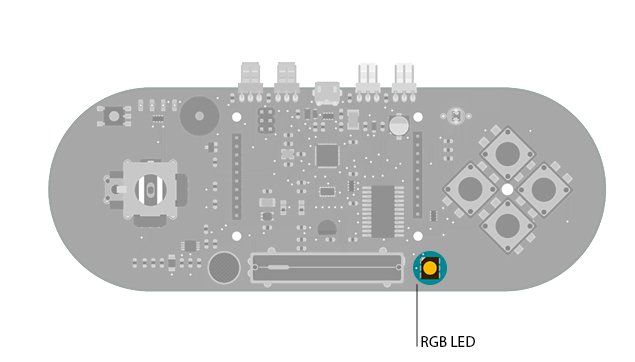
Only your Arduino Esplora is needed for this example. Connect the Esplora to your computer with a USB cable.
Code
The RGB LED is comprised of three colors that represent the three primary colors: red, green, and blue.
To control all the colors with one instruction you use the writeRGB() function. It take three arguments. Each value represents the brightness of the red, green, and blue element, respectively. The brightness scales between 0 (for completely off) to 255 (for completely on).
After setting the brightness of an LED, use delay() to pause the sketch for a second, so the light stays in the state you left it.
It’s also possible to control each light individually with the following functions :
/*
Esplora Blink

This  sketch blinks the Esplora's RGB LED. It goes through
all three primary colors (red, green, blue), then it
combines them for secondary colors(yellow, cyan, magenta), then
it turns on all the colors for white.
For best results cover the LED with a piece of white paper to see the colors.

Created on 22 Dec 2012
by Tom Igoe

This example is in the public domain.
*/
Hardware Required
- Arduino Esplora
For more detail: Arduino Esplora Blink Code
- How does the writeRGB() function work?
It takes three arguments representing the brightness of the red, green, and blue elements respectively. - What is the brightness scale for the LED colors?
The brightness scales between 0 for completely off to 255 for completely on. - Can I control each light individually?
Yes, you can use writeRed(), writeGreen(), and writeBlue() functions to control lights individually. - Why should I cover the LED with white paper?
Covering the LED helps the colors blend better for best results. - What happens after setting the brightness of an LED?
You should use delay() to pause the sketch so the light stays in the set state. - Which colors are included in the sequence?
The sketch cycles through primary colors, secondary colors like yellow and cyan, and finally white. - How do I connect the hardware to the computer?
Connect the Esplora to your computer using a USB cable. - What is the purpose of this specific sketch?
The sketch blinks the Esplora's RGB LED through various color combinations.
