
Summary of Brewmonitor: The Arduino-powered, cloud-based homebrewing controller
This article introduces BrewMonitor, a web-based system for tracking homebrew fermentation temperatures. Unlike expensive or complex Arduino-Raspberry Pi setups requiring local server configuration, this solution uses an Arduino sensor connected to a cloud-based PHP backend (Laravel) and MySQL database. It allows multiple users to monitor temperature remotely via a simple website without needing port forwarding or dynamic DNS services.
Parts used in the BrewMonitor project:
- Arduino
- Sensor
- PHP backend
- Laravel framework
- RESTful API
- MySQL database
recently started brewing beer at home with a group of friends and one of the things that quickly came to light, is that maintaining a steady fermention temperature can be the key to a good brew. We have a stick on thermometer on our fermenter buckets which we can use for reading the temperature of the beer, locally, but I was wondering if there was a system I could hook up, so that all of us could check in on the beer via the web. Lo and behold, there are a few systems available for monitoring/controlling the temperature of a batch of homebrew beer as it ferments. But most of them require expensive equipment and the ones that don’t are still based on the Arduino-sensor and Raspberry Pi-gateway model, which will set you back the bones of €80, if you make it yourself. As well as that, the webserver for the BrewPi system (most popular as far as I could see) runs on the Raspberry Pi in your home network. This means you have to configure port forwarding and something like dyndns to access it from outside the house, making the system configuration a bit of a chore.
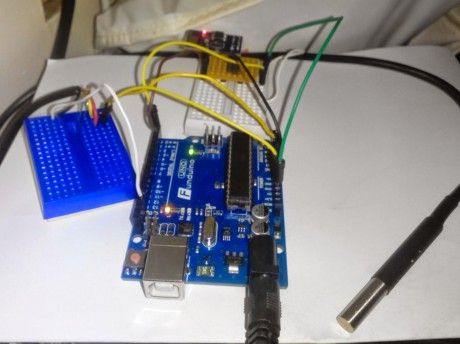
With that in mind, have a gander at this: http://dev.
For more detail: Brewmonitor: The Arduino-powered, cloud-based homebrewing controller
- How can I monitor my homebrew temperature online?
You can use a system like BrewMonitor which connects an Arduino sensor to a cloud-based PHP backend and MySQL database. - Does BrewMonitor require expensive equipment?
No, it avoids the high costs associated with other systems that often cost around €80 or more. - Can I access the system from outside my house?
Yes, because the data is hosted on the cloud, you do not need to configure port forwarding or dynamic DNS. - What programming language powers the BrewMonitor backend?
The system uses a PHP backend built with the Laravel framework. - Is a Raspberry Pi required for this specific setup?
No, this specific system does not rely on a Raspberry Pi gateway model found in other popular solutions. - What database does BrewMonitor use?
BrewMonitor utilizes a MySQL database to store the plotted temperature data. - Why might someone choose this system over BrewPi?
This system is easier to set up for remote access since it does not run a webserver locally on a home network device.
