
This article explains how to convert standard momentary tactile switches into state-saving toggle pushbuttons using a simple circuit. It highlights that while momentary switches only conduct while pressed, adding a specific integrated circuit allows them to latch and maintain their ON/OFF state after a single press, making them ideal for boot or reset functions in DIY electronics.
Parts used in the Toggle Switch Project:
- Momentary switch
- Tactile switch
- LED
- Resistor
- MC14027 J-K flip-flop IC
Just a Moment
Tactile switches (a specific type of momentary switch) are everywhere and they are especially popular on DIY electronics and microcontroller boards because they are well suited to act as a boot option or reset switch. Particularly, momentary switches are switches that don’t save their state when you depress the switch. That is, when you push the switch (and while you have the switch depressed) the circuit is ON, but once you let off the switch it reverts back to OFF.
In this micro-instructable, I will show you how to convert those ubiquitous tactile and general momentary switches into pushbutton switches that toggle and save their state. It’s very easy and extremely straight forward so you can implement it immediately in your designs if you’re interested in doing so.
Step 1: Get Yer Switches
The most obvious part of the necessary components is a momentary switch. Go grab one, or two, or a handful if you’re OCD and can’t decide. There are lots of different kinds of momentary switches from panel switches, to PCB tactile switches, to toggle momentary switches. I have collected several different kinds in the picture below.
In this instructable, I’m going to use tactile switches. There’s just something wholly satisfying about the force required to activate the switch and the crisp *click* you get is quite rewarding. Feel free to use whatever switches you have around. If you haven’t scoped the video, check it out now. I have setup two tactile switches. One in a normal configuration with an LED and requisite resistor on the high side, and then driving to ground on the other. It does what you would expect when you press the button: the nice little blue LED comes on and stays on for as long as you hold the switch down, then immediately goes off when the switch is depressed.
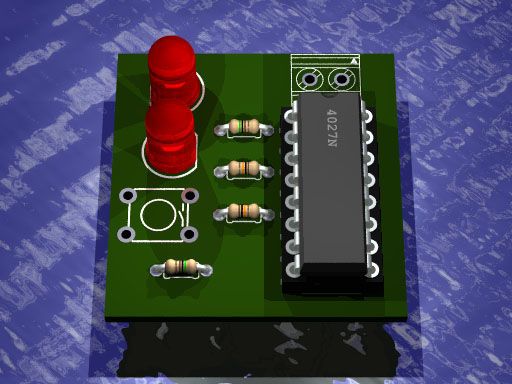
The second switch is attached to a MC14027 J-K flip-flop IC, as well as having two LED’s attached to the flip-flops. Turn the page and learn about flip-flops!
For more detail: Use a Momentary or Tactile Switch as a Pushbutton Switch
- Why are momentary switches popular on microcontroller boards?
They are well suited to act as a boot option or reset switch. - What happens when you release a standard momentary switch?
The circuit reverts back to OFF because it does not save its state. - How can you make a momentary switch save its state?
You can convert it into a pushbutton switch that toggles by using a J-K flip-flop IC. - What type of switch does the author prefer for this project?
The author prefers tactile switches due to the satisfying force required and the crisp click. - What components are used in the normal configuration setup?
The setup uses a tactile switch, an LED, and a requisite resistor on the high side driving to ground. - Which integrated circuit is used to drive the second switch?
An MC14027 J-K flip-flop IC is used to control the second switch and its attached LEDs.
