Home > Projects > Smart Connected Open Source Pot (Scopot)

Smart Connected Open Source Pot (Scopot)

Summary of Smart Connected Open Source Pot (Scopot)


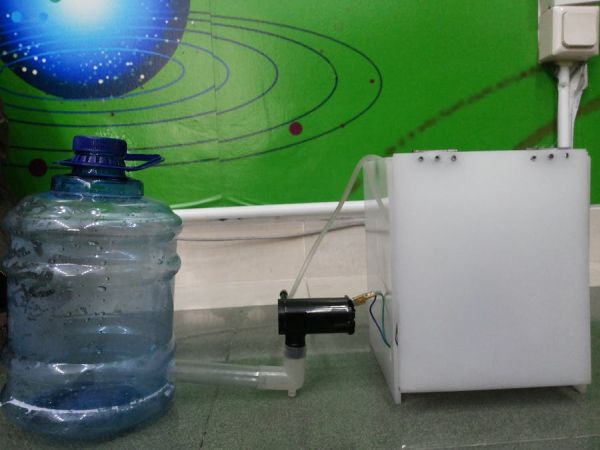
This project describes a Smart Pot (Scopot) integrating an Arduino MKR1000, soil moisture sensor, and micro water pump within a 15x15x15 cm box. It automatically waters plants when dry and uploads data to Ubidots for remote monitoring of moisture and pump activity.

Parts used in the Scopot:

  • Arduino MKR1000
  • Solid State Relay
  • Jumper wires (generic)
  • Breadboard (generic)
  • SparkFun water pump
  • Soil moisture sensor
  • Small water tank
  • WiFi network connection

A Smart Pot that has all the component inside of the pot and gives the light and humidity data to the web
Things used in this project

Hardware components

Arduino MKR1000
Arduino MKR1000
× 1
Solid State Relay
Solid State Relay
× 1
Jumper wires (generic)
× 1
Breadboard (generic)
× 1
SparkFun water pump
× 1

Software apps and online services

Arduino IDE
Arduino IDE
Ubidots
Ubidots

Hand tools and fabrication machines

rotary rool

Story

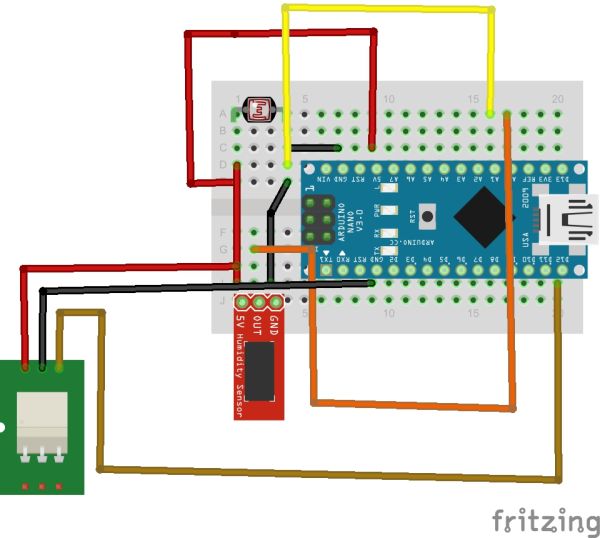
Schematics

Code

Scopot Code

Arduino

Make sure you already have the arduino MKR1000 library
#include <SPI.h>
#include <WiFi101.h>

char ssid [] = "Wifi SSID";
char password [] = "Wifi Password";
int keyIndex = 0;
int status = WL_IDLE_STATUS;

#define errorPin 6
const int sleepTimeS = 20;// Time to sleep (in seconds):
long lastReadingTime = 0;
WiFiClient client;

String idvariable = "ubidots_variable_id";
String token = "ubidots_token";
int Relay = 12; 
const int sensorMin = 0;      // sensor minimum, discovered through experiment
const int sensorMax = 1023;    // sensor maximum, discovered through experiment

//////////////////////////////////////////////////////////////////////////////////

void setup(){

  pinMode(errorPin, OUTPUT);
  pinMode(Relay, OUTPUT);
  

  for (int i=0;i<4; i++){   // let know we are working
    digitalWrite(errorPin ,HIGH);
    delay(200);
    digitalWrite(errorPin ,LOW);
    delay(200);
  }

  // Create an instance of the server
  // specify the port to listen on as an argument

  WiFiServer server(80);
  Serial.begin(9600);
  delay(10);

 
   if (WiFi.status() == WL_NO_SHIELD) {
    Serial.println("WiFi shield not present");
    // don't continue:
    while (true);
  }
 int n = WiFi.scanNetworks();
  Serial.println("scan done");
 
  if (n == 0){
    Serial.println("no networks found");
    Serial.println("Going into sleep");
// ESP.deepSleep(sleepTimeS * 1000000);
  }

  while (status != WL_CONNECTED) {
    delay(500);
    Serial.print("Attempting to connect to SSID: ");
    Serial.println(ssid);
    status = WiFi.begin(ssid, password);
    delay(10000);
  }
  
  Serial.println("");
  Serial.println("WiFi connected");
  printWifiStatus();

  // Start the server
  server.begin();
  Serial.println("WiFi Server started");


}

////////////////////////////////////////////////////////////////////////////////

void printWifiStatus() {
  // print the SSID of the network you're attached to:
  Serial.print("SSID: ");
  Serial.println(WiFi.SSID());

  // print your WiFi shield's IP address:
  IPAddress ip = WiFi.localIP();
  Serial.print("IP Address: ");
  Serial.println(ip);

  // print the received signal strength:
  long rssi = WiFi.RSSI();
  Serial.print("signal strength (RSSI):");
  Serial.print(rssi);
  Serial.println(" dBm");
}
void loop(){
  int value = (analogRead(A0));
  ubiSave_value(String(value));
  
  Serial.println("Ubidots data");
  Serial.println(value);
  Serial.println(" Going to Sleep for a while !" );

 
  delay(10000);// change this for the upload data time to ubidots 
  
}

void ubiSave_value(String value) {
  // if you get a connection, report back via serial:
  int num=0;
  String var = "{\"value\": " + String(value)+"}";
  num = var.length();
  if (client.connect("things.ubidots.com", 80)) {
    Serial.println("connected ubidots");
    delay(100);
    client.println("POST /api/v1.6/variables/"+idvariable+"/values HTTP/1.1");
    Serial.println("POST /api/v1.6/variables/"+idvariable+"/values HTTP/1.1");
    client.println("Content-Type: application/json");
    Serial.println("Content-Type: application/json");
    client.println("Content-Length: "+String(num));
    Serial.println("Content-Length: "+String(num));
    client.println("X-Auth-Token: "+token);
    Serial.println("X-Auth-Token: "+token);
    client.println("Host: things.ubidots.com\n");
    Serial.println("Host: things.ubidots.com\n");
    client.print(var);
    Serial.print(var+"\n");

  }
  else {
    // if you didn't get a connection to the server:
    Serial.println("ubidots connection failed");
  }

  if (!client.connected()) {
    Serial.println("NotConnected");
    Serial.println("disconnecting ubidots.");
    client.stop();
    // do nothing forevermore:
    for(;;);
  }

  if (client.available()) {
    char c = client.read();
    Serial.print(c);
  }
}

Source : Smart Connected Open Source Pot (Scopot)

Quick Solutions to Questions related to Scopot:

  • How does the pot determine when to water?
    The system uses a soil moisture sensor to detect dryness; when the soil feels dry, the water pump activates automatically.
  • What platform is used to upload the data?
    The project utilizes the Ubidots service to upload soil moisture data and record pump activation.
  • Can different plant needs be analyzed with this setup?
    Yes, recording both soil moisture and pump activation helps analyze the specific needs of different kinds of plants.
  • Does the project include a light sensor?
    No, the article only mentions using a soil moisture sensor and does not describe a light sensor component.
  • What are the dimensions of the pot enclosure?
    The components fit into a 15 x 15 x 15 cm square box pot.
  • Is the water tank visible from the outside?
    No, a small water tank is placed inside the pot so it looks like a regular pot from the outside.
  • Which software library is required for the code?
    The code requires the arduino MKR1000 library to be installed beforehand.
  • How long does the device sleep between readings?
    The code sets a sleep time of 20 seconds, though a delay of 10000 milliseconds is also present in the loop.

About The Author

Ibrar Ayyub

I am an experienced technical writer holding a Master's degree in computer science from BZU Multan, Pakistan University. With a background spanning various industries, particularly in home automation and engineering, I have honed my skills in crafting clear and concise content. Proficient in leveraging infographics and diagrams, I strive to simplify complex concepts for readers. My strength lies in thorough research and presenting information in a structured and logical format.

Follow Us:
LinkedinTwitter
Scroll to Top