
Summary of 4Duino Ultrasonic Sensor
This project demonstrates measuring nearby object distance using a TS601-01 ultrasonic sensor and a 4Duino. The system works by emitting ultrasonic waves that bounce off objects, calculating the return time to determine distance via sound speed formulas. The implementation involves circuit assembly, programming with Workshop 4 and Arduino IDE, uploading code via USB, and utilizing an SD card for widget image storage.
Parts used in the Distance Measurement Project:
- 4Duino
- TS601-01 Ultrasonic sensor
- Jumper Cables
- Micro USB cable
- µSD card
In this project we will measure the distance of the nearby object using TS601-01 Ultrasonic sensor and 4Duino. An ultrasonic sensor has a transmitter (sends ultrasonic signals) and a receiver (receives the ultrasonic signal after it bounced off nearby object). The sensor estimates the distance of the object by transmitting a signal and determining how long the signal took to come back. Ultrasonic Sensor has a wide range of applications such as collision protection, position control, level sensing and so on.
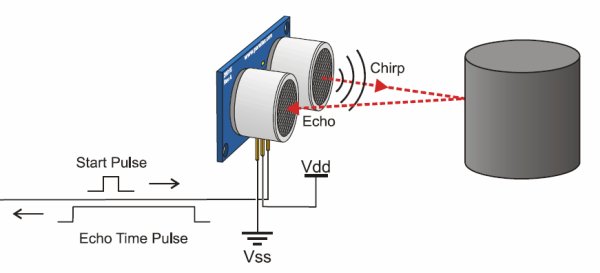
When voltage is applied from the 4Dduino to the signal pin, the sensor emits a burst of ultrasonic from the “trigger” marked T on the ultrasonic sensor. This wave will travel until it hits an object and reflects back into the “echo” or “receiver” marked R on the ultrasonic sensor. Since reflection is used, the sensor is more accurate in detecting flat surfaces.
Meanwhile, the 4Duino “listens” for any pulse in the signal pin, which is achieved on the return of the ultrasonic wave. Hence the Arduino has calculated the time taken for sound to travel to an object, and back.
Using the formula:
Distance = (Time x Speed)/2
where speed is the speed of sound (340m/s). You divide by two, since time is the travel time for forward and back. Also, sound takes 29 microseconds to travel a centimeter. Therefore the distance in centimeters can be found by:
Distance = (Time/29)/2
How it Works
Components
- 4Duino
- TS601-01 Ultrasonic sensor
- Jumper Cables
- Micro USB cable
- µSD card
Implementation
Step 1: Build
Build the circuit as shown in the following diagram and schematic.
Step 2: Program
Workshop 4 – 4Duino Extended Graphics environment is used to program this project.
This project requires the Arduino IDE to be installed as Workshop calls the Arduino IDE for compiling the Arduino sketches. The Arduino IDE however is not required to be opened or modified to program the 4Duino.
Open this file using Workshop 4.
Note: Download the project here.
Step 3: Comms Port
Connect the 4Duino to the PC using µUSB cable.
Then navigate to the Comms tab and select the Comms port to which the 4Duino connected.
Step 4: Compile and Upl0ad
Finally, go back to “Home” tab and now click on the “Comp’nLoad” button.
The Workshop 4 IDE will prompt you to insert a µSD card to the PC in order to save the widget images. Insert µSD card, select the appropriate drive and press button “OK”.
If the µSD card has the widget images you can click button “No Thanks”.
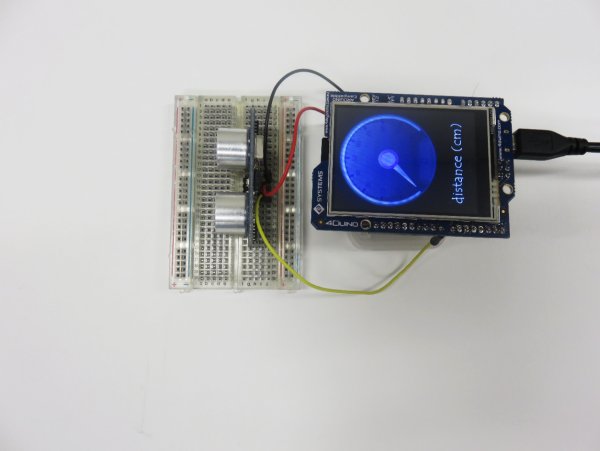
Step 5: Insert µSD card
After uploading the program in to the 4Duino, it will try to mount the µSD card. If the µSD card is not present it will prints an error message. Once µSD card is mounted, you will see the screen displayed in the image on the right.
Read more: 4Duino Ultrasonic Sensor
- How does the ultrasonic sensor estimate distance?
The sensor estimates distance by transmitting a signal and determining how long it took to return after bouncing off an object. - What happens when voltage is applied to the signal pin?
The sensor emits a burst of ultrasonic waves from the trigger marked T on the sensor. - Which surfaces are detected more accurately by this sensor?
The sensor is more accurate in detecting flat surfaces because it relies on reflection. - What formula calculates the distance in centimeters?
Distance equals Time divided by 29 then divided by 2. - Why is the calculated time divided by two in the formula?
Time represents the travel duration for both the forward journey and the return trip. - What software environment is required to program this project?
Workshop 4 – 4Duino Extended Graphics environment is used to program this project. - Is the Arduino IDE required to be open during programming?
No, the Arduino IDE is not required to be opened or modified as Workshop calls it for compiling sketches. - What action occurs if the µSD card is missing after upload?
The device prints an error message because it tries to mount the card immediately after uploading. - When should you insert the µSD card during the process?
You must insert the µSD card into the PC before clicking the Comp'nLoad button to save widget images. - What is the speed of sound used in the calculation?
The speed of sound used in the formula is 340 meters per second.
